
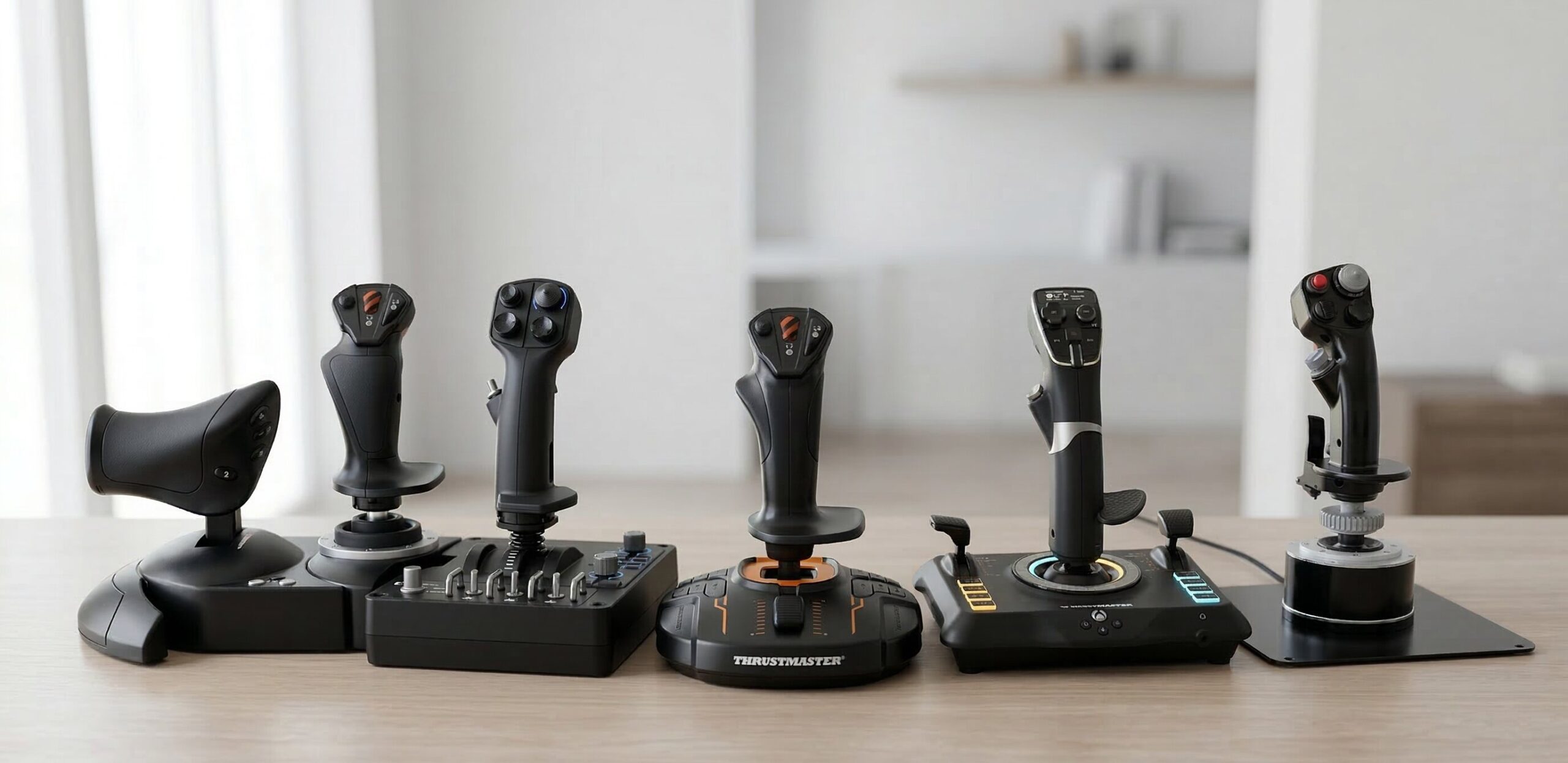
Whether you are a dedicated flight simulation enthusiast navigating a commercial airliner across the Atlantic, an elite space combat pilot dogfighting in zero gravity, or a casual gamer exploring virtual worlds, the simple act of controlling your aircraft shouldn’t be a test of physical endurance. But if you are constantly rubbing a cramped thumb, shaking out a tired wrist, or struggling to maintain a steady grip during long digital dogfights, your traditional gaming peripherals are likely failing you. Just as an unsupportive desk chair can ruin your posture and cause lower back pain, a standard, poorly designed controller can wreak havoc on your hands and wrists over time. We firmly believe that gaming should be a smooth, painless, and highly immersive process, not a source of chronic discomfort.
Swapping out those mass-produced, flimsy plastic sticks for a high-quality ergonomic joystick can completely revolutionize your digital cockpit. These specially designed instruments allow you to fly longer, maintain better precision, and alleviate physical strain. Whether you are hunting for a uniquely contoured grip to help with sweaty hands or a fully separated HOTAS (Hands On Throttle And Stick) design to eliminate shoulder pinch entirely, investing in a premium ergo joystick is one of the smartest decisions you can make for your long-term comfort. This comprehensive guide will walk you through the science of hand fatigue, what features to look for, and the absolute best products currently trending on the market, complete with detailed specifications.
Understanding Ergonomics: Why an Ergo Joystick Matters
Ergonomics focuses on designing products that align with the natural mechanics of the human body, reducing strain and increasing efficiency. When it comes to digital flight and space simulation, ergonomics plays an invisible yet monumental role in ensuring that your hands, wrists, and fingers are supported correctly to foster productivity and high-score performances rather than pain. For working adults, gamers, and simulation hobbyists, finding the right ergo joystick is incredibly vital due to the high volume of repetitive, high-tension motions we perform during gameplay. Standard, uniform cylindrical tools simply fail to accommodate the natural resting state of the human hand.
Most traditional flight sticks designed on a budget feature a very thin, perfectly straight shape that requires immense pinch-force and awkward wrist angling to control. This leaves pilots struggling to maintain a functional grip without cramping. An ergonomic alternative, like a well-crafted ergonomic joystick, prevents the common issues of slipping, muscle fatigue, and poor posture that arise from prolonged use of ill-fitting items. These specialized gaming supplies are tailored to accommodate natural gripping patterns, providing the necessary bulk, contour, or customizable weight to ensure the delicate tendons in your hands are perfectly aligned.
Furthermore, ergonomics isn’t merely about physical ease; it greatly enhances mental focus and cognitive endurance. When your hand is comfortably supported by your chosen ergo joystick, you can focus on the complex maneuvers you are executing rather than the distraction of localized pain. For those suffering from early signs of carpal tunnel syndrome or wrist tendonitis, highly specialized designs can literally give you your favorite hobby back, allowing you to dogfight and explore with dignity and ease. Therefore, prioritizing an ergonomic joystick can dramatically impact your daily gaming workflow and overall quality of life.
The Pitfalls of Standard Controllers vs. an Ergo Joystick
When gamers attempt to use standard, non-ergonomic options instead of an ergo joystick for hours on end—whether learning complex simulation mechanics, tracking targets, or managing engine throttles—several mechanical failures and physical frustrations almost always occur. Understanding these pitfalls is the first step toward making a better purchasing decision.
- Slippery and Uncontoured Grip Profiles: Traditional cheap sticks require a forceful pincer grip to maintain control, especially when pulling high-G maneuvers. This forces users to pinch the stick constantly and aggressively, causing undue pressure on finger joints and leading to what is commonly known as gamer’s cramp.
- Excessive Spring Resistance Requirements: Standard budget joysticks often feature a single, stiff spring mechanism. You have to bear down incredibly hard just to get the stick off-center. This harsh force travels straight up from your knuckles, through your wrist, and into your forearm, accelerating fatigue. A premium ergonomic joystick allows for adjustable tension.
- Lack of Weight Distribution and Base Stability: Because traditional options lack proper balancing and heavy bases, the user’s hand must do all the heavy lifting to maneuver the stick while simultaneously pressing down to keep the base from lifting off the desk. A properly balanced ergo joystick uses a weighted base to stay grounded, acting as an anchor rather than a burden.
- Poor Material Choices: Cheap hard plastics offer no shock absorption. During intense gaming sessions without an ergo joystick, this lack of cushioning contributes significantly to joint soreness.
The Anatomy of Hand Fatigue: How an Ergo Joystick Helps
To truly grasp why an upgrade is necessary, one must look at how hand fatigue develops on an anatomical level. The human hand consists of 27 bones, surrounded by an intricate web of ligaments, tendons, and muscles that are highly susceptible to repetitive strain injury (RSI). When you grip a rigid, unyielding object for hours, your intrinsic muscles remain in a state of continuous isometric contraction. They are firing constantly just to hold the object steady, before you even begin the kinetic movement of rotating the Z-axis or pulling the trigger.
By introducing an ergonomic joystick, you are actively accommodating the biological limits of your muscles. Tools with contoured palm rests, adjustable wrist shelves, and highly engineered throttle separations allow the fingers to securely envelop the tool without demanding complex, exhausting muscle isolation. This provides a restful, empowering experience for your tendons. Instead of fighting against the instrument, the ergonomic joystick works in harmony with your natural biomechanics. The median nerve, which runs through the carpal tunnel in your wrist, is spared from being compressed, preventing numbness and tingling during long-haul virtual flights.
Key Features to Look for in a Quality Ergo Joystick
When shopping for the ultimate ergo joystick to add to your simulator setup, there are several key features to heavily evaluate. You need a tool that adapts to your specific play style, hand size, and biomechanical needs.
- Shape, Profile, and Palm Rests: The most defining feature of a comfort-focused instrument is its physical profile. Unlike generic sticks, ergonomic designs feature contoured, adjustable palm rests. A supportive palm rest means you don’t have to support the weight of your own arm constantly, dramatically reducing shoulder and wrist fatigue. An ergonomic joystick with an adjustable rest ensures it fits both large and small hands.
- HOTAS Separation: HOTAS stands for Hands On Throttle And Stick. A true ergonomic joystick setup allows you to separate the throttle from the stick, placing them at shoulder width. This prevents you from hunching inward, keeping your chest open and your spine aligned.
- Sensor Precision (Hall Effect): Comfort is also about how hard you have to work to be precise. Premium tools often feature magnetic Hall Effect sensors. By removing physical friction from the sensor mechanism, the ergonomic joystick glides effortlessly, removing the burden of jerky, high-effort corrections.
- Weight, Base, and Mounting Options: If you are investing in comfort, the weight of an ergo joystick must be substantial enough to feel grounded. For users who want the ultimate setup, the ability to hard-mount the ergonomic joystick to a desk chair or desk mounts is an absolute necessity as it stabilizes the motion and puts the stick at the perfect anatomical height.
Top 5 Recommendations: The Best Ergo Joystick Models on the Market
Finding the right gaming peripheral offers the perfect blend of joy, aesthetics, and anatomical support. Here are our top 5 trending, highly-rated recommendations on Amazon when shopping for the best ergo joystick options on the market:
| Product Name | Product Image | Category | Main Feature | Buy Now |
| Thrustmaster T-Flight Hotas X | 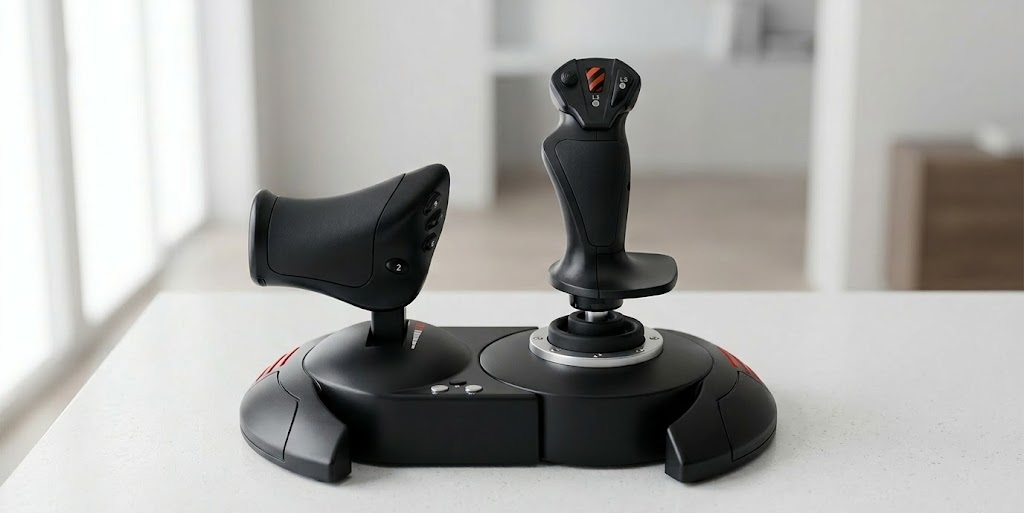 | Best Budget HOTAS | Detachable Throttle | [Buy on Amazon] |
| Logitech X56 H.O.T.A.S. | 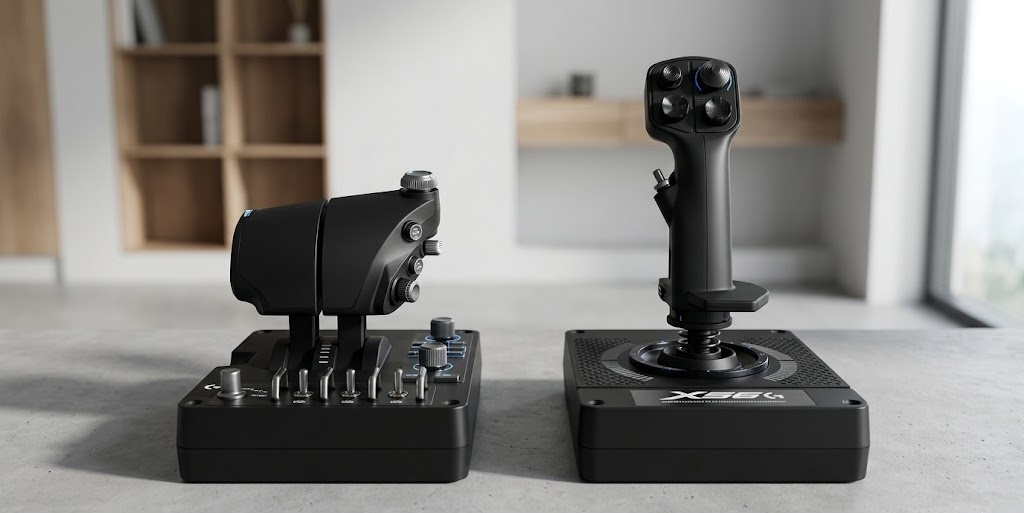 | Best for Space Sims | Adjustable Spring Tension | [Buy on Amazon] |
| Thrustmaster T.16000M FCS | 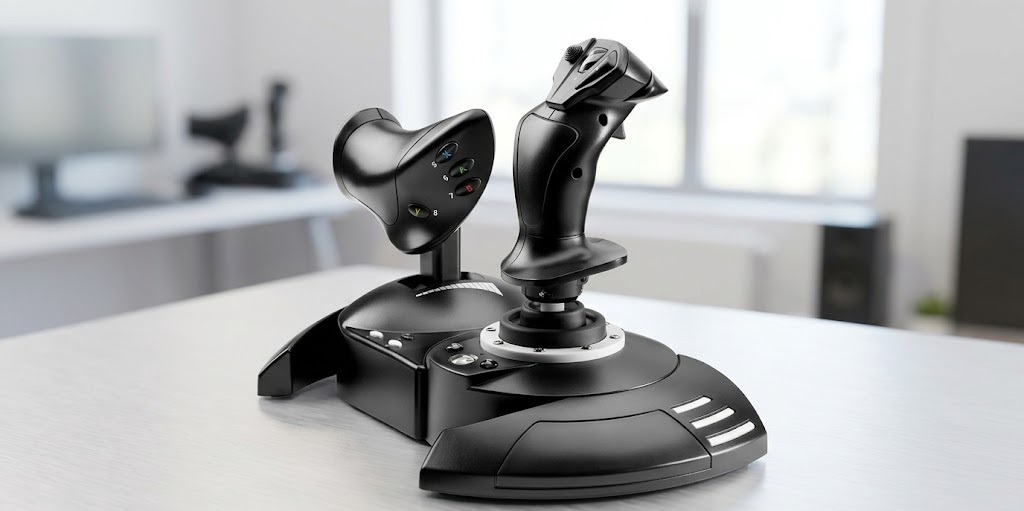 | Best Ambidextrous | Swappable Palm Rests | [Buy on Amazon] |
| Turtle Beach VelocityOne | 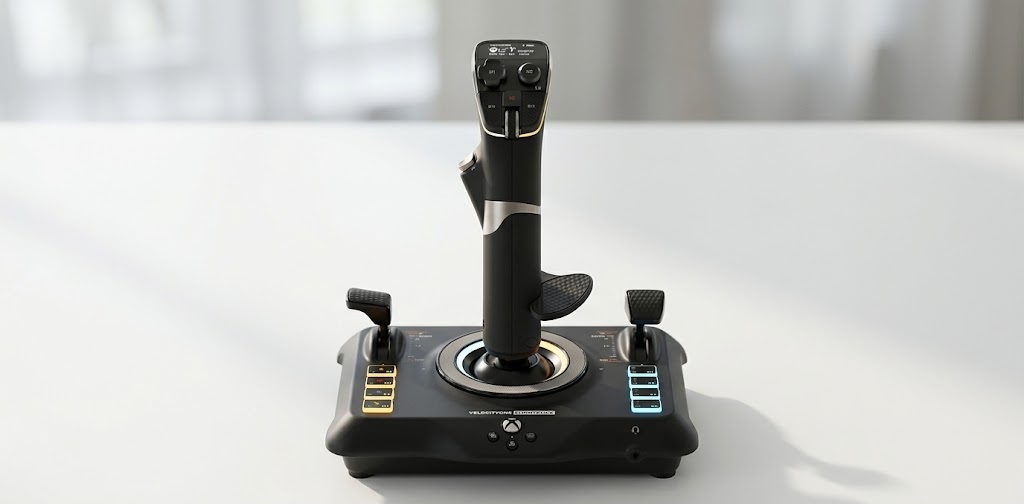 | Best for Consoles | Integrated Wrist Rest | [Buy on Amazon] |
| Thrustmaster HOTAS Warthog | 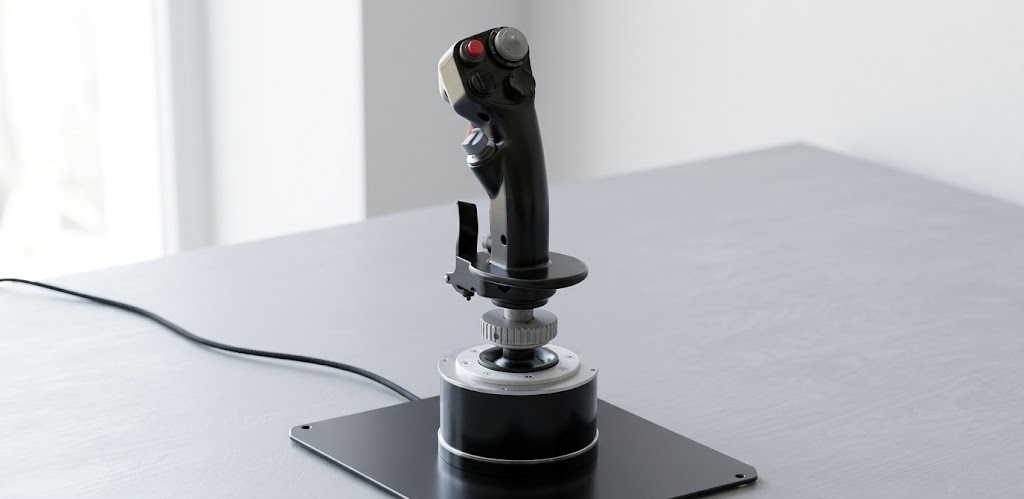 | Best Premium Metal | 1:1 Heavy Metal Replica | [Buy on Amazon] |
1. Thrustmaster T-Flight Hotas X Flight Stick (PC)
The Thrustmaster T-Flight Hotas X is a highly celebrated choice and is widely considered the ultimate entry-level ergonomic joystick. Its brilliant, user-friendly design supports strained hands perfectly without breaking the bank. Unlike single-piece sticks, this ergo joystick features a detachable throttle that naturally allows you to sit with your shoulders relaxed.
| Feature | Details |
| Material | High-grade durable plastic with large hand rest |
| Compatibility | PC, PS3 |
| Sensors | High-precision adjustable resistance |
| Weight | ~2.1 kg (entire HOTAS) |
| Specialty | Detachable throttle for adjustable shoulder width |
Pros:
- Completely eliminates the need for cramped posture by separating the throttle and stick.
- Features a massive, comfortable hand rest that takes the pressure off the wrist.
- Highly affordable ergonomic joystick with adjustable physical resistance.
Cons:
- Older aesthetic design that may not match modern RGB setups.
- Uses standard potentiometer sensors, which aren’t as smooth as magnetic ones.
2. Logitech X56 H.O.T.A.S. RGB Throttle and Stick Simulation Controller
The Logitech X56 is legendary in the ergonomic space for space simulation. What makes it a perfect ergonomic joystick for modern gamers is its massive array of inputs coupled with a customizable tension system. This model features a wide, balanced barrel and comes with four different spring tensions, allowing you to perfectly dial in the effort required to move the stick.
| Feature | Details |
| Material | Premium plastic with metal accents and soft-touch finish |
| Compatibility | PC |
| Sensors | Contactless 16-bit Hall Effect sensors |
| Weight | ~2.3 kg |
| Specialty | Interchangeable spring tension system for personalized resistance |
Pros:
- Comes with an interchangeable spring system, making it a highly customizable ergonomic joystick.
- Twin throttle allows for complex multi-engine management without awkward hand stretching.
- Contactless sensors mean zero physical friction, reducing hand strain.
Cons:
- The thick grip may feel slightly too bulky for users with very small hands.
- Requires a significant amount of desk space to position perfectly.
3. Thrustmaster T.16000M FCS HOTAS Controller
The Thrustmaster T.16000M FCS is an absolute dream for those who need an ambidextrous ergo joystick. It features fully swappable thumb and finger rests, allowing it to physically morph to fit either the right or left hand perfectly. This prevents left-handed users from having to adapt to awkward, right-biased shapes, reducing overall soreness and unfair fatigue.
| Feature | Details |
| Material | Industrial plastic with bright orange accents |
| Compatibility | PC |
| Sensors | H.E.A.R.T (HallEffect AccuRate Technology) |
| Weight | ~1.5 kg |
| Specialty | Fully ambidextrous design with swappable physical components |
Pros:
- Features the most forgiving, fully ambidextrous design on the market, making it the perfect ergonomic joystick for southpaws.
- H.E.A.R.T magnetic sensors are famously smooth and highly accurate.
- Excellent weight distribution in the base helps anchor the hand during long gaming sessions.
Cons:
- Buttons on the base require you to remove your hand from the main ergo joystick to press.
- The throttle unit is often sold separately depending on the bundle.
4. Turtle Beach VelocityOne Flightstick
The Turtle Beach VelocityOne Flightstick brings a modern, sleek approach to the ergo joystick category. Designed for both PC and Xbox, it features an integrated, ambidextrous wrist rest and a high-resolution OLED display that keeps vital information right in your line of sight, preventing neck strain from constantly looking around your physical desk.
| Feature | Details |
| Material | Matte plastic with textured, comfortable grip zones |
| Compatibility | PC, Xbox Series X|S, Xbox One |
| Sensors | High-resolution non-contact sensors |
| Weight | ~820g |
| Specialty | Integrated OLED flight management display and ambidextrous wrist rest |
Pros:
- Highly versatile ergonomic joystick that works seamlessly across modern consoles and PC.
- The integrated wrist rest provides excellent support for the heel of the hand.
- Built-in trim wheel allows for micro-adjustments without straining your fingers.
Cons:
- Lacks a separate full-size throttle unit, housing throttle levers on the base instead.
- The base is relatively light, meaning aggressive movements might tilt it.
5. Thrustmaster HOTAS Warthog Flight Stick
The Thrustmaster HOTAS Warthog is the pinnacle of the premium ergonomic joystick market. Crafted entirely from heavy-duty industrial metal, it is a 1:1 scale replica of the A-10C attack aircraft stick. The sheer weight of the unit means it will never slip or tip during gameplay. For the absolute best ergonomic experience, this stick is designed to be hard-mounted to your desk or chair, putting it at the exact anatomical height of a real pilot.
| Feature | Details |
| Material | Heavy-duty industrial metal |
| Compatibility | PC |
| Sensors | H.E.A.R.T (3D magnetic sensors) |
| Weight | ~6.5 kg (combined) |
| Specialty | 1:1 scale replica of the U.S. Air Force A-10C attack aircraft stick |
Pros:
- Unmatched realism and cold metal feel that provides a genuinely immersive experience.
- Incredibly heavy base prevents any unwanted slipping, making it a perfectly stable ergonomic joystick.
- Industrial-grade switches and buttons require the perfect amount of actuation force.
Cons:
- Extremely expensive compared to entry-level ergo joystick models.
- The heavy spring tension means it almost requires mounting for the best physical health benefits.
Comparison of Popular Models: Finding Your Ideal Ergo Joystick
Choosing between these phenomenal options comes down to identifying your specific pain points and gaming requirements. If you are entirely new to flight simulators and suffer from general wrist fatigue, the Thrustmaster T-Flight Hotas X offers the best introductory ergonomic joystick experience due to its large, forgiving palm rest and separated throttle. Its lightweight nature makes it easy to move off your desk when you need to switch back to office work.
However, if you are a left-handed gamer, the choice is unequivocally the Thrustmaster T.16000M FCS. Attempting to use a right-handed stick with your left hand is a recipe for severe cramping and tendonitis. The ability to swap the physical molding on this ergo joystick is a game-changer. Conversely, if you want a premium, customizable feel, the Logitech X56 allows you to swap out the internal springs. This is a massive anatomical benefit; if a spring is too stiff, it causes elbow and shoulder pain. Swapping to a lighter spring turns it into the perfect low-tension ergonomic joystick. Lastly, for pure simulation enthusiasts who plan to build a dedicated rig, the Thrustmaster HOTAS Warthog, when center-mounted between the legs on a dedicated chair mount, mimics the exact ergonomic posture of real-world fighter pilots.
Health Benefits of an Ergo Joystick for Joint Support
The health benefits of transitioning to a dedicated ergonomic joystick extend far beyond just your hands. When you use a proper HOTAS setup, you are forced to sit with your shoulders squared and open, rather than hunched over a tiny gamepad or keyboard. This open chest posture improves breathing and reduces the strain on your upper back and cervical spine.
Furthermore, a high-quality ergo joystick mitigates the risk of De Quervain’s tenosynovitis—a painful condition affecting the tendons on the thumb side of your wrist. Because ergonomic designs place buttons naturally under where your fingers rest, you do not have to over-extend your thumb to reach high-hat switches or triggers. By keeping the hand in a relaxed, neutral ‘handshake’ position, the ergonomic joystick ensures your joint fluid remains evenly distributed, keeping your cartilage healthy over thousands of hours of gameplay.
How to Properly Hold Your Ergo Joystick
Even the best ergonomic joystick in the world will fail to prevent pain if you hold it incorrectly. The golden rule is the “light touch.” Your grip should be firm enough to maintain control but relaxed enough that someone could easily pull a piece of paper out from between your palm and the stick.
Position the base of your ergo joystick so that your forearm is completely parallel to the floor when your hand rests on the grip. You should not have to reach up or reach down. Rest the meaty part of your palm (the hypothenar eminence) fully on the built-in palm shelf. Let your fingers drape naturally over the trigger and top buttons. Do not hover your fingers; hovering causes the extensor tendons in your forearm to remain under constant tension. Let the ergonomic joystick carry the weight of your hand.
Deep Dive: The Science of Grip Materials
The material covering your ergonomic joystick plays a massive role in long-term comfort. Cheap ABS plastics can become slick with sweat, forcing you to unconsciously squeeze tighter—a phenomenon known as “grip creep.” This microscopic increase in tension is what causes hours-delayed soreness.
Premium ergo joystick models utilize soft-touch elastomers, texturized resins, or cold metal. Rubberized grips, like those found on the Logitech X56, provide high friction with low effort. They absorb the micro-vibrations created when slamming the stick from edge to edge. Conversely, the heavy metal of the Thrustmaster Warthog acts as a heat sink, keeping sweaty hands cool during intense, high-stakes maneuvers. Understanding what material your skin reacts best to will guide you toward your perfect ergonomic joystick.
The Psychology of Gaming Comfort
It is fascinating how physical comfort directly correlates to in-game performance and psychological immersion. When you are using a cramped, unnatural controller, a portion of your brain is constantly processing the low-level pain signals from your wrist. This cognitive load detracts from your situational awareness and reaction time.
When you wrap your hand around a beautifully contoured ergo joystick, that background noise disappears. The controller ceases to be an object you are fighting and instead becomes an extension of your own arm. This psychological shift—often referred to as entering a “flow state”—is much easier to achieve when your physical body is fully supported by an ergonomic joystick. You make better tactical decisions, execute smoother landings, and ultimately enjoy the simulation on a much deeper level.
Maintaining and Caring for Your Gaming Setup
To ensure your ergonomic joystick continues to provide fluid, pain-free movement for years, regular maintenance is required. Dust and pet hair can get trapped in the ball-joint at the base of the stick, creating physical friction. This friction forces you to push harder, negating the benefits of your ergo joystick.
Once a month, unplug your device and wipe down the grip materials with a damp microfiber cloth to remove skin oils that can degrade rubberized coatings. Use a can of compressed air to blow out the gimbal mechanism. If your ergonomic joystick allows for it, a tiny application of specialized plastic-safe silicone grease to the internal gimbal can keep the stick feeling factory-new, ensuring your wrists never have to fight against internal friction.
Hand Exercises for Gamers and Pilots
Even with the absolute best ergonomic joystick, taking breaks and stretching is vital. Implementing a 5-minute stretching routine into your gaming sessions will keep your tendons elastic and healthy.
- The Prayer Stretch: Place your palms together in front of your chest and slowly lower your hands until you feel a gentle stretch in your forearms. Hold for 30 seconds.
- The Reverse Prayer: Place the backs of your hands together in front of you and lower them. This counteracts the gripping motion you use on your ergo joystick.
- Finger Extensions: Wrap a rubber band around the outside of your fingers and gently spread them apart against the resistance. This builds the opposing muscles that are often neglected during gaming.
Essential Accessories to Pair with Your Desk Setup
Your digital cockpit should work as a cohesive system to support your body. Consider pairing your new ergonomic joystick with the following upgrades to complete your workstation:
- Desk Mounts: Clamping your ergonomic joystick to the edge of your desk lowers the stick to a proper, relaxed arm height, mimicking a real cockpit.
- Ergonomic Desk Pads: A soft, yielding surface cushions your elbows and forearms.
- A Posture-Correcting Chair: Sitting correctly keeps your arm positioned perfectly parallel to the desk, allowing the ergo joystick to do its job.
- Rudder Pedals: By offloading the twisting (yaw) motion from your wrist to your feet, you remove the most stressful physical movement from your ergonomic joystick entirely.
Frequently Asked Questions (FAQs)
Q: Are ergonomic joystick options really worth the higher price tag? A: Absolutely. While a premium model might cost significantly more than a basic gamepad, the long-term reduction in hand pain, wrist fatigue, and daily frustration makes them an incredibly high-ROI investment for your body.
Q: Can an ergo joystick genuinely help alleviate symptoms of Carpal Tunnel Syndrome? A: Yes. Thicker contoured grips, adjustable palm rests, and frictionless magnetic sensors physically prevent the tight pinching motion and hard pushing that inflames the tendons. By keeping the hand in a more open, relaxed state, an ergonomic joystick offers significant relief.
Q: Are there specialized options specifically designed for left-handed players? A: Definitely! Models like the Thrustmaster T.16000M FCS are physically moldable, coming with swappable plastic pieces that allow it to transform into a perfect left-handed ergo joystick.
Q: Will it take a long time to get used to flying with a HOTAS setup? A: For traditional gamers moving from a standard controller, the transition to a full ergonomic joystick and throttle setup is usually quick. It generally takes about three to five days of consistent use for your brain to remap its motor skills to the new, healthier posture.
Conclusion: Finding the Perfect Fit
Simulation gaming should be a seamless, joyful translation of your inputs into the digital world, not a painful, exhausting chore that leaves you icing your wrist at the end of a long flight. By deeply understanding the mechanics of hand fatigue and actively seeking out specialized tools like a perfectly tensioned HOTAS or an ambidextrous ergo joystick, you can finally provide your hands with the respect, care, and comfort they deserve.
Exploring top-tier, highly rated models such as the Thrustmaster T-Flight Hotas X, Logitech X56, Thrustmaster T.16000M FCS, Turtle Beach VelocityOne, and Thrustmaster HOTAS Warthog gives you a fantastic, thoroughly vetted starting point. Carefully comparing the features, grip materials, and sensor technologies allows you to make an informed, confident decision based on your specific physical needs and setup preferences.
Remember, providing a supportive, properly mounted environment for your new ergonomic joystick is just as important as buying one. By setting up a proper, body-aligned workspace and allowing your hand to discover its grip naturally without forcing it, you create a personalized ecosystem that promotes immersion, efficiency, and healthy joint maintenance. Take the time to find a shape, weight, and tension that fits your hand perfectly. By doing so, you are making a profound, lasting investment in your daily comfort and long-term physical health. Happy flying!
Continue building out your perfect, pain-free workstation and home environment with our other top guides: [7 Best Ergo Pen Models to Stop Hand Pain & Revolutionize Your Writing]
1 thought on “The 5 Best Ergonomic Joystick Models to Eliminate Wrist Strain & Enhance Flight Simulation”