
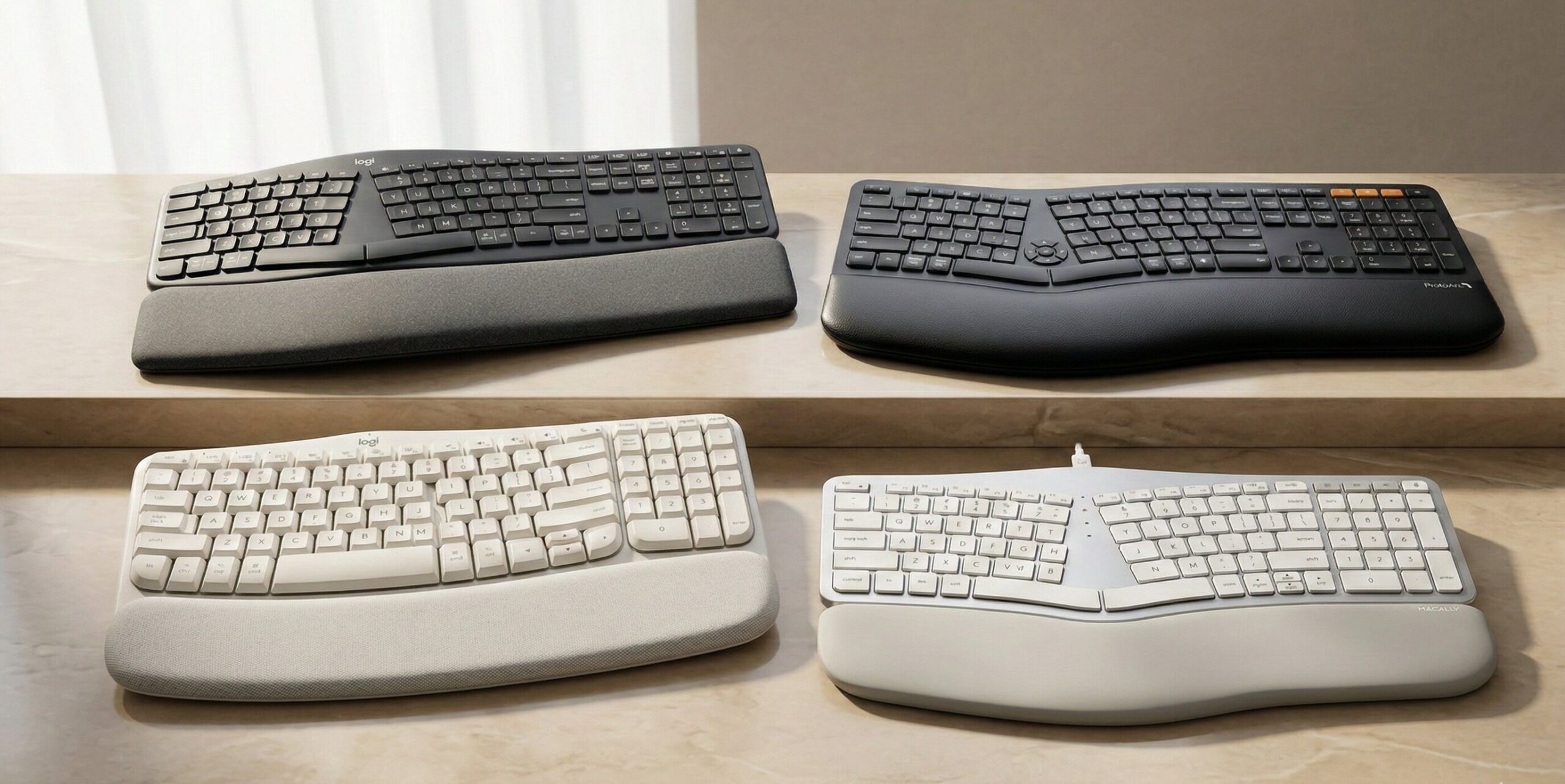
Look, we know the Apple Magic Keyboard is beautiful. It looks like a piece of modern art sitting on your desk. But let’s be entirely honest: typing on that ultra-low-profile, perfectly flat slab of aluminum for 8 to 10 hours a day is essentially like repeatedly tapping your fingers on a piece of concrete. If you spend your days coding in Xcode, writing extensive reports, or managing endless spreadsheets on your MacBook or iMac, finding the perfect ergonomic keyboard mac solution is no longer just an aesthetic choice—it is an absolute medical necessity.
You likely already know the warning signs. It starts as a subtle tightness in your forearms. Then, it escalates to a sharp pinch in your wrists, numbness tingling in your fingertips, and a persistent, dull ache radiating up to your shoulders by the time you close your laptop. Traditional flat keyboard designs force your hands, wrists, and forearms into an incredibly unnatural, flat posture (a biological position known as pronation), which puts immense, sustained pressure on your median nerve and wrist tendons.
But what happens when you finally decide to prioritize your health and switch to a more comfortable typing setup, only to find that the vast majority of the market is built strictly for Windows PCs? Finding a reliable ergonomic keyboard mac layout can feel like searching for a needle in a haystack. If you buy a standard Windows ergonomic board, you end up dealing with frustrating key mapping issues, missing Command (⌘) and Option (⌥) keys, reversed shortcut muscle memory, and a clunky workflow that slows down your daily productivity.
At Ergo Setup Lab, we believe that you shouldn’t have to sacrifice the seamless Apple ecosystem experience just to save your wrists from repetitive strain injuries (RSI). A true, high-quality ergonomic keyboard mac setup solves these issues by perfectly contouring to your natural shoulder width and wrist angle, all while maintaining the intuitive, native Apple layout you rely on every single day.
In this massive, comprehensive review, we have rigorously tested, analyzed, and selected the 4 best models of 2026 designed specifically for Apple users. Whether you are looking for an aggressively split ergonomic keyboard mac layout for severe carpal tunnel relief, or a gentle wave design to ease your transition away from the Magic Keyboard, we have thoroughly evaluated the market to bring you the top tier options.
Quick Top Picks: Best Ergonomic Keyboard Mac Options (2026)
If you are in a rush and need immediate relief, here is a quick overview of our top ergonomic keyboard mac selections.
| Product Name | Product Image | Category | Main Feature | Buy Now |
| Logitech ERGO K860 | 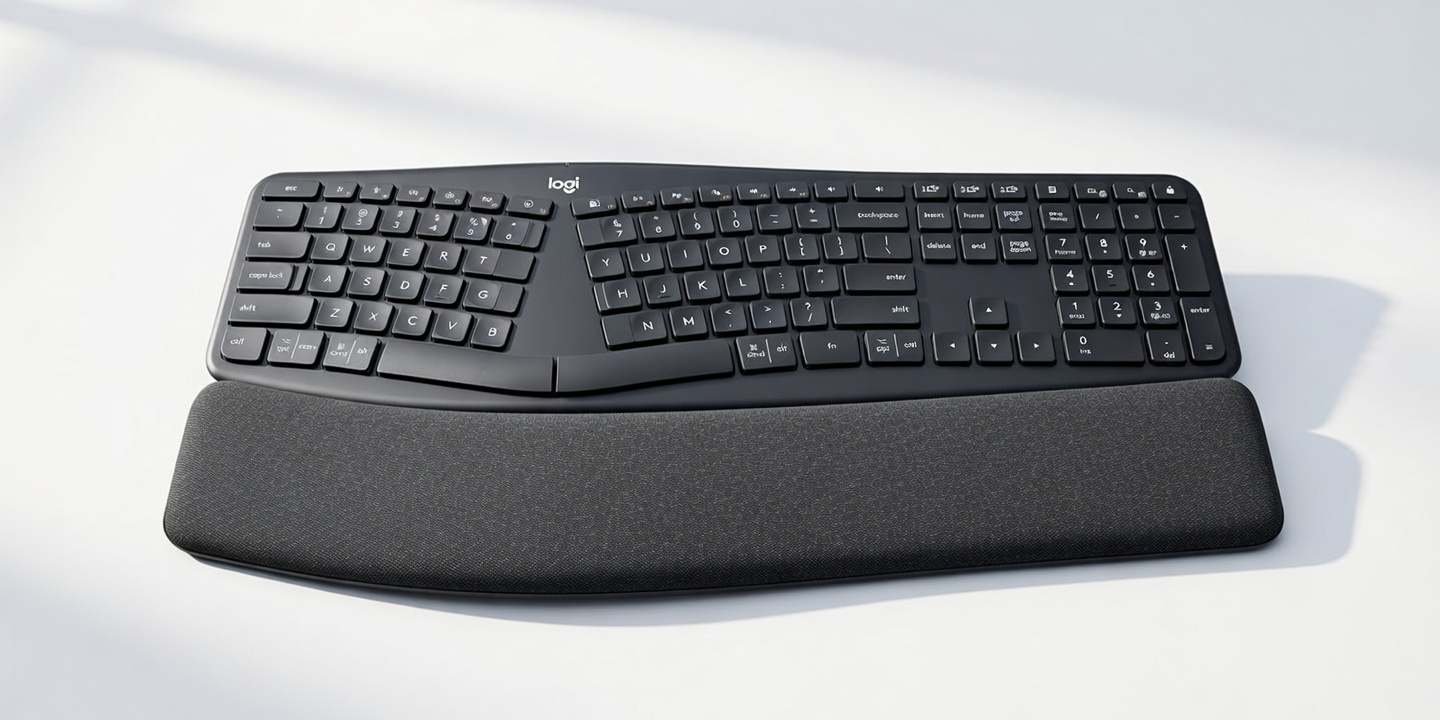 | Best Overall / Most Reviewed | Pillowed Wrist Rest & Deep Split Design | 🛒Check Price on Amazon |
| Logitech Wave Keys | 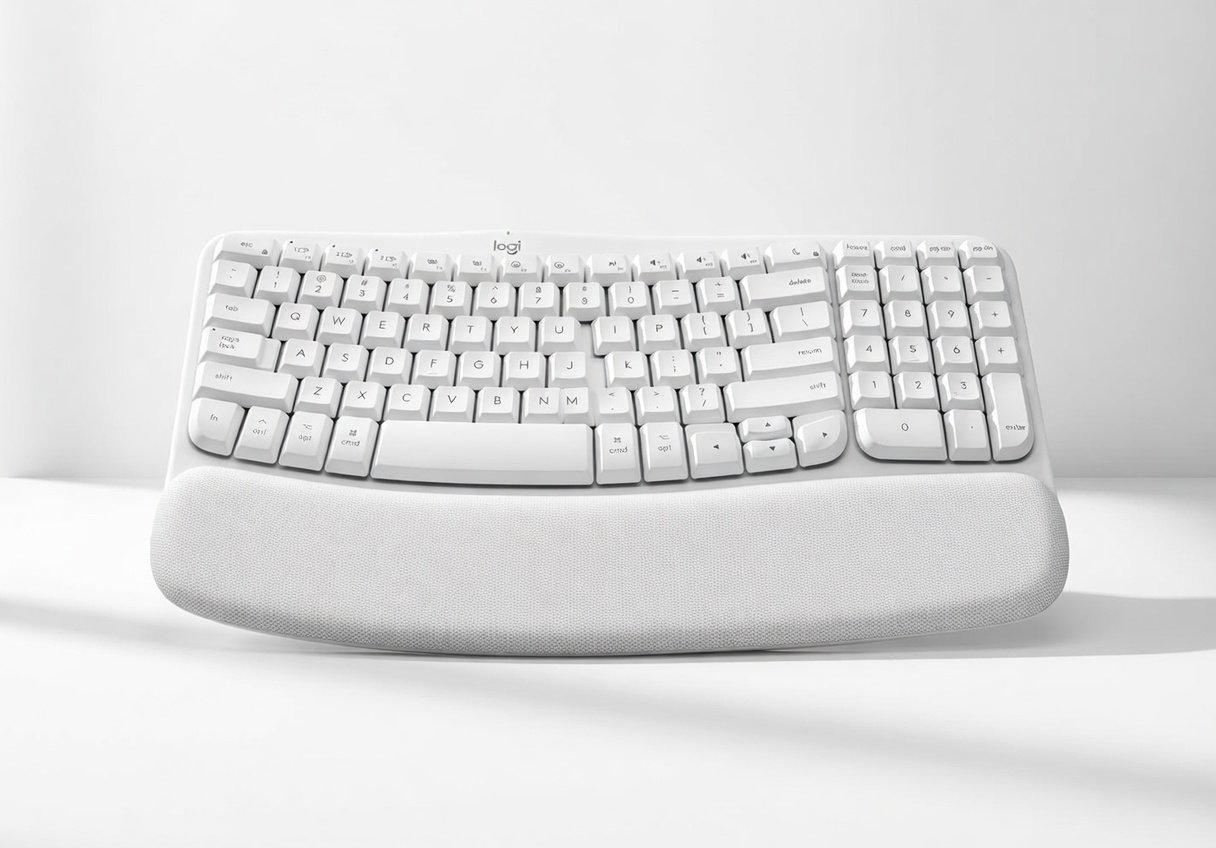 | Best Mac-Optimized / Trending | Compact Wave Shape & Logi Options+ | 🛒Check Price on Amazon |
| ProtoArc EK01 Plus | 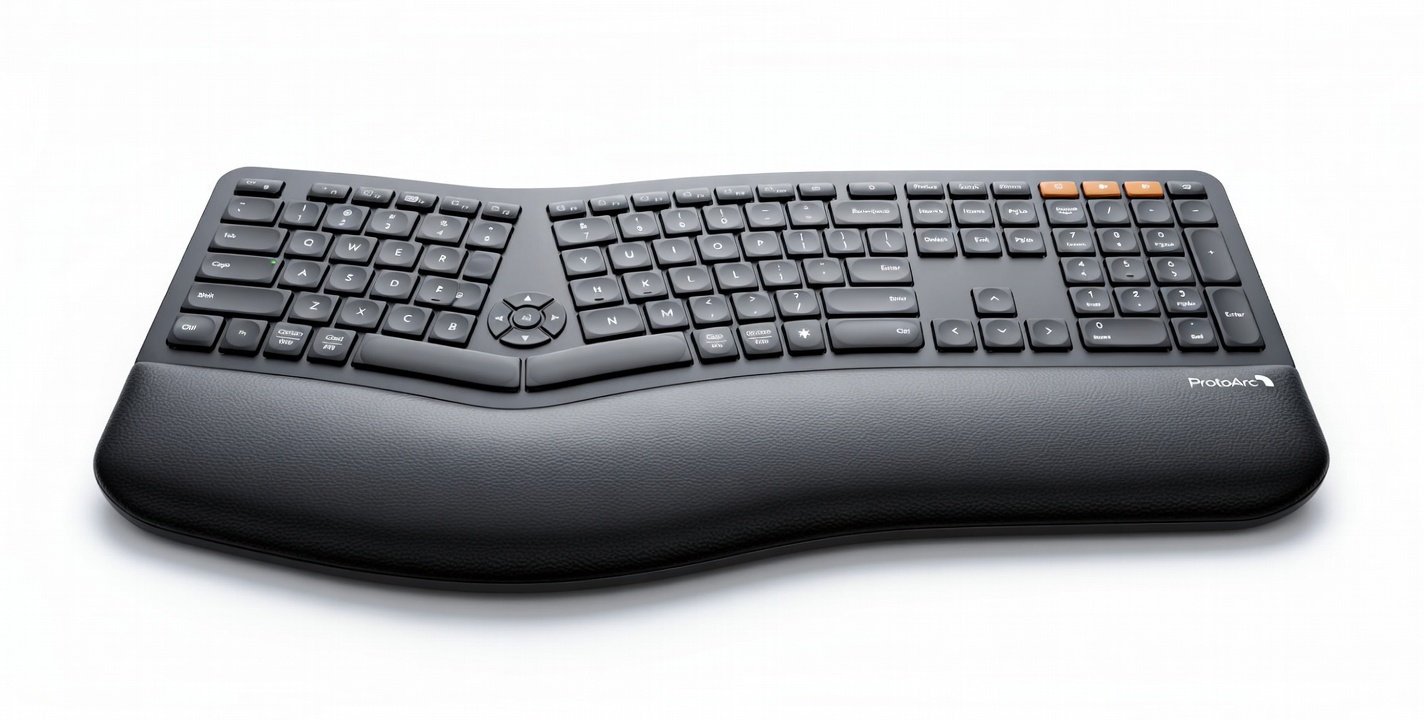 | Best Budget Trending Split | Affordable Full-Size Split Layout & USB-C | 🛒Check Price on Amazon |
| Macally Ergonomic | 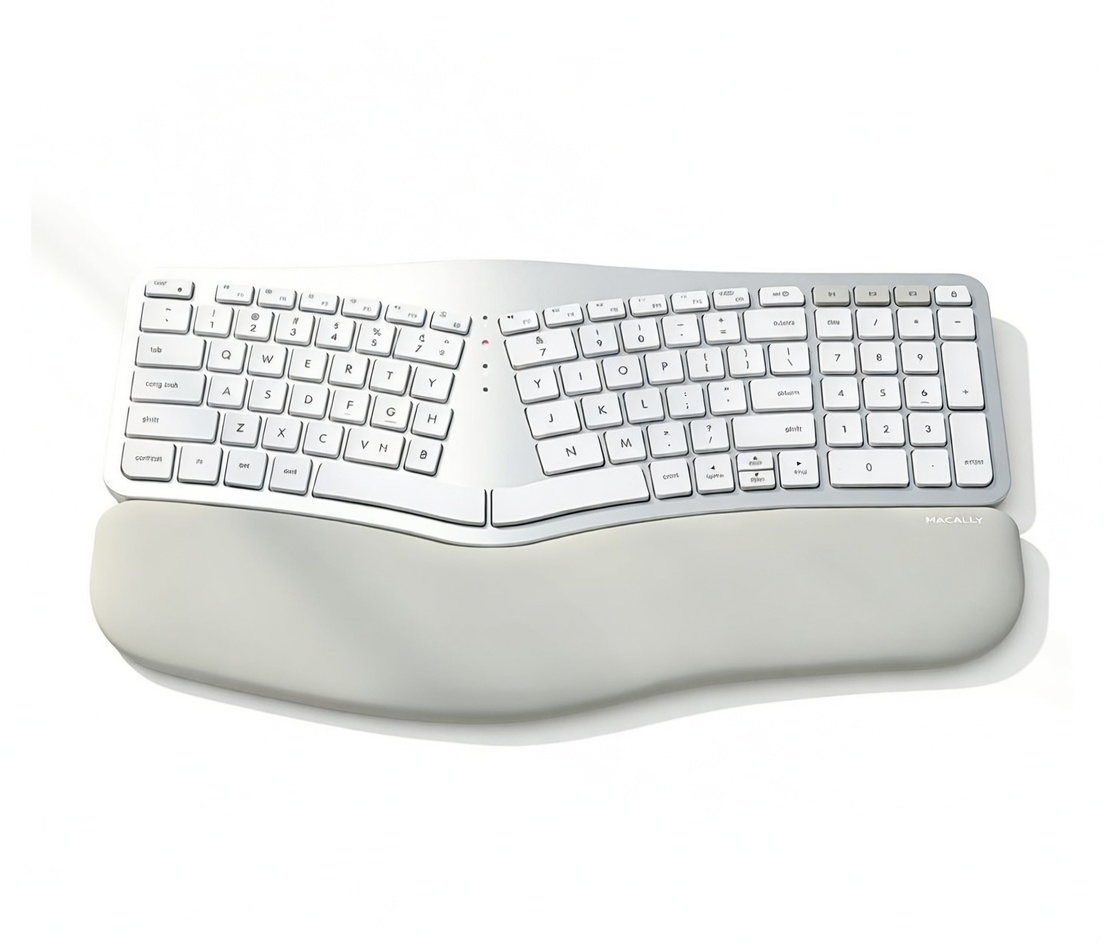 | Best Mac-Specific / Backlit | Cushioned Rest, Backlit Keys & CNC Look | 🛒Check Price on Amazon |
In-Depth Reviews of the Best Ergonomic Keyboard Options
Let’s dive deep into the specific features, typing feel, and macOS integration of each model. When selecting an ergonomic keyboard mac device, the devil is in the details—from switch actuation force to the exact angle of the palm rest.
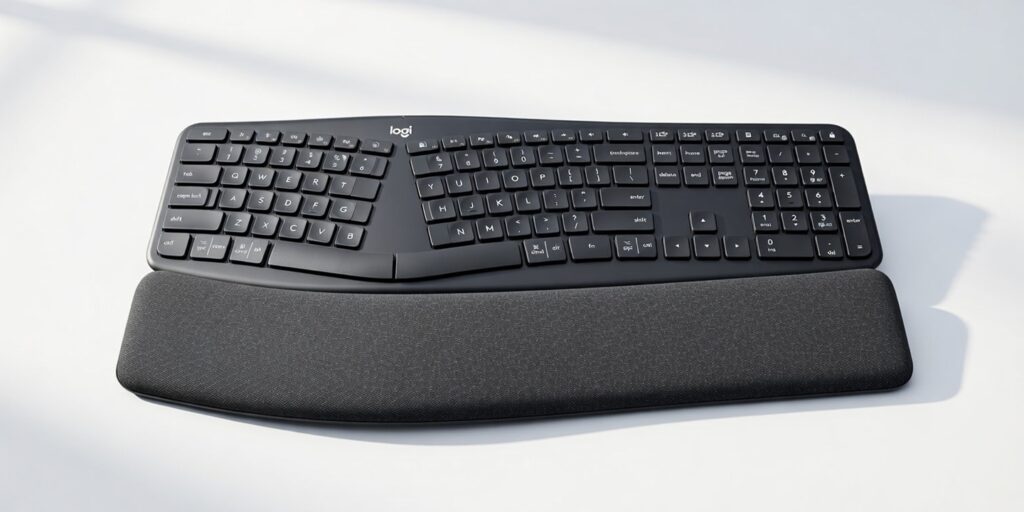
1. Logitech ERGO K860 Wireless Ergonomic Keyboard (Best Overall / Most Reviewed)
When it comes to finding the ultimate, uncompromised ergonomic keyboard mac solution, the Logitech ERGO K860 remains the undisputed champion year after year. Logitech has completely mastered the curved, split keyframe design, providing an incredibly comfortable, posture-correcting typing experience that dramatically reduces muscle strain on your wrists and forearms.
Why It’s a Winner: The K860 features a beautifully sloped, split keyframe that perfectly aligns your hands, neck, and shoulders. Unlike flat keyboards that force your wrists to bend outward (ulnar deviation), the K860 keeps your forearms perfectly straight. What truly sets this ergonomic keyboard mac apart from the competition is the meticulously engineered pillowed wrist rest. It incorporates three distinct layers of comfort: a 4mm layer of high-density foam for firm support, a 2mm layer of memory foam for personalized contouring, and an easy-to-clean, stain-resistant knitted fabric cover that prevents your palms from sweating during long typing sessions.
Furthermore, this ergonomic keyboard mac option is brilliant for users who switch between devices. It offers dual connectivity (via low-energy Bluetooth and the included Logi Bolt USB receiver) and features dual-printed keys. This means Mac users feel right at home with the clearly labeled Command and Option buttons, and you can seamlessly swap between your MacBook, your iPad, and even a Windows work PC with the press of a single easy-switch button.
Specifications:
- Design: Deep split, curved keyframe (Tented design).
- Wrist Rest: 3-layer pillowed palm rest (Fabric, Memory Foam, High-Density Foam).
- Connectivity: Bluetooth 5.0 & Logi Bolt USB Receiver (Multi-device pairing up to 3 devices).
- Battery Life: Up to 2 years on 2x AAA batteries.
- Special Feature: Innovative adjustable palm lift mechanism. Built-in legs flip out at 0, -4, and -7 degrees to keep your wrists in a neutral posture whether you are sitting low or standing at a standing desk.
Pros & Cons:
- ✅ Pros: Exceptional build quality with medically-backed, ergonomist-approved posture support.
- ✅ Pros: Perfectly integrated Mac keys (Command/Option) with flawless macOS software support via Logi Options+.
- ✅ Pros: The negative tilt adjustable palm lift is an absolute game-changer for standing desk users.
- ❌ Cons: This ergonomic keyboard mac takes up a massive amount of desk space due to its large footprint and non-detachable wrist rest.
- ❌ Cons: Uses standard AAA batteries rather than being equipped with a modern USB-C rechargeable internal battery.
Our Verdict: The Logitech ERGO K860 is an absolute triumph in ergonomic engineering. It perfectly balances a premium tactile typing feel, flawless Mac compatibility, and serious medical-grade posture support. If you have the desk space, this is the best ergonomic keyboard mac money can buy.
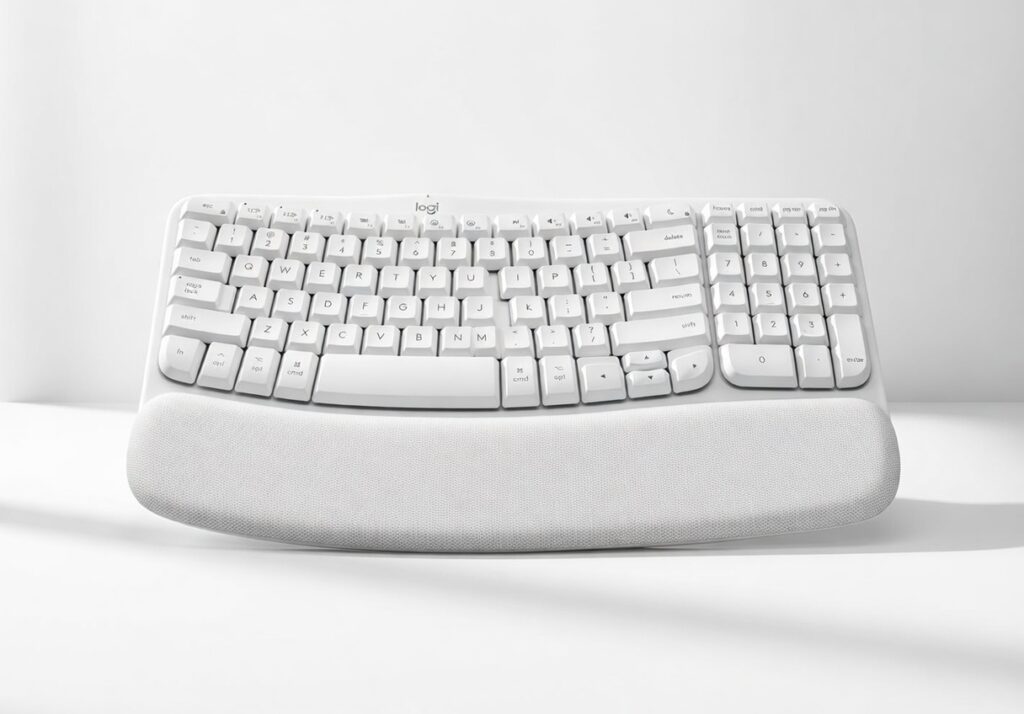
2. Logitech Wave Keys for Mac (Best Mac-Optimized / Trending Value Pick)
If you are entirely new to the world of ergonomics and feel deeply intimidated by the aggressive, divided split design of traditional models like the K860, the Logitech Wave Keys for Mac is going to be your absolute best friend. This is a highly approachable, beautifully crafted ergonomic keyboard mac that gently guides your hands into a better, healthier posture without requiring a massive, frustrating learning curve.
Why It’s a Winner: Logitech engineered the Wave Keys specifically for users who desperately want ergonomic benefits but prefer a slightly more compact, familiar footprint. Instead of splitting the keys into two separate physical islands, this ergonomic keyboard mac features a continuous “wave” shape. It rises in the middle and dips toward the edges, matching the natural varying lengths of your fingers. This means touch-typing feels completely natural from day one; you won’t find yourself reaching for the ‘T’ or ‘Y’ key with the wrong hand and hitting empty space.
This specific “For Mac” version is a standout. It comes in a stunning “Off-White” aesthetic that perfectly matches Apple’s design language. More importantly, it features a dedicated, strictly Apple key layout without any confusing dual-printed Windows keys cluttering up the board. It connects instantly via Bluetooth, bypassing the need for dongles on your modern MacBook Air or Pro.
Specifications:
- Design: Compact Wave shape (unibody, non-split).
- Wrist Rest: Cushioned palm rest with high-density memory foam.
- Connectivity: Bluetooth Low Energy (Highly optimized for macOS and iPadOS).
- Battery Life: Up to 3 years on 2x AAA batteries.
- Special Feature: Seamless integration with the Logi Options+ App, allowing you to create custom Mac shortcuts, Smart Actions, and application-specific key bindings.
Pros & Cons:
- ✅ Pros: Almost zero learning curve compared to heavily split ergonomic keyboard mac designs.
- ✅ Pros: Stunning Mac-specific colorway and a clean, dedicated Apple key layout.
- ✅ Pros: Significantly more compact than traditional ergonomic boards, saving valuable real estate on smaller desks.
- ❌ Cons: The gentle wave design doesn’t offer as much extreme nerve relief or straight-wrist correction as a true split keyboard.
- ❌ Cons: Lacks backlighting, making it difficult to use in dimly lit home office environments.
Our Verdict: An absolute lifesaver for users transitioning to an ergonomic keyboard mac setup for the very first time. It provides meaningful, immediate comfort, eliminates the annoying relearning phase of typing, and looks perfectly at home sitting next to your pristine MacBook or iMac.
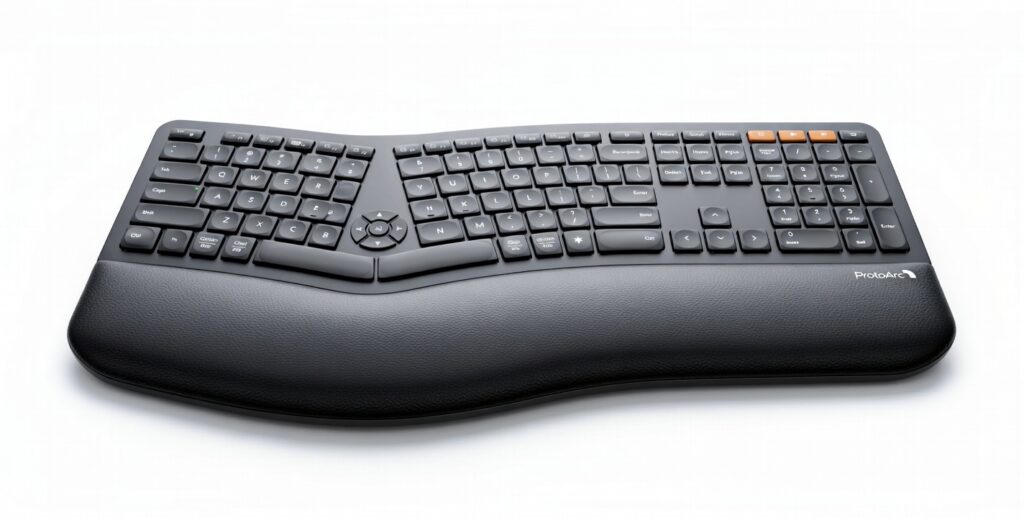
3. ProtoArc EK01 Plus Full-Size Wireless Ergonomic Keyboard (Best Budget Trending Split)
Proper desk ergonomics shouldn’t have to cost a small fortune. If you want to test out a full-sized, deeply split ergonomic keyboard mac setup without committing a massive portion of your paycheck, the ProtoArc EK01 Plus is the perfect entry-level option that is currently taking the productivity market by storm.
Why It’s a Winner: ProtoArc is a relatively new player that has managed to pack premium, top-tier ergonomic features into an incredibly affordable package. The EK01 Plus features a deep, sweeping split design that aggressively forces your hands into a relaxed, natural, shoulder-width angle. This is the exact type of posture correction you need to combat RSI. Unlike many budget boards that cut corners on comfort, this ergonomic keyboard mac includes a padded, synthetic PU leather wrist rest that feels incredibly soft and supportive under your palms.
Furthermore, the EK01 Plus utilizes high-quality scissor-switch keys. If you are used to the short travel distance and crisp tactile bump of an Apple Magic Keyboard, the scissor switches on this ergonomic keyboard mac will feel incredibly familiar and satisfying. It easily connects to your Mac via Bluetooth 5.1 and features three dedicated channel buttons, allowing you to instantly swap your typing input between your MacBook, your iPad, and your iPhone without missing a beat.
Specifications:
- Design: Full-size, aggressive split keyframe with a central peak.
- Wrist Rest: Integrated synthetic PU leather padded rest.
- Connectivity: 2.4G Wireless USB Dongle & Bluetooth 5.1 (Connects to 3 devices simultaneously).
- Battery Life: 500mAh built-in battery lasting up to a month per charge.
- Special Feature: Built-in rechargeable battery via USB-C, eliminating the need to constantly buy and replace disposable alkaline batteries.
Pros & Cons:
- ✅ Pros: Incredibly affordable, budget-friendly entry point for a true split ergonomic keyboard mac design.
- ✅ Pros: Modern USB-C rechargeable battery (a highly requested feature often inexplicably missing in premium Logitech models).
- ✅ Pros: Scissor-switch keys provide a quiet, responsive, laptop-like typing experience that Mac users love.
- ❌ Cons: The ABS keycaps can feel slightly cheaper and more prone to shining over time compared to higher-end PBT competitors.
- ❌ Cons: The palm rest padding is somewhat thinner and less plush than the luxurious 3-layer system found on the Logitech K860.
Our Verdict: The absolute best “bang for your buck” available in the ergonomic space today. It loudly proves that you can get meaningful pain relief, flawless Mac compatibility, and a modern rechargeable battery for a very reasonable price point. It is a fantastic starter ergonomic keyboard mac.
4. Macally Wired or Bluetooth Ergonomic Keyboard for Mac (Best Mac-Specific / Backlit Option)
When you want a peripheral accessory that looks and feels like it was designed directly by the engineers in Cupertino, the Macally Ergonomic Keyboard for Mac steps up to the plate. It is specifically tailored from the ground up for die-hard Mac users who simply refuse to compromise on either sleek aesthetics or practical functionality when choosing an ergonomic keyboard mac.
Why It’s a Winner: The Macally keyboard boasts a striking, brushed aluminum-style finish that perfectly complements the metallic ecosystem of your Apple devices. But aesthetics aside, it solves one of the most frustrating problems in the ergonomic market. One of the biggest, most consistent complaints about finding an ergonomic keyboard mac is the complete lack of illuminated keys. Macally solves this glaring issue by offering a brilliant, evenly distributed backlit version (available in both highly reliable wired USB-C/USB-A or wireless Bluetooth configurations) with multiple adjustable brightness levels.
Additionally, this ergonomic keyboard mac is packed with 21 dedicated, Mac-specific shortcut keys. Without needing to install any bloatware or third-party mapping software, you can natively control your media playback, adjust your screen brightness, summon Spotlight search, and trigger Mission Control effortlessly, directly from the top row.
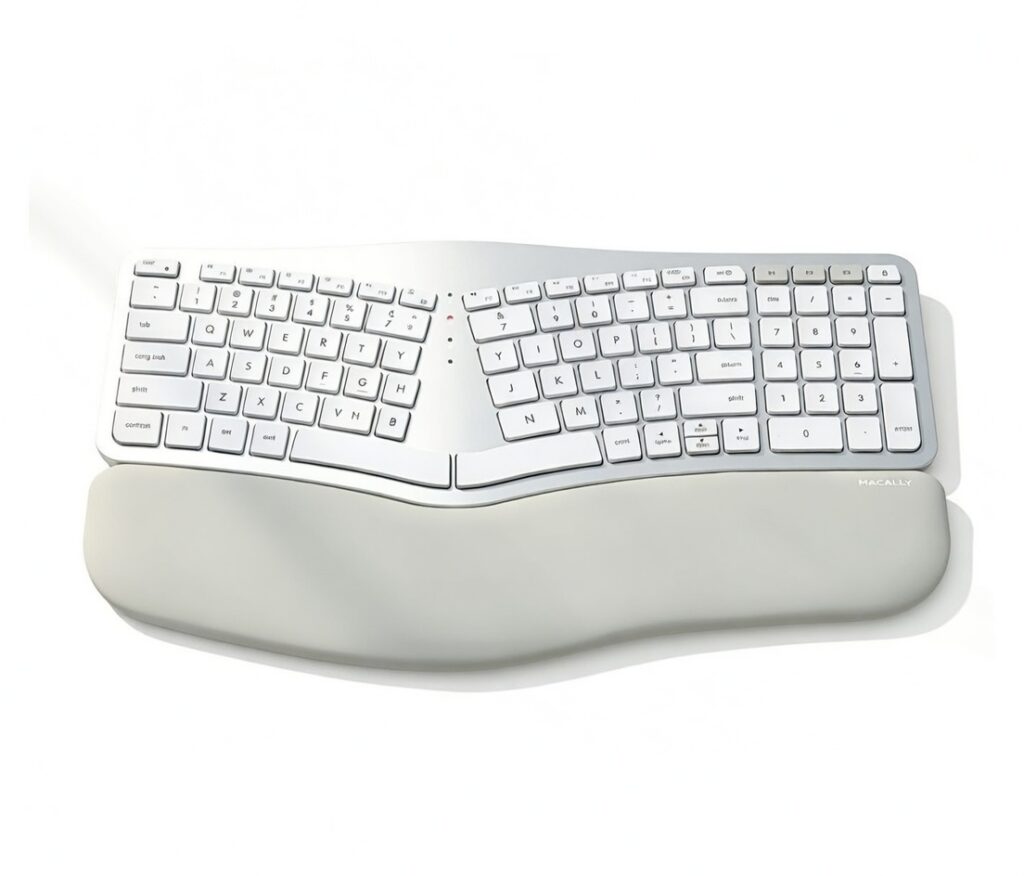
Specifications:
- Design: Split ergonomic design with a gentle central slope and tenting.
- Wrist Rest: Integrated, wide cushion with a comfortable sloped angle.
- Connectivity: Available in both a highly stable USB Wired version and a multi-device Bluetooth version.
- Special Feature: Bright LED Backlit keys (on select models) and 21 dedicated Apple shortcuts hardcoded for macOS.
Pros & Cons:
- ✅ Pros: Specifically engineered to be the ultimate ergonomic keyboard mac, featuring an aesthetic that flawlessly matches Apple laptops and desktops.
- ✅ Pros: Features the highly requested backlit keys, making it the perfect ergonomic keyboard mac for late-night coding or low-light productivity.
- ✅ Pros: Available in a rock-solid wired version for security-conscious users or those who absolutely hate dealing with battery management.
- ❌ Cons: The keys have a slightly longer travel distance and a softer membrane feel, which may require an adjustment period if you are strictly used to the ultra-low Magic Keyboard.
- ❌ Cons: The footprint is quite large, taking up a substantial amount of width on a small desk.
Our Verdict: If bright backlighting, a strict Apple-centric aesthetic, and native macOS shortcut keys are your absolute top priorities, this ergonomic keyboard mac provides excellent, posture-correcting support without ever sacrificing the premium Mac experience you have come to love.
Ergonomic Keyboard Benefits: Why You Need One
Understanding the core biomechanical benefits makes it abundantly clear why investing in an ergonomic keyboard mac is vastly superior to continuing to use the standard, flat Apple Magic Keyboard. Typing on a flat surface forces the human body into several unnatural positions. Here is exactly how an ergonomic keyboard mac fixes them:
1. Eliminates Wrist Pronation Place your hands completely flat on your desk right now, palms facing down. If you pay attention, you will feel a slight, twisting tension in the muscles of your forearms. This unnatural twisting is called pronation. An ergonomic keyboard mac with a split and tented design angles the keys upwards toward the center of the board. This allows your hands to rest in a more natural, slightly tilted, handshake-like position that immediately releases that built-up muscular tension in the forearm.
2. Reduces Ulnar Deviation Look down at your hands while typing on a standard laptop keyboard. Because the keyboard is narrow and your shoulders are wide, you are forced to bend your wrists outward at a sharp angle to align your fingers horizontally with the straight rows of keys. This outward bending is called ulnar deviation, and it is a leading cause of wrist pain. A split ergonomic keyboard mac separates the keys into two distinct halves, angling them outward to match the natural, relaxed width of your shoulders, keeping your wrists perfectly, safely straight.
3. Lowers Finger Fatigue and Extension Standard keyboards often require you to stretch your fingers unnaturally to hit peripheral keys like Return, Shift, or Backspace. The contoured, curved keyframes and highly responsive tactile switches on a quality ergonomic keyboard mac mean the keys are physically closer to your natural finger lengths. You don’t have to overstretch, which significantly lowers the overall physical effort and micro-muscle fatigue required to type thousands of words a day.
4. Promotes Better Seated Posture Because an ergonomic keyboard mac often comes with a built-in, supportive wrist rest (or more accurately, a palm rest), it prevents you from dropping your wrists down onto the hard edge of your desk. By elevating your palms and utilizing negative tilt (angling the keyboard downward away from you), it naturally encourages you to sit back in your ergonomic office chair, keeping your shoulders relaxed and your back straight, rather than hunching forward over your MacBook.
Does an Ergonomic Keyboard Help Carpal Tunnel?
During any professional ergonomic desk assessment, the most common, urgent question asked is: “Can an ergonomic keyboard mac cure my carpal tunnel syndrome?”
We need to be clear and grounded in reality: a keyboard is a tool, not a magical medical cure for an existing, severe physiological condition. However, upgrading to a high-quality ergonomic keyboard mac setup is almost universally highly recommended by doctors, occupational therapists, and ergonomists as a vital preventative measure and a primary source of pain relief.
Carpal Tunnel Syndrome occurs when the median nerve, which runs down your forearm and through a narrow passageway in your wrist (the carpal tunnel), becomes compressed and inflamed. This compression is heavily exacerbated by resting your wrists flat and hard against a desk while simultaneously bending your hands outward (ulnar deviation) and upward (wrist extension) to type on a flat keyboard.
An ergonomic keyboard mac directly combats this by doing two things. First, it lifts the wrists off the hard desk surface using a padded rest, preventing direct contact pressure. Second, it straightens the hand-to-forearm alignment via the split design, opening up the carpal tunnel and giving the median nerve room to breathe. This eliminates the pinching of the nerve and drastically reduces the muscle tension created in the forearm, neck, and shoulders that an ordinary, flat keyboard consistently causes. If you are experiencing early symptoms of RSI, switching to an ergonomic keyboard mac is the most crucial first step you can take.
Buying Guide: What to Look For in a Mac Setup
To ensure you buy the absolute best ergonomic keyboard mac option for your specific daily workflow and physical needs, you must consider these crucial, often-overlooked factors before making a purchase:
1. True Mac Layout and Software Compatibility This is non-negotiable. Ensure the ergonomic keyboard mac you choose has dedicated, properly placed Command (⌘) and Option (⌥) keys. Dealing with Windows-only keyboards on a Mac requires frustrating software workarounds, and muscle memory will constantly cause you to hit the wrong shortcuts. Furthermore, check if the manufacturer offers robust macOS software (like Logi Options+) to customize your workflow without glitching out your Apple operating system.
2. Split Design vs. Wave Design You need to be honest about your typing habits. A true, deeply split ergonomic keyboard mac design (like the ProtoArc EK01 Plus or the Logitech K860) completely separates the ‘T’/’G’/’B’ keys from the ‘Y’/’H’/’N’ keys. This offers maximum nerve relief but has a strict learning curve—if you are a messy touch-typist who crosses hands, a split board will force you to relearn how to type. A wave design (like the Logitech Wave Keys) is much easier to get used to, making it a great ergonomic keyboard mac for general ache relief without the initial drop in typing speed.
3. Wrist Rest Quality and Anatomy Do not underestimate the palm rest. Look for an ergonomic keyboard mac that utilizes thick, high-density memory foam or multi-layer fabric. Cheap, hard plastic wrist rests can actually cause more compression on your carpal tunnel over time by creating a localized pressure point at the base of your palm.
4. Switch Type and Actuation Force Mac users are generally accustomed to the extremely short travel distance of Apple’s scissor switches. If you want that laptop-like feel, look for an ergonomic keyboard mac with low-profile scissor switches (like the ProtoArc). If you want deeper, softer travel, look for high-quality membrane rubber dome switches (like the K860). The lighter the actuation force required to press the key, the less fatigue your fingers will endure.
5. Tenting and Negative Tilt An advanced ergonomic keyboard mac will offer “tenting” (raising the center of the keyboard like a tent) to fix forearm pronation, and “negative tilt” (raising the front edge of the keyboard closest to you) to keep your wrists perfectly straight when sitting high or using a standing desk.
Frequently Asked Questions (FAQ)
1. How long does it actually take to get used to a split ergonomic keyboard mac? For most users, adopting a fully split ergonomic keyboard mac involves a learning curve of about 3 to 7 days of regular use. Your overall typing speed (WPM) and accuracy might drop slightly during the first 48 hours as your brain and fingers relearn proper placement. However, muscle memory adapts remarkably quickly. By week two, most users report typing just as fast, but with zero pain, leading to a much more comfortable, sustainable typing experience.
2. Can I just use a standard Windows ergonomic keyboard on my Mac? Technically, yes, you can plug it in, but it is highly frustrating and not ideal. On a Windows board, the Windows key will default to act as the Mac Command key, and the Alt key will act as the Option key. Because these keys are physically swapped compared to an Apple layout, your muscle memory for copying, pasting, and navigating will be entirely broken. That is exactly why we highly recommend buying a dedicated, specifically labeled ergonomic keyboard mac.
3. Are ergonomic keyboards good for programming and coding on a Mac? Absolutely. Programmers, developers, and software engineers spend massive, uninterrupted amounts of time typing complex syntax. Using an ergonomic keyboard mac drastically reduces the long-term risk of developing Repetitive Strain Injury (RSI). A comfortable developer is a productive developer; an ergonomic keyboard mac allows you to code longer, with fewer typos caused by fatigue, and most importantly, without suffering from agonizing wrist pain.
4. How do I clean the fabric wrist rest on my ergonomic keyboard mac? If you choose a model with a fabric rest like the Logitech K860, maintenance is simple but necessary. Do not soak it. Use a slightly damp microfiber cloth with a very mild, diluted dish soap solution. Gently dab and wipe the fabric to lift oils and sweat, then immediately use a dry microfiber cloth to absorb the moisture. Let your ergonomic keyboard mac air dry completely before using it again.
Final Thoughts
Your long-term wrist health is completely irreplaceable. Ignoring that persistent dull pain or tingling numbness today will almost certainly lead to expensive, time-consuming physical therapy, or even surgery, tomorrow. Investing in the absolute best ergonomic keyboard mac is a remarkably small price to pay for years of comfortable, strain-free typing and sustained daily productivity.
If you are a power user who wants the absolute best premium typing experience, multi-device connectivity, and medical-grade posture support, do your wrists a favor and get the [Logitech ERGO K860]. If you are looking for an incredibly easy transition that perfectly matches your minimalist Apple aesthetic without breaking the bank, the [Logitech Wave Keys for Mac] is simply an unbeatable value.
Ready to completely revolutionize your entire desktop workspace? Finding the perfect keyboard is only half the battle. Check out our comprehensive review of the [Best Ergonomic Mouse Mac Options for Supreme Comfort] to find the ultimate pointing device to pair perfectly with your brand new ergonomic keyboard mac!
4 thoughts on “4 Best Ergonomic Keyboard Mac Options in 2026 (Stop Wrist Pain)”