
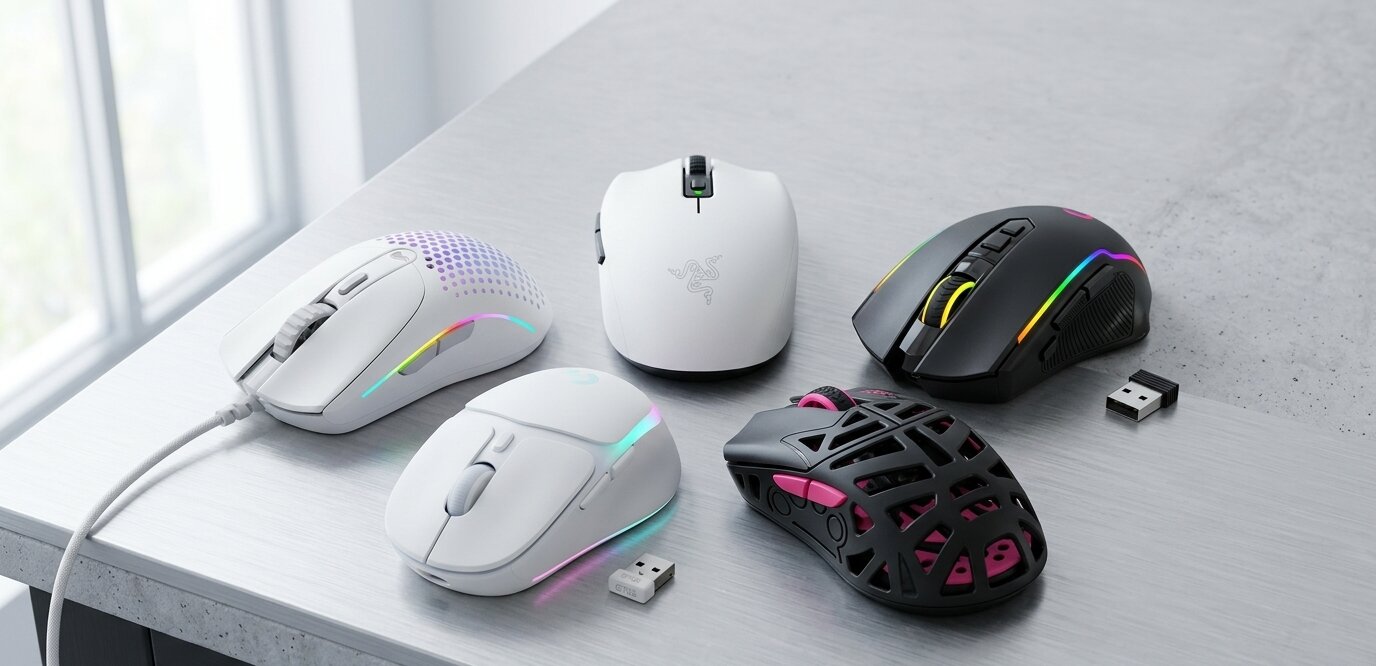
If you have smaller hands, you already know the struggle of the modern peripheral market. You unbox a highly-reviewed, premium piece of hardware, only to realize it feels like you’re trying to maneuver a heavy brick across your desk pad. Reaching the side buttons requires uncomfortable stretching, your palm aches after an hour of play, and your aim suffers simply because you cannot get a secure grip.
In the world of PC gaming, precision and comfort are everything. Using a bulky, heavy pointer when you need a streamlined, compact profile isn’t just annoying; it is genuinely bad for your wrist health and your in-game performance. Finding a dedicated gaming mouse for small hands is absolutely essential to preventing fatigue, improving your tracking, and taking your competitive play to the next level.
At Ergo Setup Lab, we know that a truly ergonomic battlestation isn’t just about the chair or the desk—it is about the tools you hold for hours on end. Manufacturers are finally waking up to the fact that one size does not fit all. Today, we are diving deep into the market to help you find the absolute best gaming mouse for small hands. Whether you are an ultra-competitive FPS player looking for a lightweight edge, or a casual gamer seeking the best ergonomic mouse for small hands to prevent cramping during long RPG sessions, we have analyzed the top contenders.
If you are tired of compromising on comfort, you are in the right place. Let’s break down our top five picks so you can finally experience what it feels like to use gear that truly fits.
Quick Comparison: Top Picks for Small Hands
| Product Name | Product Image | Weight | Connectivity | Buy Now |
| Razer Orochi V2 | 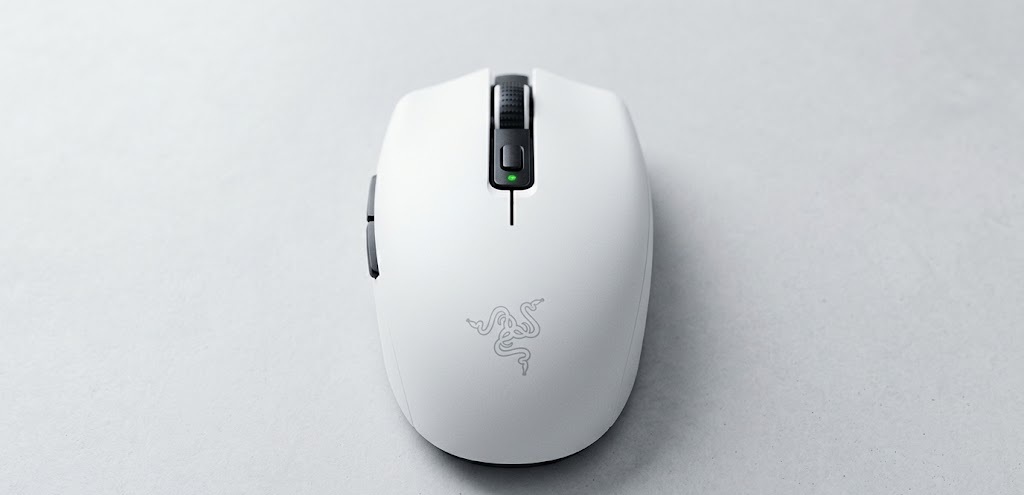 | 60g | Dual Wireless (Bluetooth & 2.4GHz) | 🛒Check Price on Amazon |
| Redragon M916 PRO | 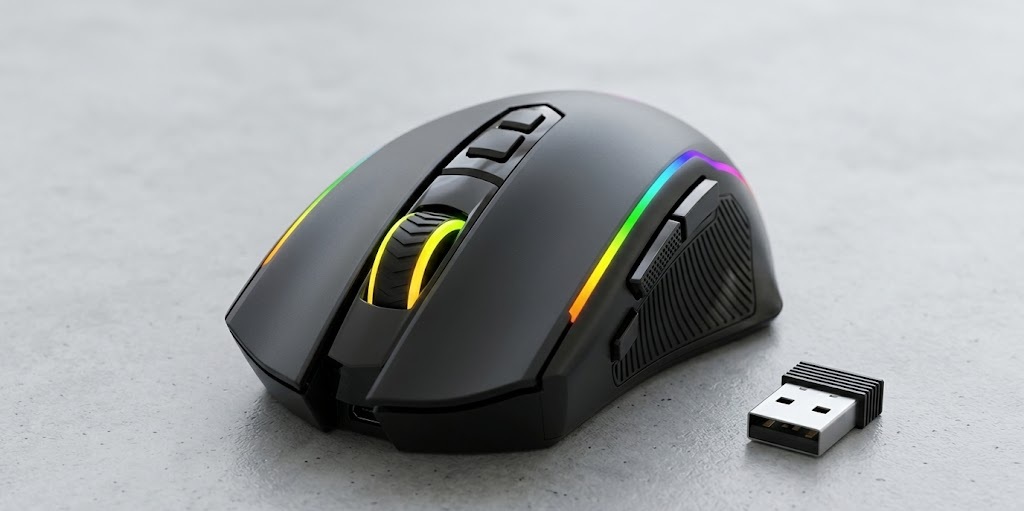 | 55g | 3-Mode (Wired, 2.4G, Bluetooth) | 🛒Check Price on Amazon |
| Logitech G705 | 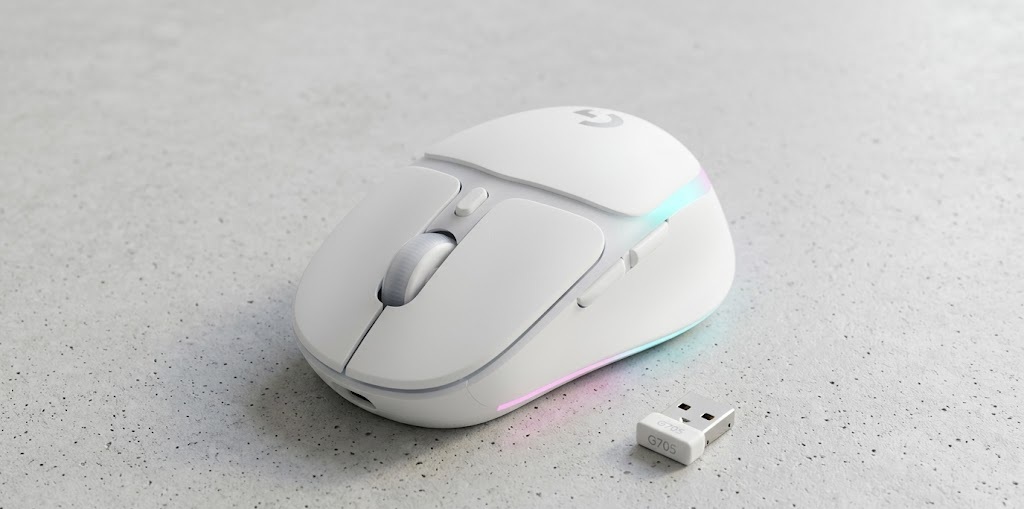 | 85g | LIGHTSPEED Wireless & Bluetooth | 🛒Check Price on Amazon |
| WLMOUSE Beast X Miao | 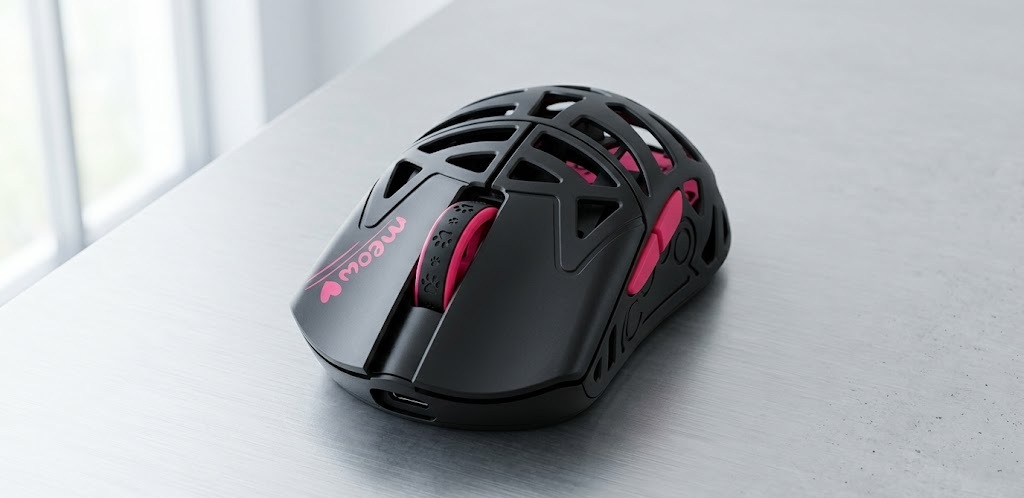 | 31g | 2.4G Wireless & Wired | 🛒Check Price on Amazon |
| Glorious Model O 2 Mini | 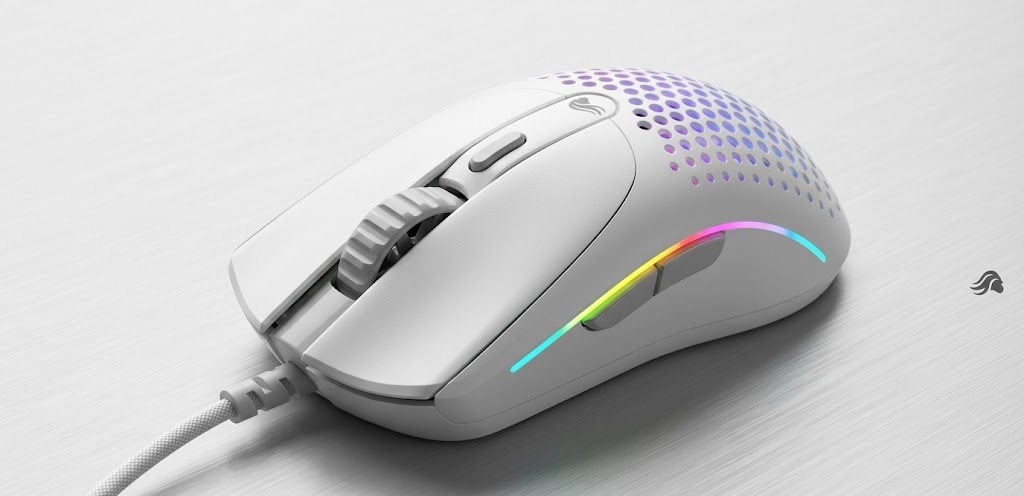 | 49g | Wired | 🛒Check Price on Amazon |
1. Razer Orochi V2 Mobile Wireless Gaming Mouse
When it comes to finding a reliable and good gaming mouse for small hands, the Razer Orochi V2 frequently claims the top spot for both casual and professional players. Razer engineered this model specifically with a compact form factor that excels for gamers who favor a fingertip or claw grip. Finding a peripheral that balances top-tier performance with daily portability can be tough, but the Orochi V2 masters it.
What makes this model stand out is its ingenious balance of weight and battery life. It utilizes a hybrid battery slot, allowing you to insert either a single AA or AAA battery to customize the weight distribution to your exact liking. Even fully loaded, it maintains an ultra-lightweight profile that prevents wrist fatigue. If you need a travel-ready companion that you can toss in a laptop bag without sacrificing tournament-grade wireless speeds, this is a phenomenal choice.
| Feature | Details |
| Weight | Ultra-lightweight 60g design (excludes battery) |
| Connectivity | Dual wireless modes: Bluetooth (max battery) & Razer HyperSpeed Wireless |
| Battery Life | Up to 950 hours (Bluetooth) / 425 hours (HyperSpeed) |
| Switches | 2nd-gen Razer mechanical switches (rated for 60 million clicks) |
| Sensor | 5G Advanced 18K DPI optical sensor |
| Power Source | Uses single AA or AAA battery (hybrid slot for balanced weight) |
| Buttons | 6 programmable buttons |
| Dimensions | 4.26″ L x 2.47″ W |
| Design/Grip | Ambidextrous style, ideal for fingertip/claw grip |
| Customization | Onboard memory + Razer Synapse software support (No RGB) |
Pros and Cons
Pros:
- Perfect size and ultra-light weight specifically tailored for petite hands.
- Outstanding battery life; a single charge lasts for months of regular use.
- Reliable, low-latency Razer HyperSpeed wireless technology.
- Sturdy build quality with crisp, tactile mechanical clicks.
- Excellent portability for travel and mobile desk setups.
Cons:
- The arch can feel a bit too shallow if you prefer a full palm grip.
- The scroll wheel lacks side-scrolling or hyperscroll features.
- The smooth surface coating can feel slippery during intense, sweaty matches.
- Occasional Bluetooth disconnection issues reported by a minority of users.
2. Redragon M916 PRO 3-Mode Wireless Gaming Mouse
Gamers on a strict budget often struggle to find specialized gear that fits their anatomy, but the Redragon M916 PRO proves that you do not have to empty your wallet to find a highly capable pointer. Weighing in at an incredibly light 55 grams, this model glides effortlessly across your mousepad, ensuring that your forearm doesn’t take the brunt of your rapid swiping movements.
The M916 PRO is arguably the best ergonomic mouse for small hands in the extreme budget category due to its natural, contoured build and skin-friendly coating. It fits snugly into smaller palms, offering exceptional control without the premium price tag. Furthermore, it boasts a staggering 26K DPI sensor and a dedicated rapid-fire button, making it a surprisingly aggressive tool for fast-paced shooters.
| Feature | Details |
| Weight | Ultra-light 55g build |
| Connectivity | 3-mode: Bluetooth, 2.4G wireless, wired USB |
| Sensor/DPI | Adjustable DPI up to 26K (250-8000 range shown in specs), 4 polling rates |
| Buttons | Fully programmable buttons with macro support & dedicated Fire button |
| Lighting | RGB backlighting (up to 9 effects, 16.8M colors) |
| Battery Life | 35 hours (RGB on) / 70 hours (RGB off); usable while charging |
| Ergonomics | Natural grip design with skin-friendly material |
| Suitability | Specifically noted in reviews for its excellent small-hand comfort |
| Software | Custom keybinds, DPI adjustments, and RGB control via software |
Pros and Cons
Pros:
- Excellent comfort and an ergonomic shape that accommodates a smaller grip beautifully.
- Strong tracking performance with low latency and precise optical sensors.
- Incredibly lightweight build at a highly competitive budget price.
- Deeply customizable via the dedicated software suite.
- Great overall value offering customizable RGB lighting and versatile 3-mode connectivity.
Cons:
- Battery drains much faster than advertised if the RGB lighting is left on continuously.
- Some users report minor wireless connectivity hiccups after several months of heavy use.
- The customization software can be somewhat clunky to navigate for beginners.
- Click actuation noise can be quite loud in quiet office environments.
3. Logitech G705 Wireless Gaming Mouse
Logitech’s celebrated Aurora Collection brought a much-needed aesthetic refresh to the peripheral market, and the Logitech G705 is the absolute crown jewel of that lineup for gamers with petite setups. If you are actively on the hunt for the best ergonomic mouse for small hands, the G705 demands your immediate attention. It was sculpted from the ground up to support smaller frames, featuring a pronounced thumb rest and a highly contoured chassis.
Beyond its stunning “White Mist” aesthetic and gorgeous LIGHTSYNC RGB, it is a formidable piece of competitive hardware. It utilizes Logitech’s flawless LIGHTSPEED technology for sub-1ms response times, ensuring zero lag. At 85 grams, it isn’t the absolute lightest option on this list, but the intense ergonomic support it provides makes it feel incredibly nimble. This dramatically reduces fatigue during intense sessions, making it a brilliant pick for those who prefer a relaxed palm grip.
| Feature | Details |
| Weight | 85g lightweight build |
| Design | Compact ergonomic design crafted specifically for smaller hands |
| Sensor | 8200 DPI LIGHTSPEED sensor (up to 130 IPS, 1000Hz polling) |
| Connectivity | Dual connectivity: LIGHTSPEED wireless + Bluetooth + wired USB-C |
| Buttons | 6 fully programmable buttons via Logitech G HUB |
| Lighting | LIGHTSYNC RGB with 3 customizable zones |
| Battery Life | 40 hours (RGB on) / up to 145 hours (RGB off) |
| Grip Style | Optimized for Right-handed claw or palm grip users |
| Charging | USB-C rechargeable; Mac, PC, and iOS compatible |
Pros and Cons
Pros:
- Purpose-built design with a perfect ergonomic fit to reduce daily fatigue.
- Beautiful, modern Aurora Collection aesthetic with stunning customizable RGB zones.
- Precise, responsive performance powered by highly reliable LIGHTSPEED wireless.
- Versatile multi-device connectivity allows you to easily switch between a PC and a tablet.
- Long-lasting battery with fast USB-C charging capabilities.
Cons:
- Sits at a premium price point compared to standard budget options.
- At 85g, it is noticeably heavier than the ultra-lightweight competition on the market.
- Geared specifically toward right-handed users, so lefties will need to look elsewhere.
4. WLMOUSE Beast X Miao Ultralight Magnesium Alloy
If you want the absolute cutting edge of enthusiast tech packed into a tiny, agile footprint, the WLMOUSE Beast X Miao is a true marvel of engineering. This is a premium, niche peripheral that utilizes a high-grade magnesium alloy shell to achieve an almost physics-defying weight of just 31 grams.
Marketed explicitly as a scaled-down model, it caters perfectly to competitive esports players utilizing a fingertip or aggressive claw grip. Do not let the adorable cat paw theme fool you; under the hood, this is an absolute monster. Equipped with a top-tier PAW3950HS sensor and capable of an astounding 8000Hz polling rate, it offers pro-level precision. If you demand zero compromises on speed, tracking, and weight, the Beast X Miao is in a league of its own.
| Feature | Details |
| Weight | Extremely ultra-lightweight 31g |
| Material | Premium magnesium alloy shell with a unique Cat Paw theme |
| Sensor | PAW3950HS sensor (50–30,000 DPI) |
| Polling Rate | Adjustable up to 8000Hz (includes 1K & 8K dongles) |
| Connectivity | 2.4G wireless + USB Type-C wired (ultra-flex paracord) |
| Switches | Premium TTC or OM optical switches + TTC dustproof encoder |
| Dimensions | 91 × 55 × 34 mm (highly compact profile) |
| Grip/Design | Claw/fingertip grip perfectly optimized for shorter fingers |
| Software | Web-based configuration (plug-and-play friendly, no bloatware) |
Pros and Cons
Pros:
- Astoundingly light and compact—the ultimate choice for fingertip grips.
- Features a high-end sensor and 8K polling for uncompromising targeting precision.
- Unique, aesthetically pleasing design paired with a rock-solid, premium magnesium build.
- Reliable low-latency wireless with an incredibly smooth glide on any quality surface.
- Web-based software means no annoying bloatware installed on your operating system.
Cons:
- Premium enthusiast product with a correspondingly high price tag.
- The extreme 31g weight can feel almost “too light” or tough to control for traditional gamers.
- The open alloy shell design can collect dust and debris more easily than solid chassis designs.
- Very cramped and uncomfortable if accidentally purchased by someone with larger hands.
5. Glorious Model O 2 Mini Wired Gaming Mouse
Glorious Gaming helped pioneer the honeycomb shell trend years ago, and the Model O 2 Mini scales that massive, industry-changing success down into a much smaller footprint. If you prefer the infinite reliability of a wired connection and are actively searching for a good gaming mouse for small hands, this is a fantastic, highly recommended contender.
Weighing just 49 grams, this symmetrical clicker features the new BAMF 2.0 Optical Sensor pushing 26K DPI. The “Mini” designation means it features a noticeably reduced hump and shorter overall length, allowing players to easily reach the front buttons and scroll wheel without hyperextending their fingers. It is an excellent, straightforward option that delivers high-tier competitive performance right out of the box without the hassle of charging cables.
| Feature | Details |
| Weight | Ultra-light 49g weight |
| Design | Symmetrical compact design (Mini / “Minus” size) with Honeycomb shell |
| Sensor | BAMF 2.0 Optical Sensor (26K DPI) |
| Switches | Next-gen Glorious switches (rated for 80 million clicks) |
| Buttons | 6 programmable buttons |
| Lighting | Custom vibrant RGB lighting |
| Cable/Skates | Ascended flexible cable + 100% PTFE G-Skates for a smooth glide |
| Suitability | Specifically scaled down; suits palm, claw, or fingertip styles |
Pros and Cons
Pros:
- Excellent lightweight feel that provides total control for petite grips.
- Extremely precise tracking and responsive clicks highly suitable for competitive esports.
- High-quality 100% PTFE skates and a flexible paracord-style cable make it feel almost wireless.
- Fantastic price-to-performance ratio in the wired superlight category.
- Symmetrical shape perfectly accommodates a wide variety of hold styles.
Cons:
- Wired design only; lacks the modern freedom of a wireless desk setup.
- Honeycomb shell requires occasional cleaning with compressed air to keep dust out.
- Some users have reported minor quality control issues (e.g., occasional double-clicks over long-term use).
How to Choose the Right Fit for Your Setup
Selecting the perfect peripheral involves a lot more than just looking at the dimensions printed on the side of the box. To find a model that will actually improve your day-to-day experience, you need to deeply consider how you play, what you play, and how you hold your gear.
Here are the key factors to consider:
1. Understand Your Specific Grip Style
How you physically hold your gear dictates what overall shape will work best for you. Finding the right match means syncing the shape to your natural posture:
- Palm Grip: You rest your entire hand flat on the chassis. If this is you, you need a slightly higher hump for ergonomic support. The Logitech G705 is incredible for this specific style.
- Claw Grip: You arch your fingers so only your fingertips and the base of your palm touch the surface. Symmetrical, compact designs like the Glorious Model O 2 Mini or the Razer Orochi V2 are exceptional choices here.
- Fingertip Grip: Only your fingertips touch the buttons, with your palm hovering in the air. You want the absolute lightest, smallest option possible. The WLMOUSE Beast X Miao is the undisputed king of this style.
2. Why Weight Matters
When your hands are smaller, maneuvering a heavy 120-gram block requires significantly more relative muscular effort, leading to faster wrist fatigue, forearm pain, and ultimately poorer aim. Ideally, your gear should weigh under 85 grams. Ultra-lightweight models (under 60 grams) allow for rapid, twitch-reaction movements in fast-paced games like Valorant, Counter-Strike 2, or Apex Legends. When shopping in this category, lighter is almost always better.
3. Wired vs. Wireless Connectivity
Historically, wireless tech suffered from terrible latency and connectivity drops. Today, premium 2.4GHz technology (like Razer HyperSpeed or Logitech LIGHTSPEED) is just as fast, if not faster, than a wired connection. Wireless removes annoying cable drag, which is a massive bonus for ergonomic freedom and clean desk aesthetics. However, wired models are often lighter and cheaper because they don’t need to house an internal, heavy lithium-ion battery.
4. Sensor Quality and DPI
Even if the chassis fits your palm perfectly, it needs to track accurately to be worth your money. Look for a modern flawless optical sensor with at least 10,000 DPI and a standard 1000Hz polling rate. High-end models will push 8000Hz polling rates. This ensures your physical hand movements translate flawlessly onto your monitor without any frustrating stuttering or spinning out during crucial team fights.
Conclusion
Upgrading your desk with the best gaming mouse for small hands is an absolute game-changer. It transforms your gaming space from a source of frustration and hand cramps into a seamless, comfortable extension of your arm.
If you prioritize maximum ergonomic support and beautiful aesthetics, the Logitech G705 is undoubtedly the best ergonomic mouse for small hands. For the ultimate competitive edge and lowest possible weight, the WLMOUSE Beast X Miao is a stunning piece of modern engineering. Meanwhile, the Razer Orochi V2 remains a legendary, well-rounded option that perfectly balances price, performance, and incredible battery life.
Evaluate your personal grip style, determine your exact budget, and make the switch to gear designed specifically for your frame. Stop settling for bulky tech. When you finally upgrade, your wrists—and your in-game stats—will thank you.
Explore More from Ergo Setup Lab: Learn how to optimize your hold and improve your aim in our comprehensive guide to the Best Gaming Mouse for Claw Grip. Complete your ergonomic battle station with our in-depth, hands-on AutoFull G7 Ergonomic Gaming Chair Review.
1 thought on “The Ultimate Guide to Finding the Best Gaming Mouse for Small Hands”