
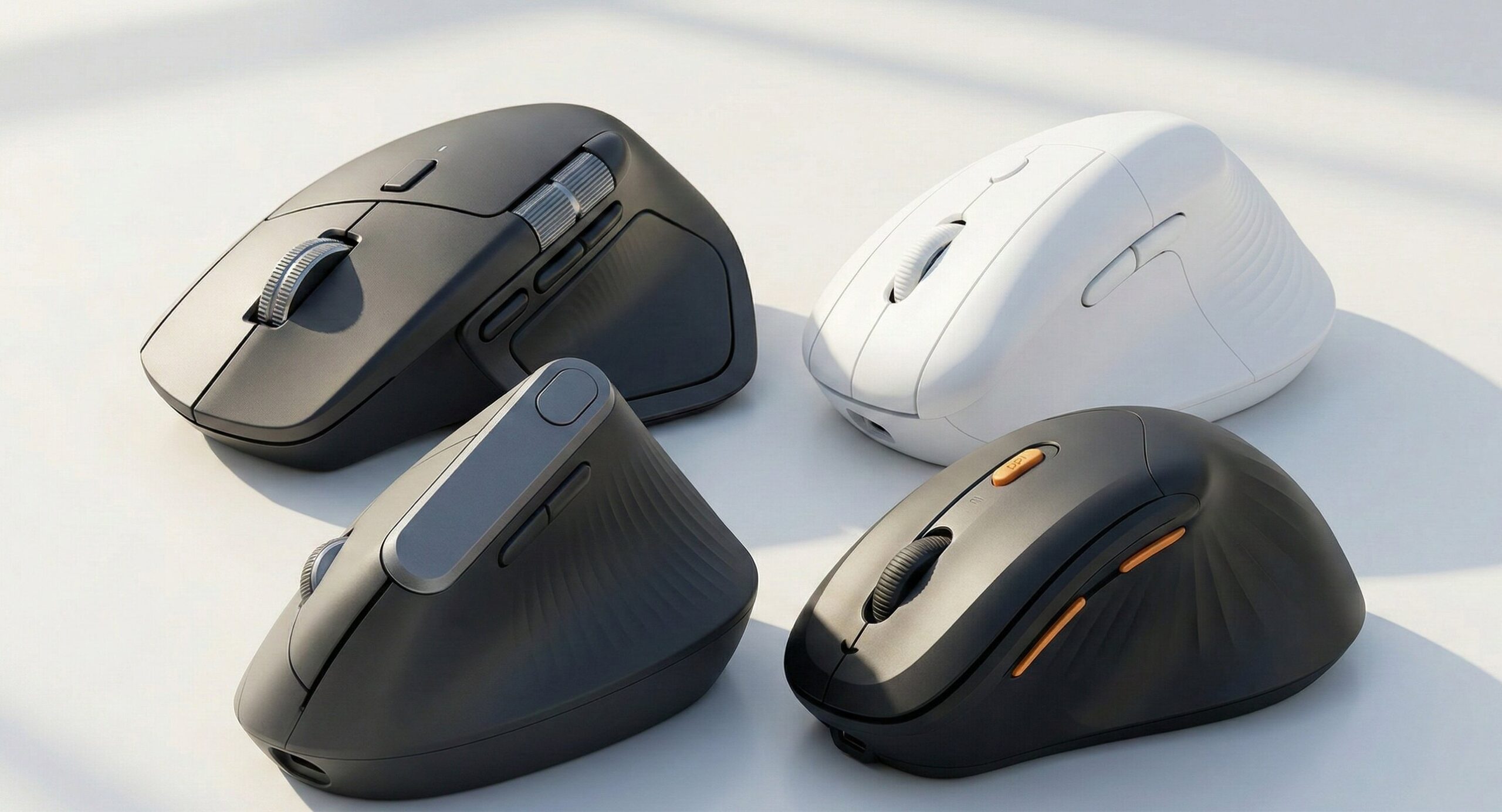
If you spend hours working on an Apple setup—whether you are meticulously editing images, compiling complex code, or managing endless spreadsheets—finding the best ergonomic mouse Mac is essential to prevent wrist strain and boost your productivity.
The sleek design of Apple’s standard Magic Mouse is visually stunning, but functionally punishing for heavy-duty work. It forces your hand into a flat, rigid posture (pronation) that puts continuous pressure on your median nerve. Over time, this can lead to severe repetitive strain injuries (RSI).
Whether you are hunting for the best vertical ergonomic mouse Mac compatible in 2026 to relieve carpal tunnel, or you simply need a highly precise ergonomic mouse for MacBook Pro and Air, we have you covered. Most ergonomic mice are built strictly for Windows, leaving Mac users with dropped Bluetooth connections and missing gestures. In this guide, we break down our top picks that seamlessly integrate with macOS, offering advanced features and ultimate comfort.
Quick Top Picks: Best Ergonomic Mouse Mac Models (2026)
| Product Name | Product Image | Category | Main Feature | Buy Now |
| Logitech MX Master 4 for Mac | 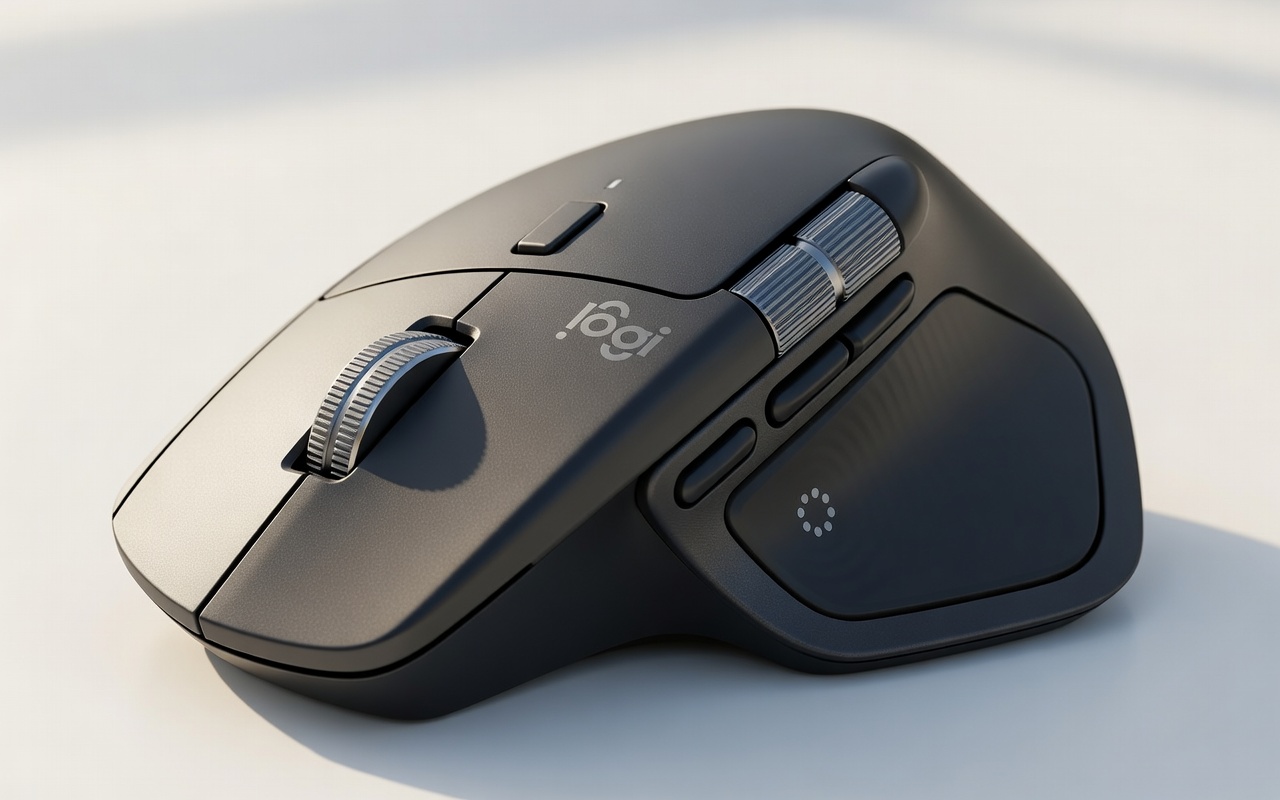 | Top Expert Pick Overall | Premium Contoured Shape & MagSpeed | Buy Now |
| Logitech Lift for Mac Vertical | 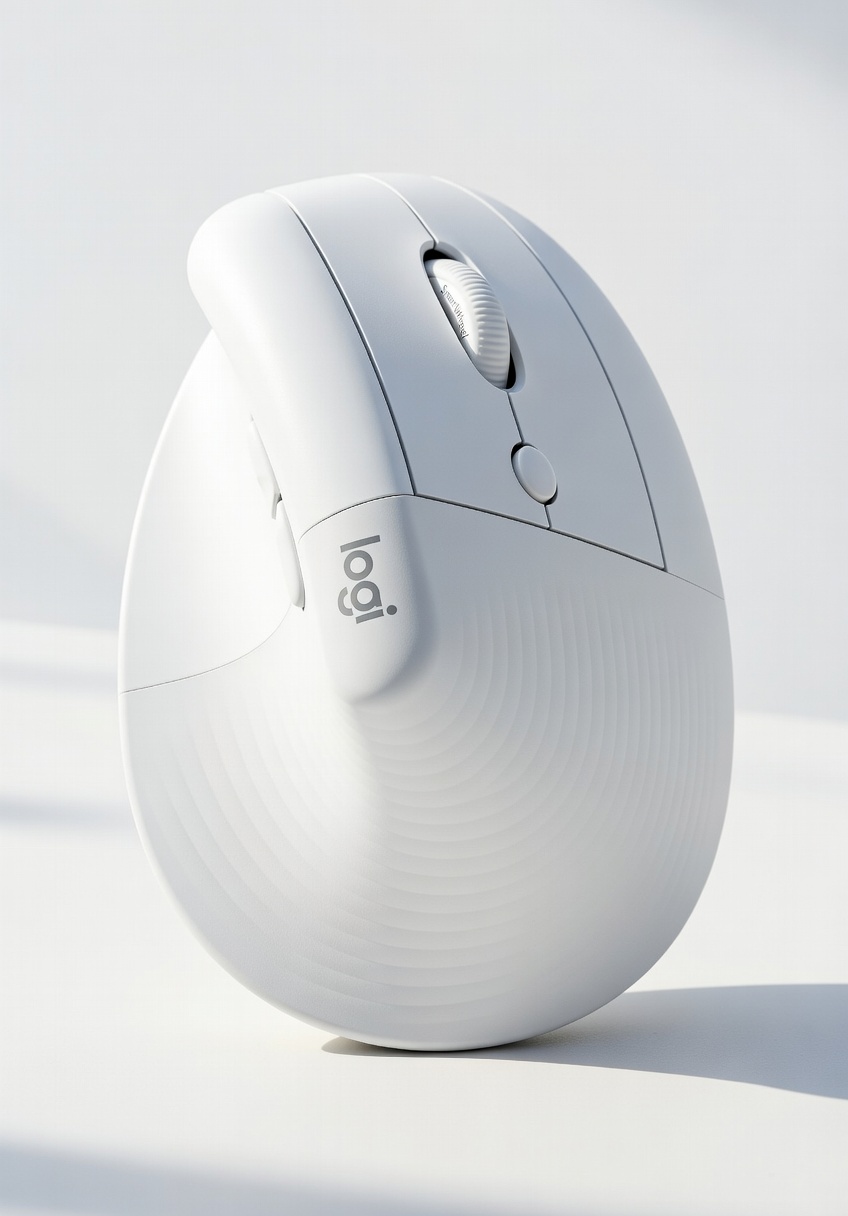 | Best Vertical for Small/Medium Hands | 57-Degree Angle & Mac Optimization | Buy Now |
| Logitech MX Vertical | 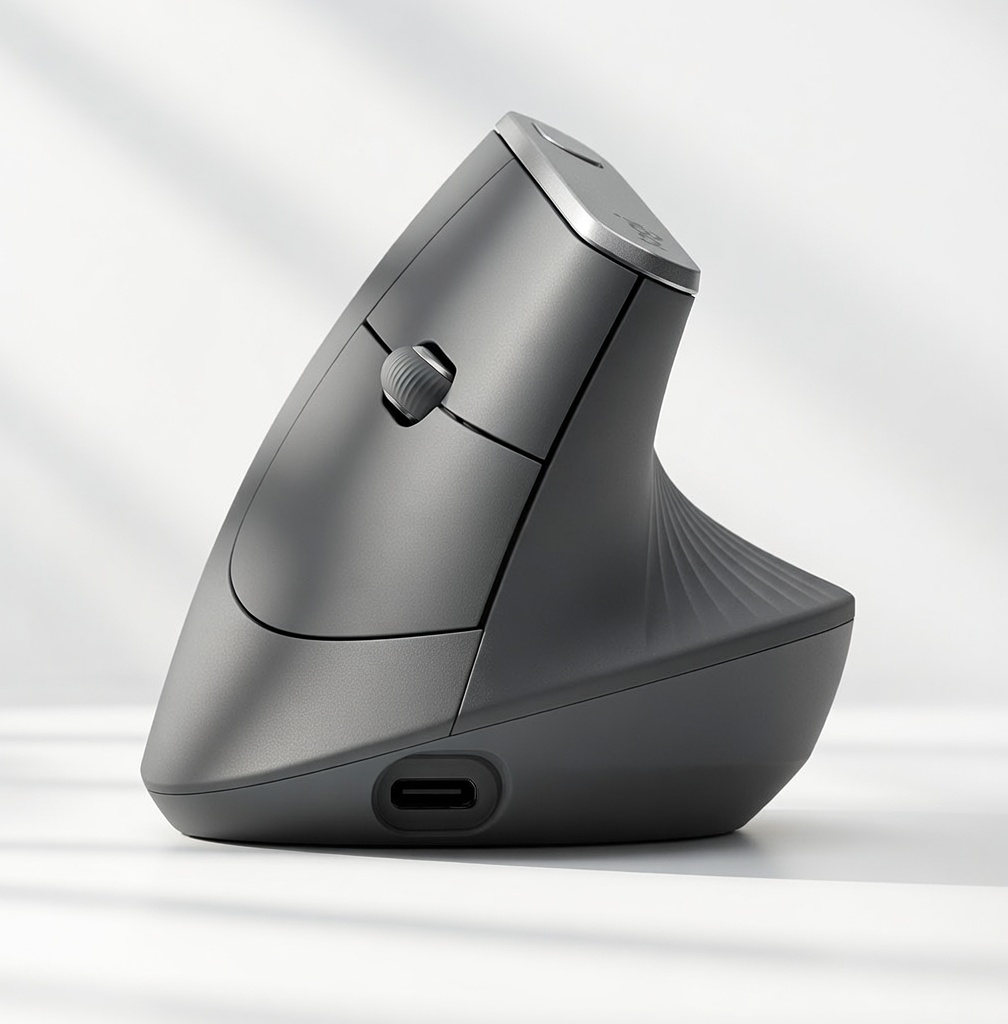 | Best Proven Vertical for Larger Hands | Strict 57-Degree Angle & USB-C | Buy Now |
| ProtoArc EM11 Vertical | 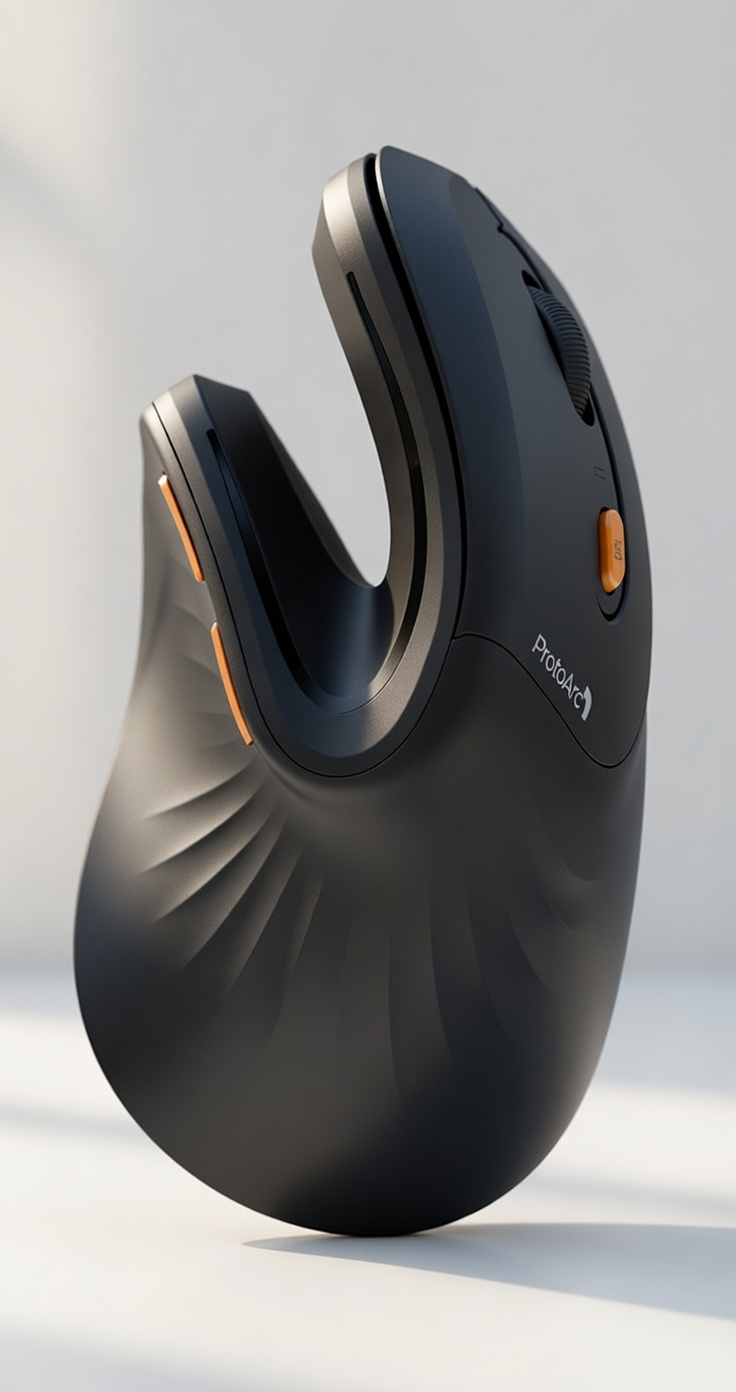 | Best Budget Trending Vertical | Rechargeable & Highly Affordable | Buy Now |
In-Depth Reviews of the Best Ergonomic Mouse Mac Options
1. Logitech MX Master 4 for Mac (Premium Contoured Ergonomic – Top Expert Pick Overall)
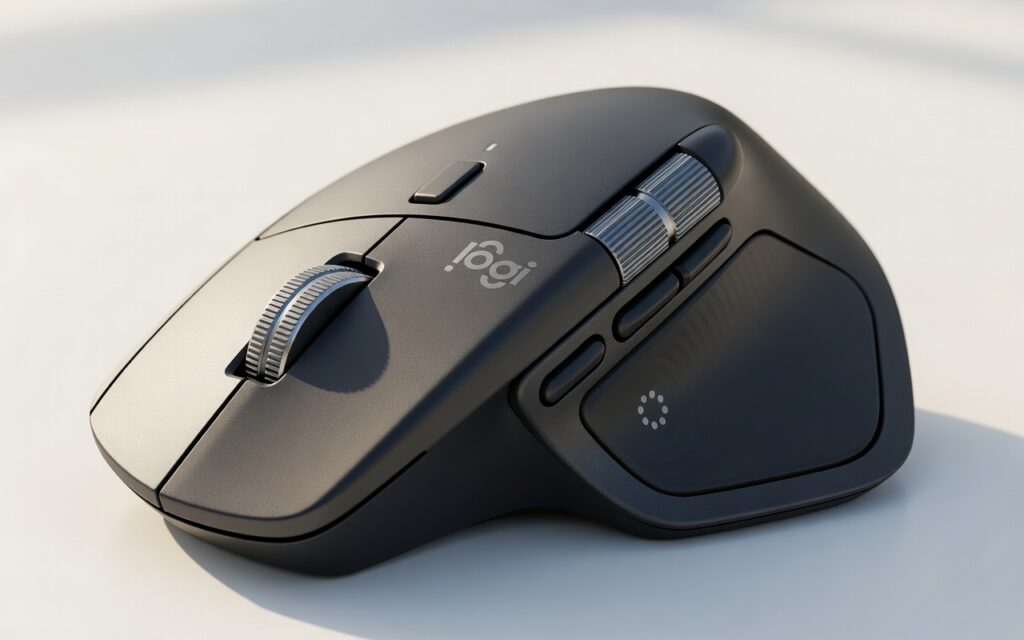
When it comes to the ultimate, uncompromising ergonomic mouse mac experience, the Logitech MX Master 4 for Mac is the undisputed champion of the modern workspace. Logitech took all the beloved, industry-leading features of their flagship MX line and engineered this specific version from the ground up for macOS and iPadOS. It is a highly productive, perfectly sculpted Bluetooth wireless mouse crafted specifically for power users, creatives, and developers who need an ergonomic mouse mac powerhouse.
Why It’s a Winner: The MX Master 4 features a carefully sculpted contoured shape that naturally supports your palm and thumb. Unlike a vertical mouse that turns your hand completely sideways, the MX Master 4 uses a deep, comfortable thumb rest and a gentle slope that eliminates the severe “claw-grip” required by flat mice. This provides a brilliant middle ground for users who want an ergonomic mouse mac upgrade but still need the extreme precision of a traditional horizontal mouse.
The textured rubber surface feels incredibly premium against the skin and prevents sweat buildup during long editing sessions. But the real magic lies in the MagSpeed electromagnetic scroll wheel. It is whisper-quiet and engineered to be fast enough to scroll 1,000 lines of code or spreadsheet rows in a single second, then automatically stop on a pixel.
Because it is a dedicated ergonomic mouse mac device, the thumb-wheel and hidden gesture buttons integrate flawlessly with macOS. You can press the thumb pad down and swipe your mouse left or right to seamlessly switch between full-screen apps or trigger Mission Control—exactly replicating the gestures you would use on an Apple Magic Trackpad. If you want the absolute best all-around ergonomic mouse mac experience that boosts both health and workflow speed, this is the gold standard.
Specifications:
- Design: Deep thumb rest with a natural, gentle palm contour
- Connectivity: Bluetooth Low Energy (Mac Optimized for stable connection)
- Sensor: 8000 DPI Darkfield sensor (tracks flawlessly on glass desks)
- Buttons: 7 fully customizable buttons with macOS gesture support
- Special Feature: MagSpeed scrolling and Logi Options+ Mac Software
Pros & Cons:
- ✅ Pros: Flawless macOS integration with pre-mapped Apple trackpad gestures.
- ✅ Pros: The deep thumb rest significantly reduces grip tension and hand fatigue.
- ✅ Pros: Fast USB-C to USB-C charging (a full charge lasts an incredible 70 days).
- ❌ Cons: The heavy, bulky design is not ideal for frequent travel or small laptop bags.
- ❌ Cons: It carries a premium price tag compared to standard office mice.
Our Verdict: The Logitech MX Master 4 for Mac is an absolute triumph in ergonomic design and professional productivity. It perfectly balances striking aesthetics, native macOS function, and lasting posture support, making it our top ergonomic mouse mac recommendation.
2. Logitech Lift for Mac Vertical Ergonomic Mouse (Best Vertical for Small/Medium Hands)
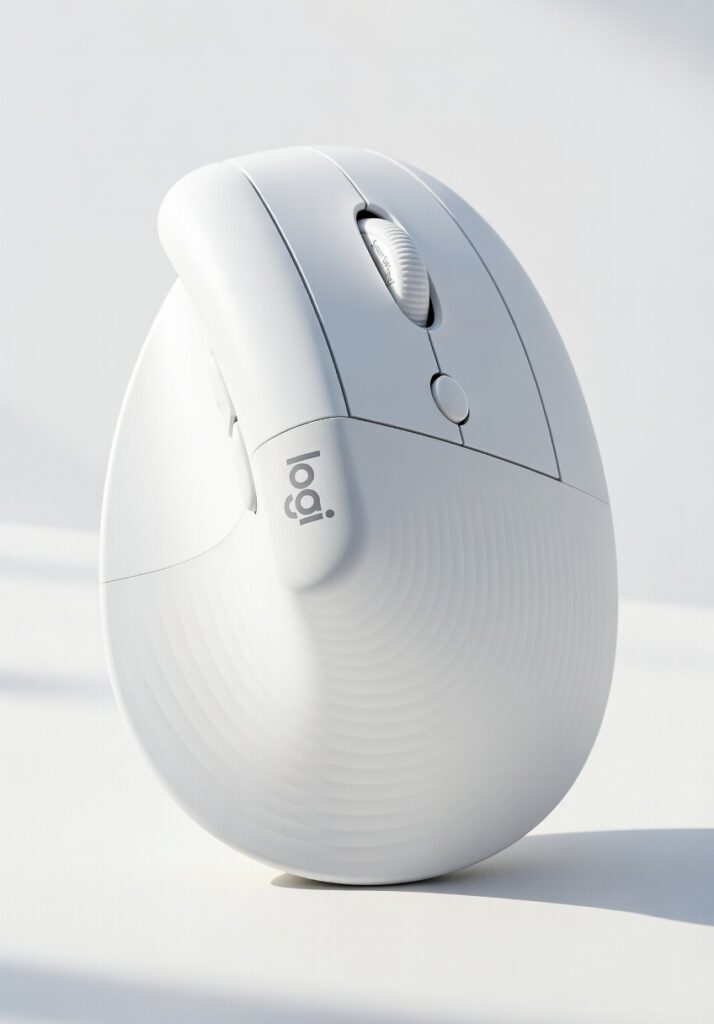
If you have small to medium-sized hands and find that standard ergonomic mice feel like you are trying to maneuver a heavy brick around your desk, the Logitech Lift for Mac is going to be your new best friend. This is a brilliant, highly specialized vertical ergonomic mouse mac solution that doesn’t compromise on advanced functionality or aesthetic appeal.
Why It’s a Winner: The Lift for Mac features a unique, scientifically proven 57-degree vertical angle. When you hold it, it elevates your wrist off the hard desk surface and gives an immediate feeling of relief, sending a wave of comfort straight up through the forearm and into the shoulder. This specific Mac edition comes in a striking pale grey designed specifically to match your silver or space grey MacBook, making it the most visually appealing ergonomic mouse mac on the market. It boasts highly reliable Bluetooth connectivity tailored exclusively for Apple devices to prevent dropouts.
What makes this a phenomenal ergonomic mouse mac choice is the acoustic engineering. The left and right click buttons utilize ultra-quiet microswitches. This means you won’t disturb your coworkers in an open-plan office, making it perfect for quiet environments. Furthermore, scrolling feels like second nature with the silent SmartWheel, which natively understands macOS scrolling inertia and seamlessly shifts from precision line-by-line scrolling to speed-scroll when you flick it.
Logitech defines “small to medium hands” as anything under 19 cm (7.5 inches) from the wrist crease to the tip of the middle finger. If you fall into this category, finding an ergonomic mouse mac fit is tough, because standard vertical mice force you to stretch your fingers painfully. The Lift is perfectly scaled down so every button rests naturally right under your fingertips.
Specifications:
- Angle: 57-degree vertical posture
- Connectivity: Bluetooth Low Energy (Mac Optimized)
- Compatibility: macOS 11 or later, iPadOS 14 or later natively supported
- Size Target: Hands under 19 cm (7.5 inches)
- Special Feature: Silent SmartWheel and ultra-quiet click mechanisms
Pros & Cons:
- ✅ Pros: Unbeatable, tailored fit for small to medium hands, preventing finger overextension.
- ✅ Pros: Highly responsive silent clicks and a brilliant precision scroll wheel.
- ✅ Pros: Matches Apple’s minimalist aesthetic beautifully on any desk setup.
- ❌ Cons: Uses a standard AA battery instead of being USB-C rechargeable.
- ❌ Cons: The strict vertical angle takes a few days of muscle-memory retraining to get used to.
Our Verdict: A genuine lifesaver for petite Mac users. If the Apple Magic Mouse leaves your fingers aching and your wrist stiff, the Lift for Mac is the perfect ergonomic mouse mac choice to keep your workflow uninterrupted.
3. Logitech MX Vertical (Best Proven Vertical for Larger Hands / Max Strain Relief)
When severe wrist pain strikes and you are dealing with actual medical symptoms, you need serious, uncompromising equipment. The Logitech MX Vertical is widely recommended by physical therapists, orthopedic specialists, and ergonomists as the ultimate vertical ergonomic mouse mac solution for users with medium to large hands who need immediate intervention.
Why It’s a Winner: The MX Vertical was designed, built, and rigorously tested with criteria set out by leading university ergonomists. Its signature 57-degree vertical angle reduces muscular strain in the forearm by a massive 10% compared to a traditional non-vertical mouse, actively promoting a much healthier, upright ergonomic posture. This ergonomic mouse mac peripheral is ideal for users who want to gently but firmly force their hand into a comfortable “handshake” position while navigating their Mac.
Beyond the physical shape, it operates as a premium ergonomic mouse mac device thanks to its internal hardware. It features a best-in-class high-precision 4000 DPI sensor. Why does this matter for pain relief? A higher DPI means the cursor moves further on the screen with significantly less physical hand movement. You require roughly 4x less hand movement to cross a dual-monitor setup, which translates to substantially less fatigue for your muscles and tendons by the end of an 8-hour shift.
It also features an incredible textured thumb rest and a beautifully sculpted aluminum top piece that looks right at home next to a Mac Studio or MacBook Pro. With Logitech’s Flow software, your ergonomic mouse mac can seamlessly move your cursor from your Mac directly onto your iPad, copying and pasting text effortlessly between the two Apple devices.
Specifications:
- Orientation: 57-degree strict vertical angle for maximum nerve relief
- Connectivity: Bluetooth, Unifying USB Receiver, or direct USB-C wired connection
- Charging: Built-in USB-C rechargeable battery (with quick charge capabilities)
- Special Feature: Dedicated cursor speed switch on top allows instant DPI adjustment
Pros & Cons:
- ✅ Pros: Premium, medical-grade posture support specifically scaled for larger hands.
- ✅ Pros: Incredible USB-C quick charge functionality (just 1 minute of charge gives you 3 full hours of use).
- ✅ Pros: Multi-device flow allows seamlessly moving between Mac, iPad, and even Windows machines.
- ❌ Cons: Much too large for users with petite hands (under 6.9 inches), which will cause stretching.
- ❌ Cons: The tall profile makes it easy to accidentally knock over when reaching for your keyboard.
Our Verdict: If you are actively suffering from Repetitive Strain Injury (RSI), tendonitis, or carpal tunnel and have larger hands, this is the most effective ergonomic mouse mac available to function like a prescribed medical device for your desk.
4. ProtoArc EM11 Vertical Ergonomic Mouse (Best Budget Trending Vertical)
Ergonomics shouldn’t have to cost a fortune, and you shouldn’t be locked out of a pain-free work experience just because you are on a tight budget. If you want to test out a vertical ergonomic mouse mac setup without committing a large chunk of your paycheck, the highly trending ProtoArc EM11 is the absolute perfect entry-level option on the market today.
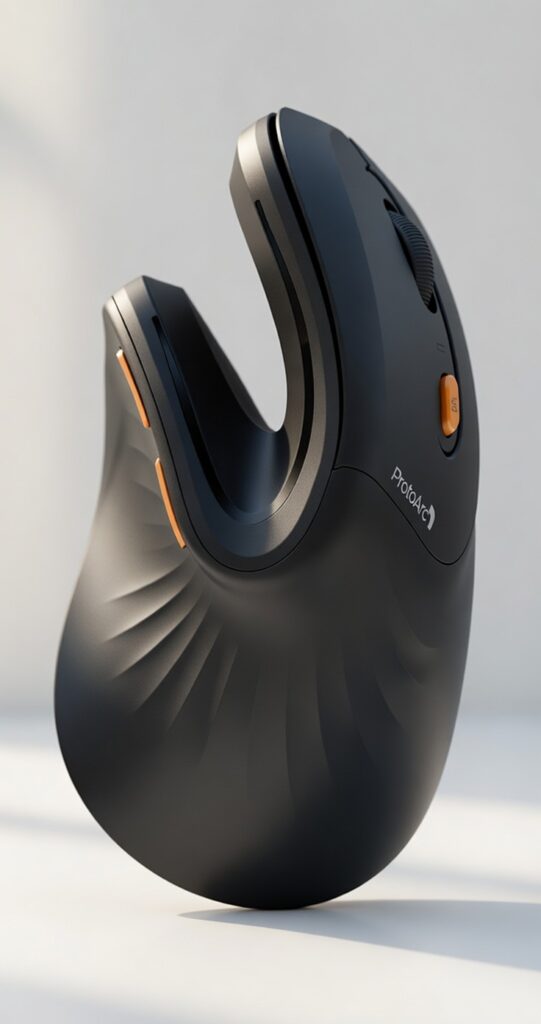
Why It’s a Winner: The ProtoArc EM11 has recently taken the ergonomic world by storm because it packs an astonishing number of premium features into a highly affordable package. It features a silky-smooth, rubberized matte finish that feels fantastic in the hand and provides excellent grip without causing sweaty palms. It maintains a natural handshake position, making the transition to an ergonomic mouse mac much easier and less intimidating for first-time vertical mouse users.
What truly sets this apart as an excellent budget ergonomic mouse mac is its modern internal components. Unlike many cheap budget options that rely on disposable batteries and outdated micro-USB ports, the EM11 features a built-in rechargeable battery that charges via USB-C—meaning you can use your MacBook charger to juice it up. It also features an incredibly handy OLED screen right on the top of the mouse. This screen brightly displays your current battery life, connection mode, and DPI level, taking all the guesswork out of your daily usage.
It works flawlessly as an ergonomic mouse mac right out of the box via stable Bluetooth 5.0, requiring no dongles or complicated software installations to get basic functionality running smoothly on your Apple computer.
Specifications:
- Battery: Built-in 930mAh rechargeable battery via modern USB-C
- Connectivity: Bluetooth 5.0 & 2.4G Wireless (Dual mode)
- DPI Levels: Easily adjustable on the fly (1000 / 1600 / 2400)
- Special Feature: Handy built-in LED screen for real-time battery and DPI monitoring
Pros & Cons:
- ✅ Pros: Incredibly affordable budget option that doesn’t feel cheap.
- ✅ Pros: Eco-friendly built-in rechargeable battery with universal USB-C charging.
- ✅ Pros: Clean, modern aesthetic with a highly comfortable, sweat-resistant grip.
- ❌ Cons: The overall build quality and weight feel slightly lighter than premium Logitech competitors.
- ❌ Cons: The side forward/back buttons cannot be easily re-programmed on macOS without downloading third-party mapping software.
Our Verdict: This is undeniably the best budget ergonomic mouse mac available today. It proves that you can get meaningful, life-changing pain relief, modern USB-C charging, and highly reliable Mac connectivity for the price of a few cups of coffee.
Ergonomic Mouse Mac Benefits: Why You Need One
Understanding the core physiological benefits makes it abundantly clear why these specialized devices are vastly superior to standard flat Apple mice. When searching for an ergonomic mouse mac upgrade, here is exactly what is happening to your body:
1. Eliminates Forearm Pronation
Place your hands flat on your desk, palms facing completely down. If you pay close attention, you will feel a slight, dull tension wrapping around the bones in your forearm. Now, slowly turn your hands sideways as if you are reaching out to hold a coffee cup or shake someone’s hand. That immediate, noticeable release of muscular tension is exactly what a vertical or highly contoured ergonomic mouse mac provides. A proper ergonomic mouse mac is specifically designed to completely eliminate forearm twisting (pronation), allowing the two bones in your forearm (the radius and ulna) to run parallel rather than crossing over each other.
2. Reduces Wrist Extension
Standard flat mice, especially low-profile ones like the Magic Mouse, often force you to bend your hand backward at the wrist just to rest your fingers on the clickers. This is called wrist extension. Over time, holding your wrist in this bent position cuts off vital blood flow and compresses nerves. An ergonomic mouse mac keeps your wrist perfectly straight and aligned with your forearm, significantly reducing wrist extension to allow you to work much more comfortably for vastly longer periods.
3. Lowers Grip Tension and Pinch Force
Because gravity naturally helps your hand rest against the sculpted side of a vertical or contoured mouse, you don’t have to aggressively “pinch” the sides of the device with your thumb and pinky finger to pick it up and move it around. Choosing an ergonomic mouse mac allows you to completely relax your grip, which reduces the strain on the tendons running through your fingers and directly into your carpal tunnel.
Does an Ergonomic Mouse Mac Help Carpal Tunnel?
During any professional ergonomic workspace assessment, the single most common question is: “Can an ergonomic mouse mac cure my carpal tunnel?” It is important to be clear: while a computer mouse cannot miraculously cure an existing, diagnosed medical condition, pairing an ergonomic mouse mac with your daily workflow is highly recommended by medical doctors and physical therapists as a vital preventative measure and a powerful tool for daily pain relief.
Carpal Tunnel Syndrome occurs when the median nerve, which runs through a narrow passageway in your wrist, becomes severely compressed and inflamed. Traditional flat mice force you to rest the base of your palm—and subsequently, that exact median nerve—directly into the hard, unforgiving surface of your desk. A well-designed ergonomic mouse mac physically lifts the median nerve entirely off the desk surface. Instead, it places the resting weight of your hand safely on the fleshy, padded side of your palm. This simple postural change dramatically reduces nerve compression when using your ergonomic mouse mac.
Buying Guide: What to Look For in an Ergonomic Mouse Mac
To ensure you buy the absolute best ergonomic mouse mac setup for your specific needs, body type, and workflow, you must consider these crucial factors before making a purchase:
- Strict Mac Compatibility & Software: Never buy an ergonomic mouse that relies on outdated 2.4GHz USB-A dongles if you own a modern MacBook with only USB-C ports. Ensure your ergonomic mouse mac has highly reliable Bluetooth connectivity and dedicated, well-supported Mac software (like Logi Options+). Without proper software, you will lose your beloved Apple trackpad gestures, making your workflow slower.
- Measure Your Hand Accurately: In ergonomics, size matters more than anything else. If your hand measures less than 17.5 cm (6.9 inches) from your bottom wrist crease to the absolute tip of your middle finger, you definitively need a smaller ergonomic mouse mac like the Logitech Lift. If your hand is larger, buying a small mouse will force you to cramp your fingers, making the pain worse. In that case, the MX Vertical or MX Master 4 is your ideal choice.
- Contoured vs. Vertical Angle: You must decide your primary goal. If you want extreme, high-speed productivity, lots of customizable buttons, and a natural resting posture, go with a highly contoured ergonomic mouse mac (like the MX Master 4). However, if you are actively fighting severe wrist pain, shooting pains, or numbness and need maximum nerve relief above all else, you must choose a strict vertical ergonomic mouse mac (like the Lift or MX Vertical).
- Sensor Quality & Polling Rate: Mac users often have beautifully sleek glass or high-gloss desks. Cheap optical sensors will jump and stutter on these surfaces. Look for an ergonomic mouse mac with a premium sensor (like Logitech’s Darkfield technology) that tracks flawlessly on glass, ensuring your cursor never skips while you are doing delicate design work.
Frequently Asked Questions (FAQ)
1. How long does it actually take to get used to a vertical ergonomic mouse mac? Most users experience a brief muscle-memory learning curve that lasts anywhere from 3 to 7 days. Your high-speed clicking accuracy might drop slightly during the first 48 hours, but the familiar two-button grip design with a center scroll wheel provides a very intuitive transition. After a week, going back to a flat mouse will feel incredibly unnatural.
2. Is the Apple Magic Mouse really that bad for ergonomics? Yes, from a purely ergonomic and medical standpoint, it is notoriously poor. While it features incredible touch-sensitive glass for gestures, its ultra-low profile offers absolutely zero palm support. This forces your hand into a flat, highly tense position (pronation) and requires a constant “claw” pinch-grip to maneuver, making an ergonomic mouse mac upgrade essential for long-term health.
3. Do these ergonomic mouse mac models work smoothly with iPadOS? Absolutely! All the Bluetooth-enabled mice on this list, especially the Logitech models, can pair seamlessly with your iPad. Apple has built robust cursor support into iPadOS, allowing you to use your ergonomic mouse mac to build a highly ergonomic, travel-friendly mobile workstation.
4. Can I play video games on my Mac with a vertical ergonomic mouse mac? While an ergonomic mouse mac is fantastic for slower-paced simulation, strategy, or city-building games (like Civilization), vertical mouse models are generally not recommended for high-speed, competitive FPS (First Person Shooter) gaming. The heavier weight and completely different center of gravity make rapid “flick” aiming much more difficult.
5. How do I replicate Apple’s native swiping gestures on a third-party ergonomic mouse mac? Premium options like the Logitech MX Master 4 feature a hidden “gesture button” located right under where your thumb rests. Using the Logi Options+ software, you can program your ergonomic mouse mac so that holding this button down and physically sliding the mouse left, right, up, or down triggers Mission Control, App Exposé, or swipes between your full-screen desktops, perfectly mimicking trackpad swipes.
Final Thoughts
Your wrist health and physical comfort are completely irreplaceable. Ignoring that minor pinching pain today almost always leads to expensive physical therapy, medical bills, or forced time off work tomorrow. Investing in the best ergonomic mouse mac is a incredibly small price to pay for years of comfortable, highly productive, and completely strain-free work on your Apple devices.
If you are a power user, video editor, or developer who wants the absolute best premium experience for both lightning-fast productivity and deep comfort, you need to get the [Logitech MX Master 4 for Mac]. On the other hand, if you are currently dealing with severe wrist pain, numbness, or carpal tunnel symptoms and have petite to average hands, the [Logitech Lift for Mac Vertical Ergonomic Mouse] is going to be your ultimate ergonomic mouse mac savior.
Ready to upgrade the rest of your workstation for total full-body health? Be sure to check out our comprehensive review of the [Best Dual Monitor Setup Ergonomic Mounts] to keep your typing posture perfect, or see our definitive guide to reclaiming your lower back health with our top picks for the [3 Best Stands for an Ergonomic Drawing Tablet Setup].
3 thoughts on “The Best Vertical & Ergonomic Mouse Mac Users in 2026”