
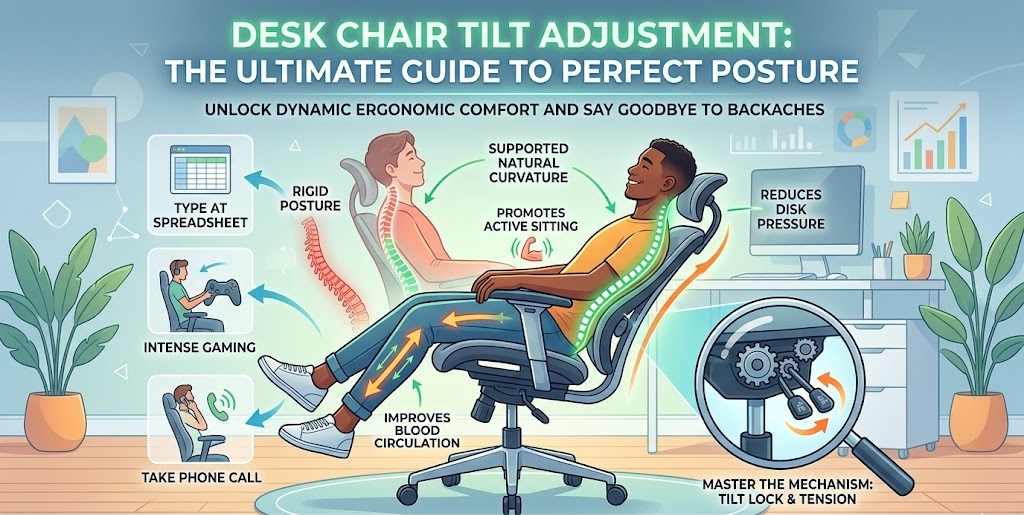
Are you constantly shifting in your seat, trying to find that one comfortable spot during a long workday? You are not alone. Millions of remote workers and gamers suffer from lower back pain, neck stiffness, and poor circulation simply because they don’t know how to properly configure their seating. While most people know how to move their seat up and down, mastering your desk chair tilt adjustment is the actual secret to unlocking all-day comfort.
Whether you are typing away at a spreadsheet, locked into an intense gaming session, or leaning back to take a phone call, your chair needs to move with your body. A rigid chair forces your spine into unnatural positions, while a properly adjusted one supports your natural curvature.
In this comprehensive guide, we will break down exactly what desk chair tilt adjustment is, the different types of mechanisms available, how to set up your chair for optimal ergonomics, and even how to troubleshoot common issues when your chair’s levers stop cooperating. Let’s dive in and transform your home office experience.
What is Desk Chair Tilt Adjustment?
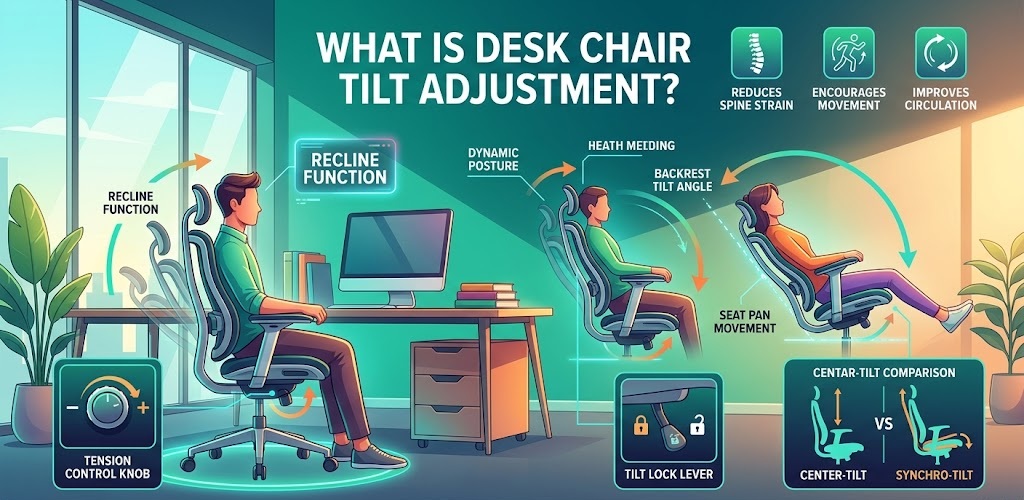
At its core, desk chair tilt adjustment refers to the mechanical features that allow the seat pan and the backrest of your office chair to rock back and forth or lock into a specific reclined angle.
When you lean back in a high-quality office chair, you shouldn’t feel like you are doing a core workout just to keep the chair from snapping forward. The tilt mechanism controls this motion. It dictates how far back you can lean, the amount of resistance the chair gives you when you push back, and whether the seat base tilts up when your back goes down.
Understanding your desk chair tilt adjustment options is the difference between a static, uncomfortable chair and dynamic, ergonomic seating that promotes “active sitting”—a concept highly recommended by physical therapists and ergonomic experts.
5 Common Types of Tilt Mechanisms Explained
Not all office chairs are built the same. Depending on the brand and price point, the mechanism underneath your seat will vary. Here are the five most common types of tilt configurations you will encounter:
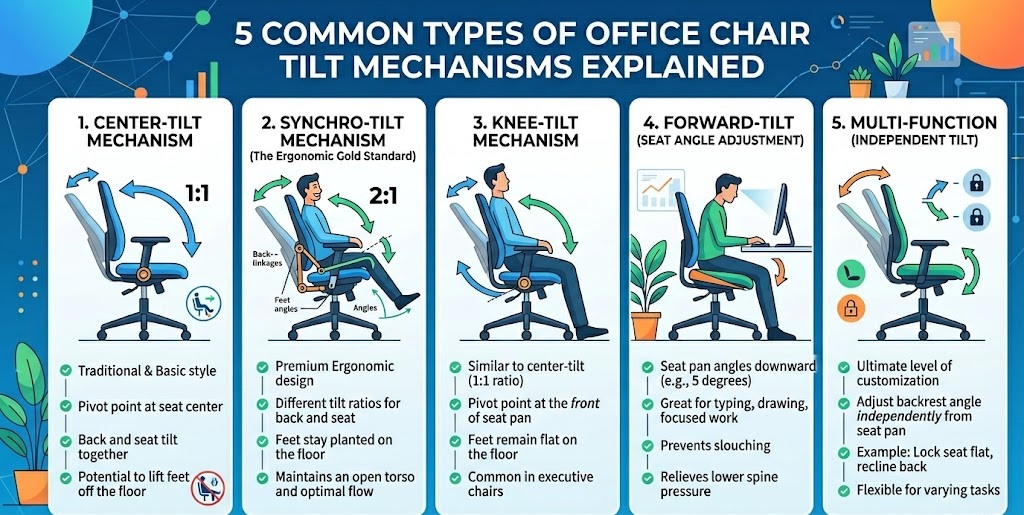
1. Center-Tilt Mechanism
This is the most traditional and basic form of desk chair tilt adjustment. The pivot point is located directly in the center of the seat pan. When you lean back, the backrest and the seat pan tilt backward at the exact same ratio (a 1:1 ratio).
- The Downside: Because the seat pan tilts up as you lean back, it can lift your feet off the floor, putting pressure on the underside of your thighs and restricting blood circulation.
2. Synchro-Tilt Mechanism (The Ergonomic Gold Standard)
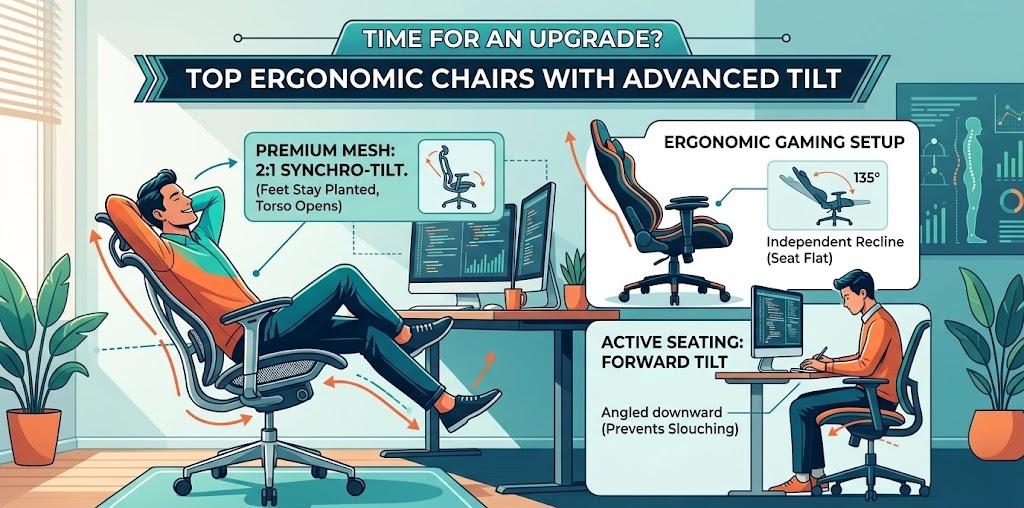
If you are shopping for a premium ergonomic chair, this is what you want. A synchro-tilt mechanism moves the backrest and the seat pan at a different ratio—usually 2:1. For every two degrees you recline the backrest, the seat pan only tilts up by one degree.
- The Benefit: This ensures that your feet stay firmly planted on the floor while you lean back, keeping your torso open and maintaining optimal blood flow.
3. Knee-Tilt Mechanism
Similar to the center-tilt, the seat and back move at a 1:1 ratio. However, the pivot point is moved all the way to the front of the seat pan (right behind your knees).
- The Benefit: Because the pivot is at the front, leaning back does not lift your knees. Your feet stay on the floor, making it a favorite feature in heavy-duty executive chairs.
4. Forward-Tilt (Seat Angle Adjustment)
While most tilt adjustments focus on leaning back, a forward tilt allows the seat pan to angle downward toward the floor (usually about 5 degrees).
- The Benefit: This is an incredible feature for people who tend to lean closely into their monitors while typing or drawing. It prevents you from slouching and takes the pressure off your lower spine.
5. Multi-Function (Independent Tilt)
This offers the ultimate level of customization. You can adjust the angle of the backrest entirely independently from the seat pan. You can lock the seat flat and recline the back, or tilt the seat forward and lock the back upright.
The Ergonomic Benefits: Why Proper Tilt Matters
You might be wondering, “Why should I care this much about a lever under my chair?” The answer lies in the biomechanics of the human body. According to ergonomic guidelines from occupational health authorities, static posture is the enemy of a healthy spine.

Properly utilizing your desk chair tilt adjustment provides several massive health benefits:
- Reduces Spinal Disc Pressure: Sitting at a rigid 90-degree angle actually puts more pressure on your spinal discs than standing. Reclining slightly (between 100 to 110 degrees) transfers some of your upper body weight onto the backrest, giving your spine a much-needed break.
- Promotes Active Sitting: A free-floating tilt allows your body to make micro-movements throughout the day. These tiny shifts engage your core muscles and prevent stiffness.
- Improves Blood Circulation: By ensuring your feet remain flat on the ground and the edge of the seat doesn’t dig into your thighs, you prevent the numbing sensation and poor circulation that causes deep vein thrombosis (DVT).
- Accommodates Different Tasks: You shouldn’t sit in the same position to type an email as you do to watch a training video. Tilt mechanisms allow you to seamlessly transition from “focus mode” to “relaxation mode.”
Step-by-Step Guide: How to Perfect Your Desk Chair Tilt Adjustment
Ready to dial in your setup? Follow these steps to find your perfect ergonomic sweet spot.
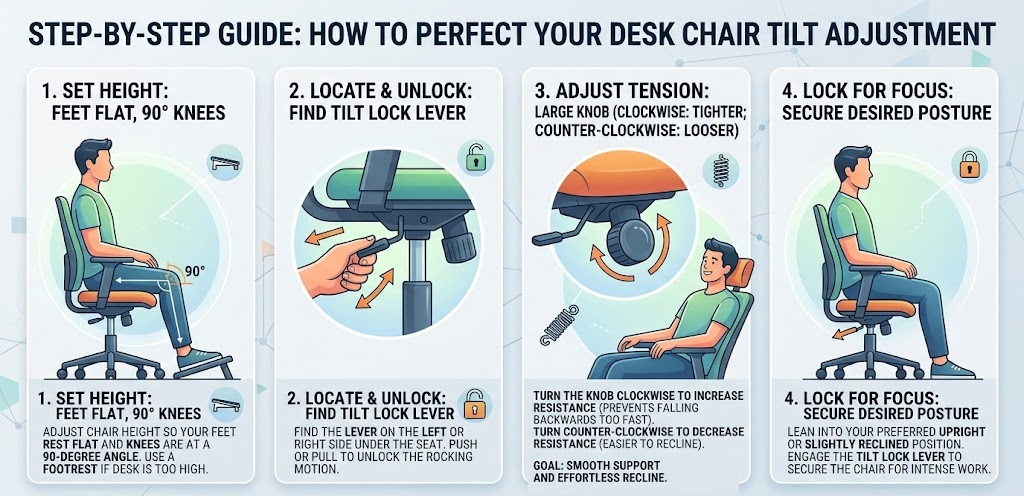
Step 1: Set Your Base Height First
Before touching the tilt, adjust the height of your chair. Your feet should be flat on the floor, and your knees should be at a 90-degree angle. If your desk is too high, use a footrest. (Check out our guide on the best desk chair with footrest for more on this).
Step 2: Locate the Tilt Lock Lever
Most chairs have a lever on the left or right side under the seat cushion. Push or pull this lever to unlock the chair. You should now be able to rock back freely.
Step 3: Dial in the Tilt Tension
This is the most crucial part of desk chair tilt adjustment. Look for a large, round knob under the front center of the seat (sometimes it’s a crank on the side). This is the tilt tension knob.
- If the chair is too hard to push back: Turn the knob counter-clockwise to loosen the tension.
- If you feel like you are falling backward too fast: Turn the knob clockwise to tighten the tension.
- The Goal: You want the tension set perfectly so that you can recline effortlessly, but the chair still supports your weight and brings you back upright smoothly without you having to use your stomach muscles.
Step 4: Utilize the Tilt Lock for Focused Work
While active rocking is great, sometimes you need to sit upright for intense keyboard work. Lean into your preferred upright position (or slight forward tilt if your chair supports it) and engage the tilt lock lever to secure the chair in place.
Troubleshooting Common Tilt Issues
Even the best office gear experiences wear and tear. If your desk chair tilt adjustment isn’t working correctly, try these quick fixes before throwing the chair away.
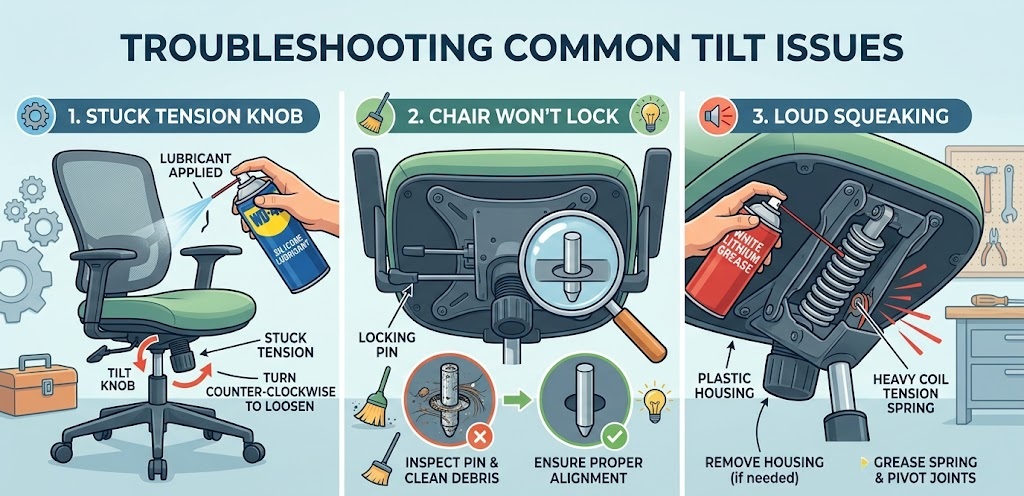
Problem 1: The Tilt Tension Knob is Stuck and Won’t Turn
- The Fix: Over time, dust and pressure can lock the threads of the tension knob. First, apply a small amount of WD-40 or a silicone-based lubricant to the thread above the knob. Let it sit for 10 minutes. Then, push the backrest forward slightly while turning the knob to relieve the internal pressure on the spring.
Problem 2: The Chair Leans Back but Won’t Lock
- The Fix: The locking pin mechanism might be misaligned or jammed with debris. Turn the chair upside down and inspect the metal pin connected to your tilt lever. Clean out any hair or dust. If the metal pin is bent, it will require a replacement mechanism plate.
Problem 3: Loud Squeaking When Leaning Back
- The Fix: Squeaking is almost always caused by metal-on-metal friction within the spring mechanism. Flip the chair over, remove the plastic housing covering the tension spring (if applicable), and spray white lithium grease directly onto the heavy coil spring and the pivot joints.
Time for an Upgrade? Top Ergonomic Chairs with Advanced Tilt
If your current chair only has a basic center-tilt, or if the mechanism is completely broken, no amount of troubleshooting will fix your posture. Upgrading to a chair with an advanced desk chair tilt adjustment system is an investment in your daily health and productivity.
Here are a few features to look for in your next setup:
- Premium Mesh Chairs with Synchro-Tilt: Look for chairs that offer a 2:1 synchro-tilt ratio. This allows for deep recline during breaks without lifting your legs. Brands that focus on heavy-duty ergonomics often feature weight-activated tilt, which automatically adjusts the tension based on your body weight!
- Gaming Chairs with Independent Recline: If you are building an [Insert Internal Link: ergonomic gaming setup], look for chairs that allow you to lock the backrest at 135 degrees for controller gaming, while keeping the seat pan perfectly flat.
- Active Seating: Chairs with forward-tilt are absolute game-changers for people who do intricate desk work, read heavy textbooks, or draw.
Make sure whatever chair you choose pairs well with your desk height. If you recently upgraded to an [Insert Internal Link: L-shaped desk for gaming], ensure the armrests of your new chair can adjust to slide perfectly underneath the desk surface when the chair is locked upright.
Frequently Asked Questions (FAQs)
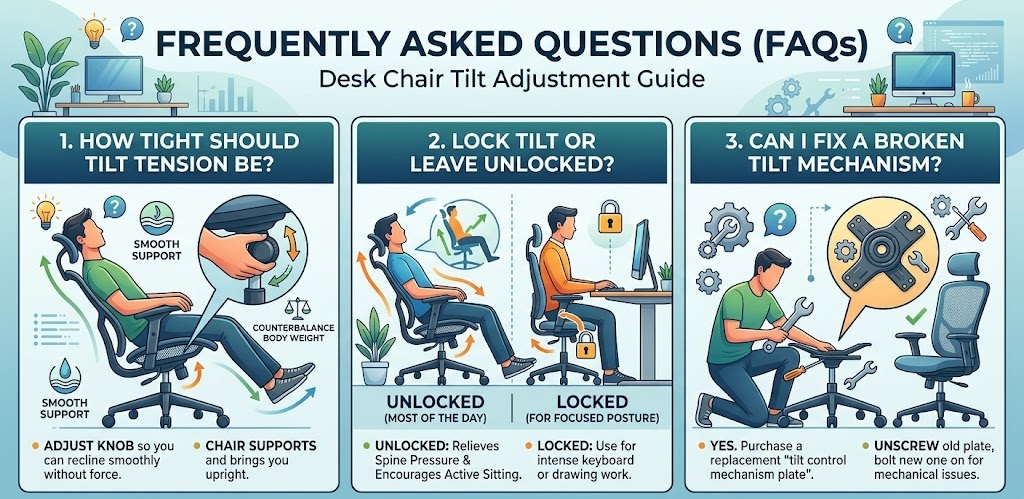
How tight should my desk chair tilt tension be? Your tilt tension should be adjusted so that it perfectly counterbalances your body weight. You should be able to lean back without forcing it, and the chair should gently support you when returning to an upright position without launching you forward.
Is it better to lock my chair tilt or leave it unlocked? It is highly recommended to leave the tilt unlocked (free-floating) for the majority of the day. This encourages dynamic movement and active sitting, which relieves spine pressure. Only lock the tilt when you need to maintain a strict, focused posture for typing or drawing.
Can I fix a broken tilt mechanism? Yes. If the internal spring or locking pin is broken, you don’t necessarily need a whole new chair. You can purchase a replacement “tilt control mechanism plate” online, unscrew the old one from the bottom of the seat pan, and bolt the new one on.
Conclusion
Taking the time to master your desk chair tilt adjustment is one of the easiest, yet most impactful upgrades you can make to your home office ergonomics. Your chair is a tool, and just like any tool, it needs to be calibrated to the user. By understanding the difference between synchro-tilt and center-tilt, dialing in your tension knob, and utilizing the lock feature appropriately, you can say goodbye to end-of-day backaches.
Evaluate your current chair today. If it doesn’t give you the ergonomic support your body requires, it might be time to start looking at better options. Your spine will thank you for it!