
Are you feeling a sharp pain in your wrist after a long day of work? You are not alone.
Using a traditional flat mouse forces your hand into an unnatural twisted position (called pronation). Over time, this repetitive strain can lead to serious issues like Carpal Tunnel Syndrome or constant wrist stiffness.
The good news? A simple switch to the Best Ergonomic Mouse can fix this.
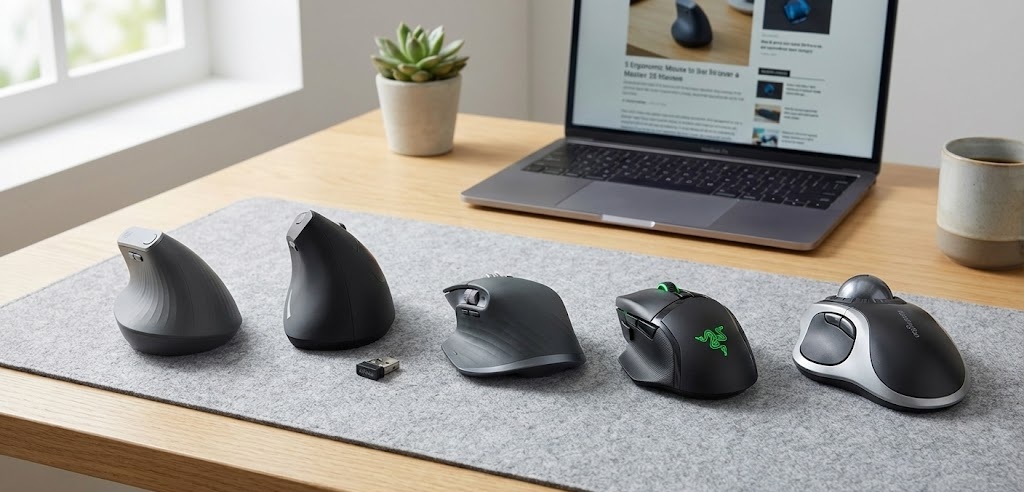
An ergonomic mouse tilts your hand into a natural “handshake” position, relieving pressure on your nerves and muscles instantly. In this guide, we have reviewed the top 5 ergonomic mice for 2026 that will help you work pain-free and boost your productivity.
Quick Top 5 Picks: At A Glance
If you are in a hurry, here are our top 5 recommendations based on comfort, price, and performance.
| Product Name | Product Image | Best For | Why We Chose It | Buy Now |
| Logitech MX Vertical | 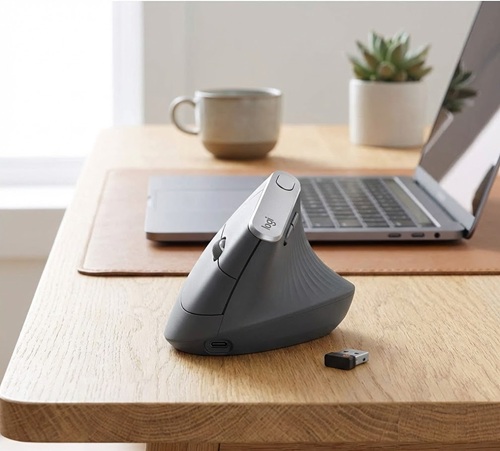 | 🏆 Best Overall | Proven 57° angle for maximum wrist relief. | Buy Now |
| Anker Wireless Vertical Mouse | 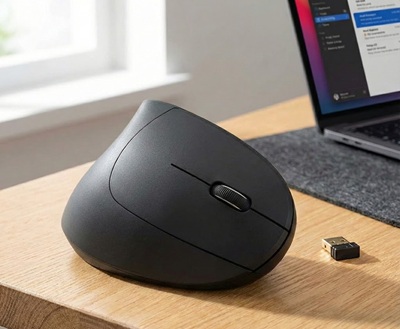 | 💰 Best Budget | Excellent ergonomic shape at a very low price. | Buy Now |
| Logitech MX Master 3S | 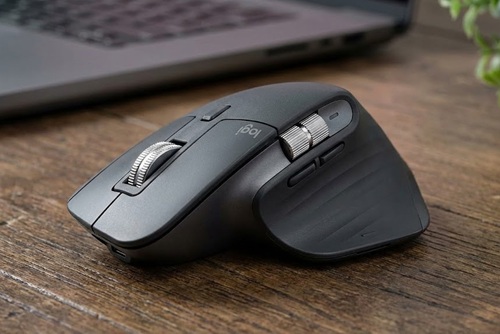 | ⚡ Best Premium | Ultimate productivity tool with magnetic scrolling. | Buy Now |
| Razer Basilisk V3 | 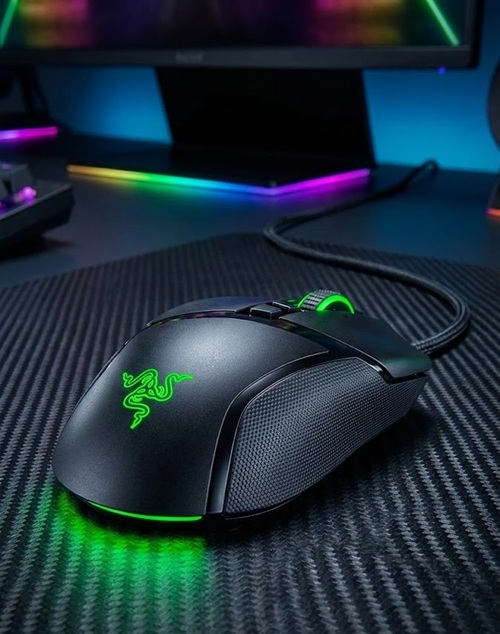 | 🎮 Best Hybrid | Great thumb support for both gaming and work. | Buy Now |
| Kensington Orbit Trackball | 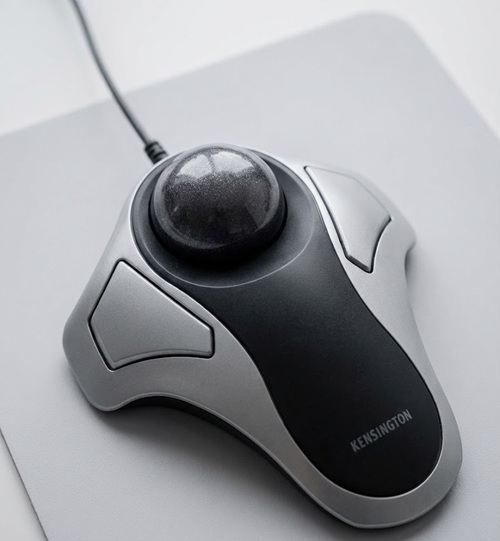 | 🦾 Best Trackball | Zero arm movement required; best for shoulder pain. | Buy Now |
1. Logitech MX Vertical (Best Overall)
Perfect for: People with moderate to severe wrist pain who want the best relief.
The Logitech MX Vertical is widely considered the gold standard in ergonomic mice. It was designed and tested with criteria set by leading ergonomists. Its unique 57-degree vertical angle reduces muscular strain by 10% compared to a standard mouse.
Key Features:
- Connectivity: Bluetooth, USB Receiver, USB-C Cable
- DPI (Speed): 4000 DPI High-Precision Sensor
- Battery Life: Up to 4 months on a full charge
Why We Like It: The “handshake” position feels incredibly natural. You don’t need to twist your forearm to use it. Plus, the textured rubber surface gives you a solid grip, so your hand doesn’t slip. It also charges very fast—1 minute of charging gives you 3 hours of use.
Pros: ✅ Proven vertical angle reduces wrist pressure. ✅ Reduces hand movement by 4x. ✅ Premium build quality. ✅ Fast charging.
Cons: ❌ A bit expensive. ❌ Not suitable for small hands.
Our Verdict: If you want to invest in your long-term health, this is the Best Ergonomic Mouse money can buy.
2. Anker 2.4G Wireless Vertical Mouse (Best Budget)
Perfect for: Beginners who want to try a vertical mouse without spending much.
You don’t need to break the bank to get ergonomic comfort. The Anker Vertical Mouse is the best budget-friendly option that delivers real results. It mimics the same “handshake” grip as expensive models but costs a fraction of the price.
Key Features:
- Connectivity: USB Receiver (2.4G Wireless)
- DPI: 800 / 1200 / 1600 Adjustable
- Battery: 2 AAA Batteries (Not included)
Why We Like It: It’s simple, effective, and works right out of the box. While it doesn’t have fancy software, the shape is spot-on for relieving wrist tension. The thumb buttons (Next/Previous) are also a nice touch for browsing.
Pros: ✅ Extremely affordable (Under $30). ✅ Encourages a neutral wrist posture. ✅ Lightweight and easy to move. ✅ Auto-sleep mode saves battery.
Cons: ❌ Uses disposable batteries. ❌ Feels a bit slippery/plasticky.
Our Verdict: For the price, the Anker Wireless is simply the Best Ergonomic Mouse for budget shoppers. It’s the perfect entry-level ergonomic mouse.
3. Logitech MX Master 3S (Best for Productivity)
Perfect for: Designers, coders, and power users who need speed and comfort.
While not fully vertical, the Logitech MX Master 3S is a masterpiece. It features a sculpted design that supports your palm and thumb perfectly, keeping your hand relaxed during long work sessions.
Key Features:
- Connectivity: Bluetooth & Logi Bolt Receiver
- DPI: 8000 DPI (Works on Glass)
- Scrolling: MagSpeed Electromagnetic Wheel
Why We Like It: The scroll wheel is magic—it can scroll 1,000 lines per second! It’s also 90% quieter than previous models, so you won’t annoy your coworkers with clicking sounds. The thumb scroll wheel makes horizontal navigation (like in Excel) a breeze.
Pros: ✅ Extremely comfortable palm support. ✅ Silent clicks are great for offices. ✅ Amazing battery life (70 days). ✅ Customizable buttons for every app.
Cons: ❌ Not a “true” vertical mouse (still some pronation). ❌ Large size; not for small hands.
Our Verdict: If you prioritize workflow speed along with comfort, the MX Master 3S is unbeatable.
4. Razer Basilisk V3 (Best for Work & Gaming)
Perfect for: Gamers who also work from home.
Who says ergonomic mice can’t be for gaming? The Razer Basilisk V3 has a contoured shape with a dedicated thumb rest that keeps your thumb off the mousepad, reducing drag and friction.
Key Features:
- Connectivity: Wired (Speedflex Cable)
- DPI: 26,000 DPI Optical Sensor
- Buttons: 11 Programmable Buttons
Why We Like It: It bridges the gap between work and play. The optical switches are super fast, and the tilt wheel offers extra functionality. The RGB lighting is subtle but cool.
Pros: ✅ Excellent thumb support. ✅ High-performance sensor. ✅ “Infinite Scroll” wheel mode. ✅ Durable build quality.
Cons: ❌ Wired only (cable might drag). ❌ “Gamer” look might not fit strict offices.
Our Verdict: The best hybrid mouse for those who work by day and game by night.
5. Kensington Orbit Trackball Mouse (Best for Shoulder Pain)
Perfect for: People with limited desk space or shoulder injuries.
If moving your arm causes pain, stop moving it! The Kensington Orbit Trackball lets you control the cursor with just your fingers while your arm stays stationary.
Key Features:
- Connectivity: Wired or Wireless options
- Control: Finger-operated Trackball
- Design: Ambidextrous
Why We Like It: It requires zero desk space. The scroll ring around the ball is intuitive and lets you fly through web pages without moving your wrist.
Pros: ✅ Zero arm movement required. ✅ Ambidextrous (Good for Left & Right users). ✅ Very compact footprint. ✅ Scroll ring is addictive to use.
Cons: ❌ Takes time to learn (muscle memory). ❌ Needs regular cleaning.
Our Verdict: A lifesaver for anyone dealing with shoulder or upper arm strain.
Buying Guide: How to Choose the Best Ergonomic Mouse
Choosing the Best Ergonomic Mouse depends on your specific hand size and type of pain. Here is what you need to consider:
1. Type of Grip (Vertical vs. Flat)
- Vertical Mice: Best for Wrist Pain. They rotate your hand to eliminate forearm twisting. (e.g., Logitech MX Vertical).
- Trackball Mice: Best for Shoulder Pain. Since you don’t move the mouse, your arm rests completely. (e.g., Kensington Orbit).
- Contoured Mice: Best for Palm Support. Good for general comfort if you don’t like vertical shapes. (e.g., MX Master 3S).
2. Hand Size One size does not fit all.
- Small Hands: Look for compact vertical mice.
- Large Hands: The Logitech MX Vertical or MX Master 3S are perfect.
- If the mouse is too big, you will stretch your fingers. If it’s too small, you will claw it, causing more pain.
3. Connectivity
- Wireless (Bluetooth/Dongle): Best for a clean setup. No cable drag means smoother movement.
- Wired: No battery worries, but the cable can sometimes pull against the mouse.
Frequently Asked Questions (FAQ)
Q: Do vertical mice really fix carpal tunnel? A: They don’t “cure” it, but they significantly reduce the pressure on the median nerve, which helps manage pain and prevents the condition from getting worse.
Q: How long does it take to get used to a vertical mouse? A: It usually feels strange for the first 2-3 days. Within a week, your muscle memory will adapt, and you won’t want to go back to a flat mouse.
Q: Which mouse is best for small hands? A: If the Logitech MX Vertical is too big, look for the “Logitech Lift,” which is specifically designed for small to medium hands.
Final Thoughts on 5 Best Ergonomic Mouse for Wrist Pain & Carpal Tunnel
Ignoring wrist pain is a mistake. A small investment in the Best Ergonomic Mouse can save you from years of chronic pain and medical bills.
- For the best relief: Go with the Logitech MX Vertical.
- For the best value: Pick the Anker Wireless Vertical Mouse.
- For power users: Choose the Logitech MX Master 3S.
Upgrade your workspace today—your wrists will thank you!
Check Out:
5 Best Ergonomic Office Chairs for Back Pain Under $300 (2026 Review)
5 Best Electric Standing Desks for Home Office (2026 Review)
3 thoughts on “5 Best Ergonomic Mouse for Wrist Pain & Carpal Tunnel (2026 Review)”