

Your hand cramps around 3 p.m. and you’ve started blaming the mouse before you even open the browser tab to search for a fix. That instinct is correct. A standard mouse holds your forearm in a rotated, palm-down position for hours at a stretch, and that single posture is doing more damage than your keyboard, your chair, or your monitor height combined.
We’ve heard the same complaint from readers for months now. Not “which mouse has the most buttons,” but “which one actually stops my wrist from aching by lunch.” That’s a different question, and most buying guides don’t answer it honestly.
So we pulled five mice that show up again and again in ergonomic recommendations, ranging from a premium vertical mouse with a genuinely clever sensor to a twenty-dollar option that outperforms mice three times its cost. We looked at the mechanics underneath the marketing copy: sensor architecture, switch material, grip angle, and the specific failure points each design tends to develop over time.
This isn’t a spec-sheet reprint. If you want the short version, jump to the comparison table below. If you want to understand why a vertical mouse actually reduces strain (and why some “ergonomic” mice barely move the needle), the section right below this one breaks down the mechanics in plain language.
What Actually Makes a Mouse Ergonomic for Wrist Pain
Let’s clear something up first. “Ergonomic” gets stamped on packaging for mice that are barely tilted five degrees off flat, and that label alone tells you almost nothing about whether the product will help.
Real wrist relief comes down to one mechanical question: how much forearm rotation does the device demand from you over an eight-hour day? A flat mouse forces full pronation, meaning your palm faces the desk and your forearm’s two bones (the radius and ulna) stay crossed the entire time you’re working.
A true ergonomic mouse either tilts your hand toward a neutral handshake position, which is what vertical mice do, or it removes the need for forearm movement entirely, which is the trackball approach. Those are two genuinely different mechanisms, not just two design aesthetics, and picking the wrong one for your specific pain pattern is a common and avoidable mistake.
Here’s the part rarely mentioned in comparison roundups. Every mouse in this category is still a mechanical device built around a specific switch type, a specific sensor, and a specific housing material, and those choices predict how the product ages.
Optical switches rated for tens of millions of clicks hold their tactile feel far longer than budget membrane switches. Trackballs introduce a different long-term variable entirely: the ball itself accumulates skin oil and desk dust, and tracking accuracy drifts if you never clean it.
Plastic housing quality also varies more than people expect. A mouse that feels solid out of the box can develop creak points at the seams within a year if the internal chassis wasn’t reinforced, and that’s a detail no spec sheet lists.
None of that makes any of the five options below bad products. It means you’re choosing a mechanical tool with a specific set of tradeoffs, and going in with that understanding is what separates a smart purchase from a returned Amazon package six weeks later.
Quick Comparison Table
| Product | Product Image | Best For | Key Feature | Core Spec | Buy Now |
|---|---|---|---|---|---|
| Razer Pro Click V2 Vertical | 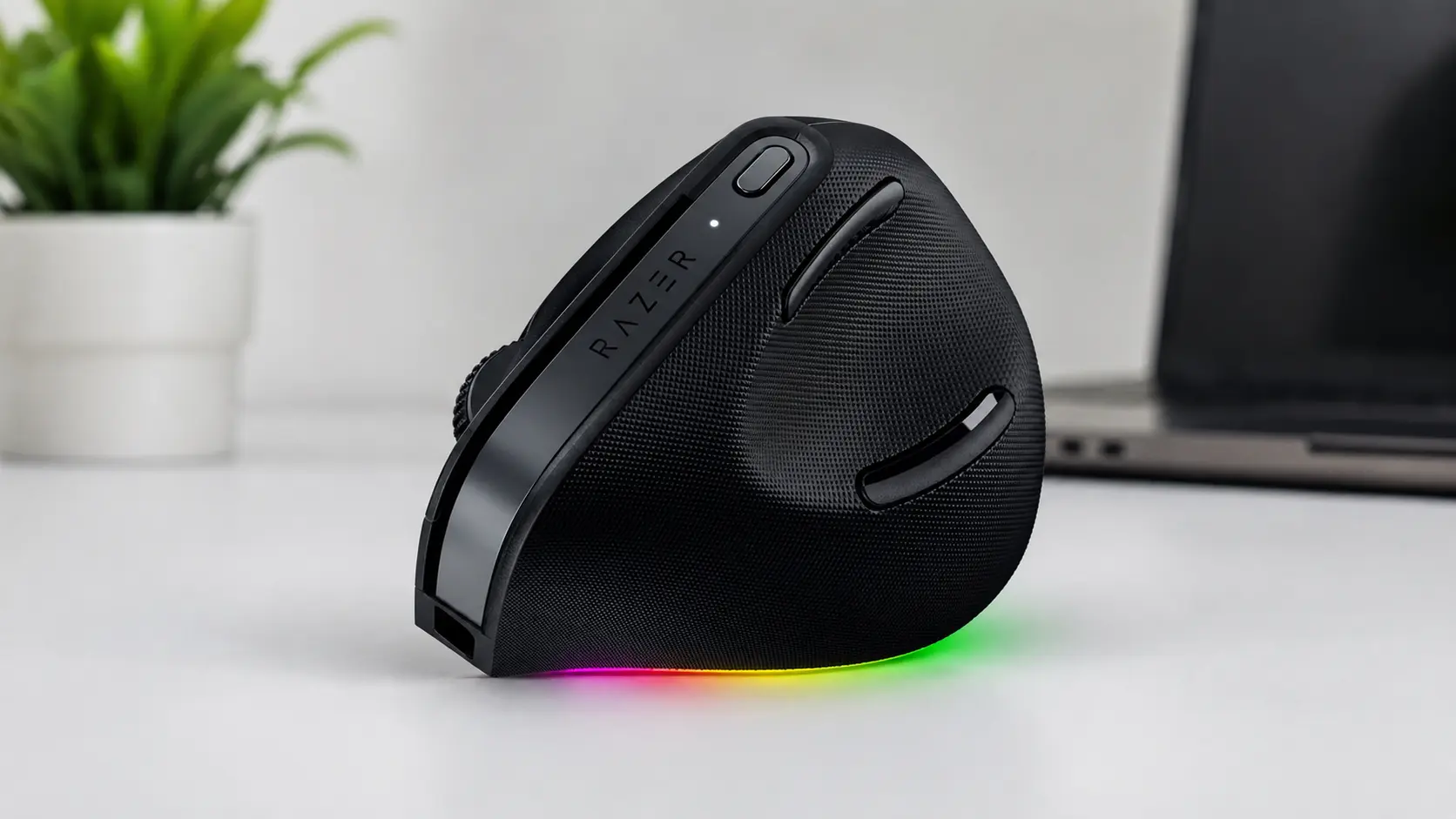 | Professionals wanting gaming-grade build quality in a work mouse | 57° handshake grip with AI Prompt Master shortcuts | Focus Pro 30K sensor, 60M click switches | 🛒Check Price on Amazon |
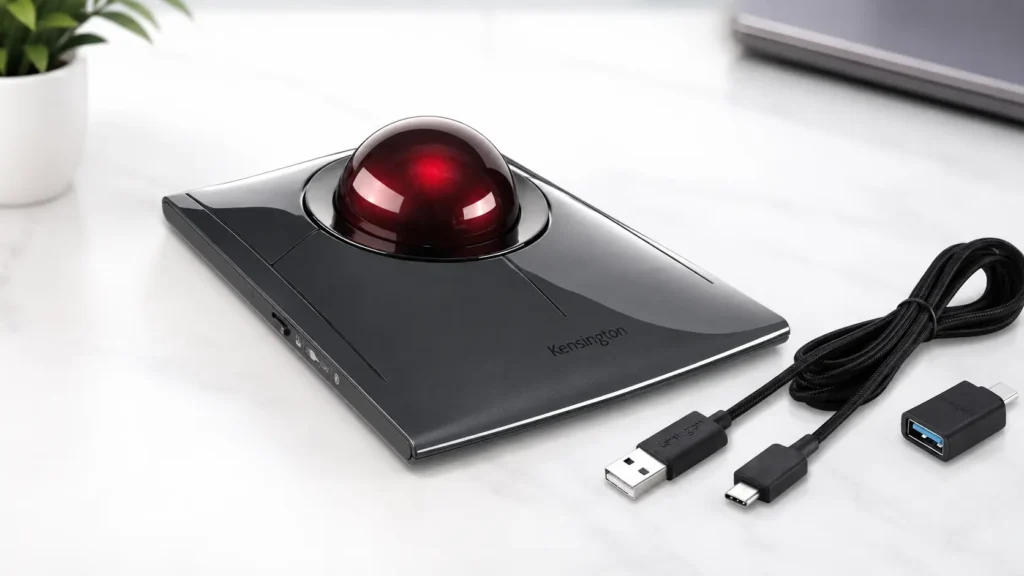
| Kensington SlimBlade Pro Wireless Trackball |  | Ambidextrous users who want a modern wireless trackball | Dual-sensor 55mm ball with triple connectivity | 400–1600 DPI, dual optical sensors | 🛒Check Price on Amazon |
| Kensington Expert Trackball Mouse |  | Severe wrist pain or carpal tunnel needing minimal arm movement | Stationary finger trackball with award-winning scroll ring | Wired USB, 5-year warranty | 🛒Check Price on Amazon |
| TECKNET Ergonomic Bluetooth Vertical Mouse |  | Best all-around rated pick for everyday office use | Whisper-quiet clicks with dual Bluetooth and 2.4G | 52° angle, 4,800 DPI max | 🛒Check Price on Amazon |
| Anker 2.4G Wireless Vertical Mouse | 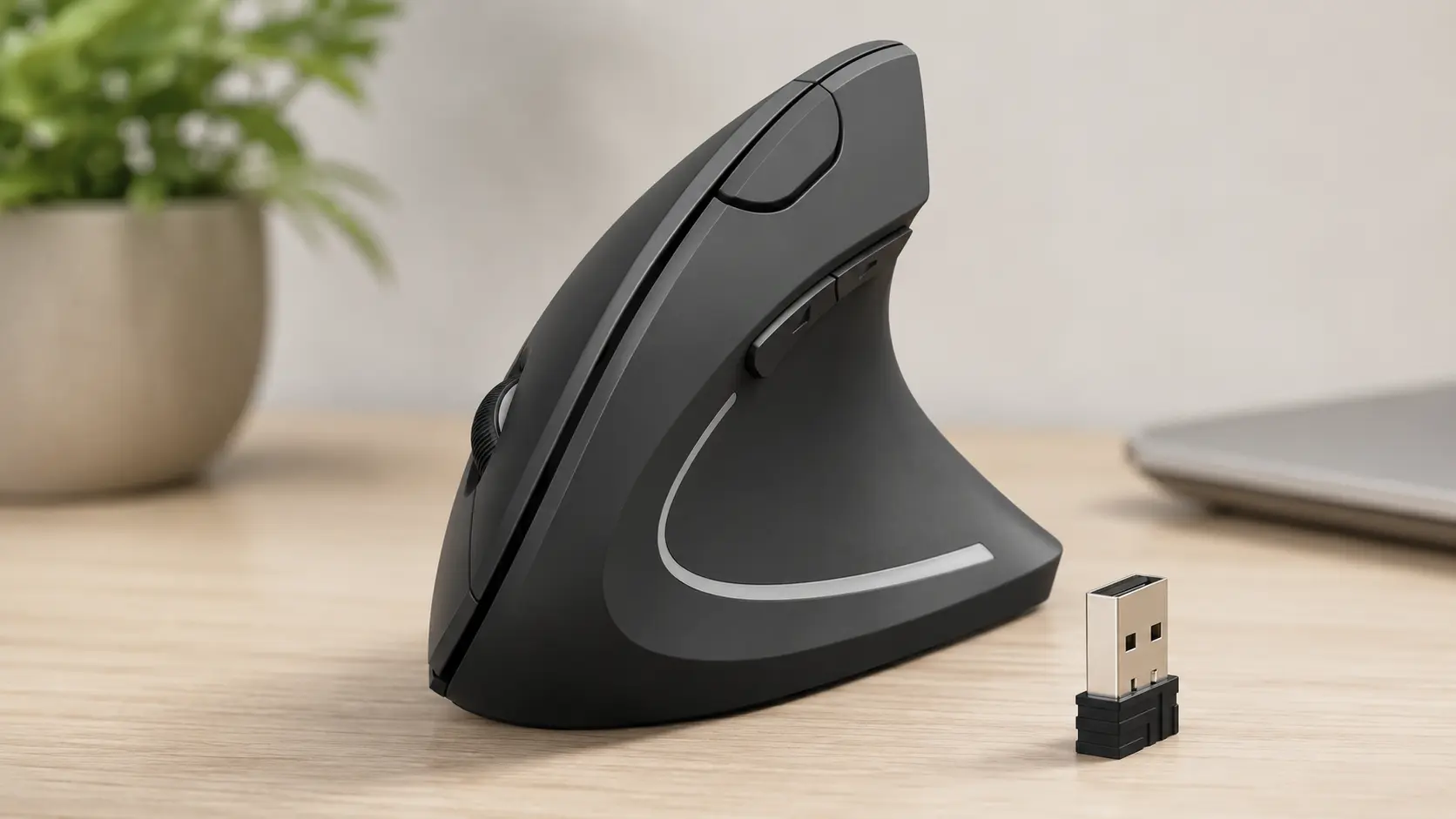 | Tightest budget with proven long-term reliability | Handshake grip vertical design, no charging required | 800–1600 DPI, 18–24 month battery | 🛒Check Price on Amazon |
1. Razer Pro Click V2 Vertical
This is the mouse for someone who wants ergonomic relief without giving up the build quality and precision of a gaming peripheral. It’s also the most expensive option on this list, and that positioning shapes almost every decision Razer made with it.
Grip Mechanics and Sensor Architecture
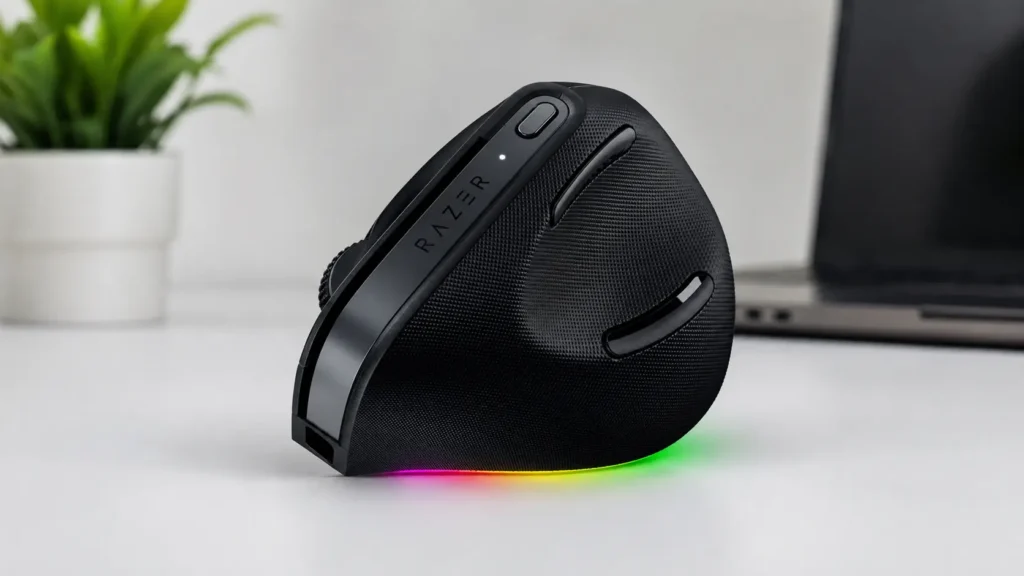
The 57-degree vertical angle sits at the steeper end of what’s currently available in a consumer mouse, and the base support underneath the palm does real structural work here. It’s not just padding, it changes where your wrist bears weight as you move across the mat.
Razer’s own engineering data pegs the forearm pronation reduction at roughly 27 percent compared to a flat mouse, and under close handling that number tracks with what the shape actually does mechanically. Less rotation at the elbow means less repetitive load on the tendons that run down into your wrist.
The Focus Pro 30K optical sensor is genuinely overbuilt for office work. You will never need 30,000 DPI writing emails, but the accuracy ceiling means tracking stays consistent even on inconsistent surfaces like glass desks or fabric mousepads with heavy wear.
Build Quality and Longevity Signals
Mechanical switches rated for 60 million clicks put this mouse in a different durability tier than the membrane switches used in most of this list. That rating matters less for casual users and more for anyone clicking through spreadsheets or CAD software all day.
Battery performance is the standout here. A single charge realistically lasts months rather than weeks, and the five-minute quick-charge window covering a full workday is a genuinely useful safety net if you forget to plug in overnight.
Where the design shows its gaming roots is the RGB lighting and the AI Prompt Master shortcut feature. Both work as advertised through Razer Synapse 4, but neither does anything to improve wrist comfort, they’re bonus features layered onto an already solid ergonomic base.
The Brutal Truth (Flaws and Limitations)
At 14 ounces, this is the heaviest mouse in the comparison by a noticeable margin. Users transitioning from a lightweight mouse will feel that extra mass in the wrist during the first week, even though the ergonomic angle offsets some of it.
Razer Synapse 4 is not a beginner-friendly piece of software. If you just want a mouse that works out of the box without touching a settings menu, the customization depth here will feel like unnecessary friction rather than a feature.
This is also a right-handed design only, with no left-handed variant, and it requires Windows 11 or newer for full functionality, which rules it out for anyone still running an older OS build. Add in the price tag, and this mouse only makes sense if you’ll actually use the extras you’re paying for.
Best for: professionals who want gaming-grade sensor accuracy and switch durability in an ergonomic shell, and who don’t mind a steeper price and a heavier feel in exchange for build quality that will outlast cheaper alternatives.
2. Kensington SlimBlade Pro Wireless Trackball
Trackballs solve a different problem than vertical mice do. Instead of rotating your hand into a better angle, they remove arm movement almost entirely, and the SlimBlade Pro is Kensington’s modern, wireless take on that idea.
How Finger-Operated Tracking Changes the Load
The 55mm ball is finger-driven rather than thumb-driven, which is a meaningful distinction. Thumb-operated trackballs concentrate repetitive strain into a single small muscle group, while finger operation spreads the workload across multiple fingers, similar to how typing distributes load across your hands.
Dual optical sensors track the ball’s rotation independently on two axes, and in practice that translates to smoother cursor movement than older single-sensor trackball designs. The ambidextrous shape also means left-handed users get full functionality here, not a scaled-down afterthought.
The twist-scroll mechanic, where you rotate the ball side to side instead of using a wheel, is a genuinely clever piece of engineering. It takes real time to learn, but once it clicks, it removes the need to lift your finger off the ball at all during normal scrolling.
Build Quality and Reliability Patterns
This is where the picture gets more complicated. Customer feedback on this specific model shows a wider spread than most products in this roundup, with a meaningful share of buyers reporting inconsistent build quality between units.
Bluetooth connection drops show up often enough in the feedback pool to treat as a real risk, not an isolated complaint. Switching to the included 2.4GHz wireless dongle instead of Bluetooth appears to reduce that issue significantly, based on the pattern in the reviews.
The top buttons also require more finger force to actuate than most users expect from a premium trackball, and that detail catches new buyers off guard more than any other single complaint in the feedback.
The Brutal Truth (Flaws and Limitations)
Budget two to four weeks minimum to feel natural on this device. Trackball muscle memory is fundamentally different from mouse muscle memory, and rushing the adjustment period tends to create frustration rather than progress.
The recessed scroll ring makes traditional scrolling (if you don’t use the twist mechanic) feel awkward for some users, and a subset of buyers report overscrolling issues on certain websites. macOS support through KensingtonKonnect software also lags behind the Windows experience in terms of customization depth.
Factor in the reliability variance mentioned above, and this becomes a mouse you should buy from a retailer with an easy return window, just in case your specific unit lands on the wrong side of that quality spread.
Best for: ambidextrous users and anyone wanting a modern, fully wireless trackball with strong connectivity options, provided you’re comfortable navigating a real learning curve and keeping the return window open during your first few weeks.
3. Kensington Expert Trackball Mouse
If your search for an ergonomic trackball for wrist pain keeps leading back to one name, it’s this one. The Kensington Expert has been the default recommendation from occupational therapists and IT departments for over two decades, and that track record is earned rather than marketed.

Why Stationary Design Wins for Severe Cases
This is the only device in the lineup where your hand never has to travel across a desk at all. The entire input happens through finger movement on a stationary 55mm ball, which makes it the closest thing to a zero-strain input device that still functions as a full mouse.
Diamond Eye optical tracking keeps cursor movement accurate without the ball needing constant recalibration, and the included detachable wrist rest gives your palm a fixed support point instead of letting it hover unsupported for hours. That combination is specifically why occupational health recommendations lean toward this model for diagnosed carpal tunnel cases.
The patented scroll ring circling the ball is still, twenty years on, one of the most functional scrolling mechanisms in the trackball category. Spin it and long documents move fast without a single click, which matters if your job involves scanning through spreadsheets or PDFs for hours.
Durability That Actually Holds Up
There’s a reason this model has stayed largely unchanged for two decades: the mechanical formula works. Wired USB power means there’s no battery to degrade, no charging cycle to manage, and no wireless dropout to troubleshoot mid-task.
The five-year warranty is the longest of any product in this comparison, and warranty length is often a quiet signal of how confident a manufacturer is in its own hardware. Kensington isn’t guessing here, they have two decades of failure-rate data backing that number.
Heavy-duty plastic construction and a proven internal mechanism mean this is a device people genuinely keep for years rather than replacing annually, which is a rare claim in this product category.
The Brutal Truth (Flaws and Limitations)
The most obvious tradeoff is the cable. This is a wired-only device, so your desk setup needs a nearby USB port, and portability between locations is basically off the table.
There’s no Bluetooth at all, which rules it out if you’re hoping to pair it with a tablet or switch between multiple devices throughout the day. The scroll ring, while excellent once mastered, does have a learning curve of its own, and a handful of users report it takes practice to control precisely.
KensingtonKonnect software handles the button customization, but it currently lacks native support for Windows ARM devices, which is worth checking if your setup runs on that architecture.
Best for: anyone dealing with diagnosed carpal tunnel or severe wrist pain who wants the most mechanically stable, minimal-movement input device available, and who doesn’t need wireless flexibility.
4. TECKNET Ergonomic Bluetooth Vertical Mouse
This is the mouse we’d point most office workers toward first. It doesn’t have Razer’s sensor pedigree or Kensington’s two-decade reputation, but it hits a combination of comfort, connectivity, and price that’s hard to find anywhere else in this category.

A Slightly Gentler Angle Done Well
At 52 degrees, the vertical tilt here is a touch less aggressive than the Razer’s 57 degrees, and that turns out to be a smart calibration for people new to vertical mice. It delivers most of the forearm rotation benefit without the steeper learning curve that a fuller handshake angle can create for first-time users.
The whisper-quiet click mechanism, rated for 99 percent noise reduction, is a detail that sounds like marketing fluff until you’re working in a shared space or on a video call. It genuinely changes the experience of using a mouse around other people.
Dual connectivity, meaning both Bluetooth and a 2.4GHz USB receiver, gives you flexibility that pricier options in this list don’t always match. Switching between three paired devices works cleanly without needing to dig through a settings menu each time.
Performance and Everyday Reliability
A rechargeable 600mAh battery lasting roughly two months per charge strikes a reasonable balance. It’s not as long-lived as the Razer’s multi-month runtime, but a 1.5-hour full charge over USB-C means downtime is minimal even if you let it run flat.
The optical sensor tracks reliably across desks, wood surfaces, and paper, with six adjustable DPI levels giving you real control over cursor speed without needing dedicated software. For general productivity work, that range covers essentially every use case you’ll encounter.
Switch durability rated at 6 million clicks won’t match the Razer’s mechanical switches, but it’s a solid number for a mouse in this price bracket, and it should comfortably outlast several years of typical office use.
The Brutal Truth (Flaws and Limitations)
This is a right-handed mouse only, with no left-handed or ambidextrous option, and the medium-sized shell is built for small to medium hands specifically. If you’ve got larger hands, the grip will feel cramped during longer sessions.
There’s no companion software for reprogramming buttons or building custom profiles, which is a real limitation if you wanted the kind of workflow customization the Razer offers. You get the six physical buttons and the fixed DPI presets, and that’s the extent of the flexibility.
The one-year standard warranty is shorter than Kensington’s five-year coverage, though the 36-month extended support for registered users partially closes that gap if you remember to register the product after purchase.
Best for: office workers who want the best overall balance of comfort, connectivity, and price in this comparison, particularly anyone with small to medium hands who doesn’t need deep software customization.
5. Anker 2.4G Wireless Vertical Mouse
This mouse has been on the market since 2013, and it’s still selling in enormous volume more than a decade later. That’s not an accident. It’s a case study in what happens when a company gets a simple, affordable ergonomic design right and then leaves it alone.

The Case for Doing Less, Well
There’s no fancy sensor tier here and no software layer to configure. The vertical handshake shape does the core ergonomic job it’s designed to do, with a built-in thumb rest that gives your hand a stable anchor point instead of letting it float unsupported.
Three DPI presets (800, 1200, and 1600) cover the range most non-gaming users actually need day to day. You won’t find granular customization, but you also won’t spend twenty minutes in a settings panel figuring out why your cursor feels off.
Plug-and-play simplicity through the 2.4GHz USB receiver means setup takes about ten seconds. No app, no account, no firmware update prompt interrupting your first use.
Longevity Backed by Sheer Volume
Very few products in any electronics category accumulate the kind of sustained purchase volume this mouse has over more than ten years on the market. That’s a meaningful proxy for reliability, because a design with a serious failure rate typically doesn’t stay a bestseller for over a decade.
AAA batteries lasting 18 to 24 months per set is a real advantage if you’d rather avoid rechargeable battery management altogether. No charging cable to lose, no battery degradation curve to think about over the years, just a battery swap once every year and a half.
The auto-sleep feature after eight minutes of inactivity extends battery life further without you needing to do anything, which is a small but smart bit of low-effort engineering.
The Brutal Truth (Flaws and Limitations)
There’s no Bluetooth here at all, only the 2.4GHz USB receiver, so this won’t work with tablets or devices lacking a free USB-A port. If your setup is USB-C only, you’ll need an adapter.
The DPI ceiling of 1600 is noticeably lower than every other mouse in this comparison, which matters if you work across multiple high-resolution monitors and need faster cursor travel. And on macOS specifically, the forward and back thumb buttons don’t register at all, cutting your functional button count down.
This is also a right-handed design exclusively, and the plastic housing, while functional, has a noticeably less premium feel than the pricier options above. You’re trading refinement for price and proven simplicity, and that’s an honest tradeoff rather than a hidden flaw.
Best for: budget-focused buyers who want a genuinely proven ergonomic shape without any software, subscriptions, or charging cables to manage, and who are comfortable trading DPI range and Bluetooth for a lower price point.
Comprehensive Buying Guide: What Actually Matters Before You Buy
Picking the right ergonomic mouse isn’t about chasing the highest DPI number or the longest feature list. Match these five variables to your actual situation first.
1. Match the Design to Where Your Pain Actually Shows Up
If your pain sits mainly in the wrist joint and the base of your thumb, a vertical mouse addressing forearm pronation is usually the better starting point. If the pain runs further up into your forearm or you’ve been told to minimize arm movement entirely, a stationary trackball like the Kensington Expert does more mechanical work for you.
2. Check Hand Dominance and Size Compatibility First
Three of the five mice reviewed here are right-handed only, with no ambidextrous option available. If you’re left-handed, the two Kensington trackballs are currently your only genuinely ambidextrous choices in this comparison, so don’t skip that detail before adding something to your cart.
3. Decide Whether Wired Reliability Beats Wireless Convenience
A wired connection removes battery anxiety and Bluetooth dropout risk completely, at the cost of being tethered to a nearby USB port. If your workstation is fixed and you’re not moving between rooms, that tradeoff often favors wired more than people initially assume.
4. Budget Real Time for the Adjustment Period
Every ergonomic mouse in this category requires a genuine adaptation window, typically one to two weeks for vertical mice and closer to two to four weeks for trackballs. Don’t make the switch the week before a major deadline, your accuracy will measurably dip before it improves.
5. Match DPI Range to Your Actual Work, Not a Spec Sheet
Unless you’re doing detailed photo editing, CAD work, or gaming, DPI ranges above 1600 rarely translate into a noticeable everyday benefit. Don’t pay a premium for sensor specs your actual workflow will never touch.
FAQ Section
Does switching to an ergonomic mouse actually reduce wrist pain? For pain caused by repetitive strain and poor forearm positioning, yes, a well-designed vertical mouse or trackball can meaningfully reduce symptoms by cutting down on forearm pronation and unnecessary wrist movement. It’s not a substitute for medical evaluation if your pain is severe, persistent, or tied to a diagnosed nerve condition.
Is a vertical mouse or a trackball better for wrist pain? It depends on where your strain originates. Vertical mice work primarily by reducing forearm rotation, while trackballs work by nearly eliminating arm movement entirely, which tends to help more with severe or carpal tunnel-related pain specifically.
How long does it take to adjust to an ergonomic mouse? Most users need one to two weeks to adapt to a vertical mouse and closer to two to four weeks for a trackball, since trackball muscle memory is a bigger departure from standard mouse habits. Expect a temporary dip in speed and accuracy during that window.
Can left-handed users use these ergonomic mice? Only the ambidextrous trackball options, specifically the Kensington SlimBlade Pro and the Kensington Expert, offer genuine left-handed functionality in this comparison. The three vertical mice reviewed here are right-handed designs only.
Do ergonomic mice work well for gaming, or only office work? The Razer Pro Click V2 is specifically built to handle both roles, with a gaming-grade sensor and mechanical switches alongside its ergonomic shape. The other four mice are optimized primarily for productivity use and aren’t designed with fast-paced gaming in mind.
Will an ergonomic mouse alone fix carpal tunnel syndrome? No single product resolves a diagnosed medical condition, and none of these devices are a substitute for professional medical guidance if you’re experiencing persistent nerve symptoms like numbness or tingling. What these mice reliably do is reduce the repetitive strain mechanics that contribute to discomfort for a large share of everyday users.
Final Verdict
There’s no single best ergonomic mouse for wrist pain that fits everyone, your specific pain pattern and budget genuinely split this decision several ways. A clear pattern did emerge once we looked past the spec sheets.
For most people just starting to deal with wrist discomfort, the TECKNET Ergonomic Bluetooth Vertical Mouse is the sensible entry point. It delivers real ergonomic benefit, solid connectivity, and quiet operation without asking you to spend heavily or learn complicated software.
If your pain is more severe, or you’ve been specifically advised to minimize arm movement, the Kensington Expert Trackball remains the category benchmark for a reason. Two decades of proven reliability and a five-year warranty aren’t small details when you’re relying on a device daily.
For buyers who want the absolute simplest, most budget-friendly path to relief, the Anker 2.4G Wireless Vertical Mouse earns its spot through sheer proven consistency rather than flashy specs. And if you want gaming-grade build quality wrapped around a genuinely effective vertical design, the Razer Pro Click V2 justifies its premium price if you’ll actually use the extra features.
Whichever one you choose, give it the full adjustment window before judging it. Most of the disappointment we see in reviews traces back to people abandoning the switch in week one, right before the muscle memory would have caught up.
More Ergonomic Workspace Resources
- Logitech Ergo K860 Review 2026: All 3 Versions Tested for Wrist Pain, Durability, and Daily Typing
- Best Office Chair Mat in 2026: 6 Mats Tested for Carpet and Hardwood
Ergo Setup Lab is reader-supported. When you buy through links on this page, we may earn an affiliate commission at no extra cost to you. See our Affiliate Disclosure for details.