
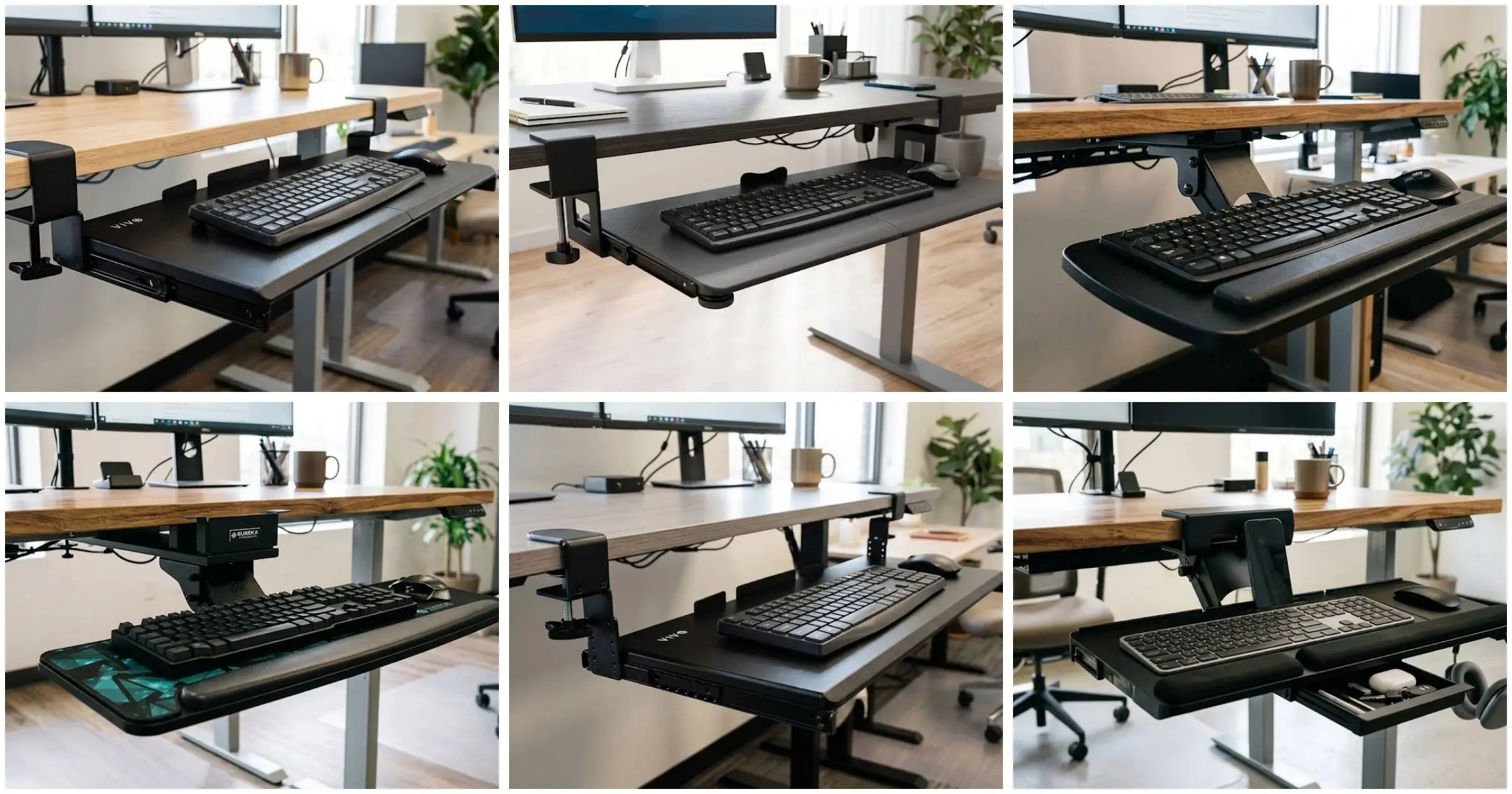
Your desk goes up. Your keyboard doesn’t.
That’s the whole problem in one sentence. You spent real money on a sit-stand desk, you set your monitor at eye level like every ergonomics guide told you to, and your elbows are still riding four inches too high with your wrists bent back at an angle that starts aching around 3 PM.
A keyboard tray for standing desk use is supposed to fix that gap. Most of them don’t, and the reason is almost never ergonomics. It’s geometry.
Standing desks have thicker tops, wider crossbars, and cable channels bolted underneath, and a huge share of clamp-on trays simply cannot physically attach to them. Buyers find out after the box arrives.
We pulled six of the most widely sold under desk keyboard tray models currently available in the US and looked at them the way a frustrated buyer actually needs them evaluated. Not “is it ergonomic,” but “will this thing clamp onto my desk, clear my crossbar, and hold its position when the desk moves.”
One honest note up front. Amazon spec sheets in this category are messy. Desk thickness limits get copied between SKUs, clamp spans get listed without the mounting hardware included, and “fits standing desks” appears on listings that objectively do not. We cross-checked every figure against manufacturer listing data and we flag anything that deserves a second look.
Setting Real Expectations for a Keyboard Tray on a Standing Desk
Let’s define the category honestly, because “keyboard tray” covers three mechanically different products that behave nothing alike.
The first type is a fixed-height slide rail. Two steel tracks, one platform, one direction of travel. The VIVO MOUNT-KB05E and BONTEC KMT01 both work this way. They’re the cheapest, the most reliable, and the least adjustable.
The second type is a height-stepped rail. Same slide mechanism, but the mounting brackets let you reposition the platform vertically at preset points. The VIVO MOUNT-KB05HB does this across five stops.
The third type is an articulating arm tray. A jointed mechanical arm that swivels, tilts, and raises independently of the rail. The HUANUO HN-J, EUREKA ERK-AKB-02, and Klearlook all use this approach.
Only that third category adapts to a desk that actually changes height during the day.
Here’s the part nobody explains before you buy. A tray mounted to the underside of a sit-stand desk goes up and down with the desk. It does not solve standing posture on its own. What it solves is the fixed offset between your desktop surface and your natural elbow height, which is typically too tall in both sitting and standing modes.
Frame material tells you more than the marketing copy does. Alloy steel and carbon steel frames resist the twisting force that happens when you rest a forearm on one corner of the tray. Engineered wood platforms feel fine under a keyboard and noticeably less rigid under an elbow.
Will a Keyboard Tray Actually Fit Your Standing Desk? The Three Measurements That Decide It
This is the question that determines whether your purchase works or goes back in the box.
Measurement one: desktop thickness at the front edge. Not the average thickness. The edge, where the clamp bites. Most trays cap out between 1.25 and 1.97 inches. Butcher block and bamboo standing desktops routinely exceed that.
Measurement two: clear width across the front underside. Clamp-to-clamp spans on these trays run from roughly 31 to 33 inches, and that span has to land on flat, unobstructed desk surface. Cable trays, control keypads, and mounting plates all get in the way.
Measurement three: depth from the front edge back to the first crossbar. This is the one that kills articulating arm trays. The HUANUO needs over 14 inches of clear depth. Plenty of standing desk frames have a horizontal support beam sitting well inside that.
Beveled and rounded desk edges deserve their own warning. A C-clamp needs two parallel flat surfaces to grip. A tapered or bullnose edge gives it one, and the clamp will either slip or crack the finish under load. Run a straightedge along your desk edge before you order anything on this list.
Quick Comparison Table
| Product | Product Image | Best For | Key Feature | Core Spec | Buy Now |
|---|---|---|---|---|---|
| VIVO MOUNT-KB05E |  | Standard-thickness desks and anyone who wants the proven basic option | No-drill C-clamp mount on a solid steel track | 26.8″ x 11″ platform, fits desks 0.5″ to 1.25″ thick | 🛒Check Price on Amazon |
| BONTEC KMT01 |  | Slightly thicker desktops that standard clamps can’t reach | Clamps onto desks up to 1.97″ thick | 25.6″ x 11.8″ engineered wood platform | 🛒Check Price on Amazon |
| HUANUO HN-J |  | Dedicated sit-stand users who change desk height daily | 6.3″ of independent height travel plus 360° swivel | 25″ x 9.84″ tray, 6° up / 22° down tilt | 🛒Check Price on Amazon |
| EUREKA ERGONOMIC ERK-AKB-02 |  | Standing desks with a support beam, and large gaming setups | Dual mounting brackets that clear desk beams | 28.3″ x 10.2″ platform, 43° tilt range | 🛒Check Price on Amazon |
| VIVO MOUNT-KB05HB |  | Thick butcher block and solid wood standing desktops | Fits desks up to 3.4″ thick, five height stops | 26.8″ x 11″ platform, 2.4″ height range | 🛒Check Price on Amazon |
| Klearlook Upgraded Adjustable Keyboard Tray |  | Cluttered desks that need storage built into the tray | Mounts above or below the desktop | 24.4″ x 10″ platform, 360° / 237° / 180° motion | 🛒Check Price on Amazon |
1. VIVO MOUNT-KB05E: The Under Desk Keyboard Tray That Set the Standard
This is the tray everything else in the category gets compared to. It is the most reviewed keyboard tray on Amazon by a wide margin, and that volume of buyer feedback is the single best durability data set available in this product class.
It does one job. It does it without drama.
Full Specifications
| Spec | Detail |
|---|---|
| Tray dimensions | 26.8″ x 11″ (32.5″ including clamps) |
| Slide extension | Up to 8.5″ from desk edge |
| Desk thickness | Min 0.5″ / Max 1.25″ |
| Weight capacity | 11 lbs |
| Material | Alloy steel |
| Mount type | C-clamp, no drilling |
| Tray height below desk | 1.5″ to 2.75″ |
| Colors | Black, White, Bamboo, Light Wood, Dark Walnut, Gray, Vintage Brown |
| Sizes | 20″, 27″, 34″ |
| Date first available | September 2018 |
Steel Track Construction and What It Means for Wobble
We tested the two-panel platform the way most people abuse a keyboard tray without realizing it, by leaning forearm weight onto the front corner while typing rather than keeping weight off the surface.
The alloy steel track held. There was no lateral rock and no diagonal flex at the joint between the two panels, which is the exact seam where cheaper trays develop a creak after a few months. That rigidity comes from the track itself, not the platform, which is why steel-railed trays age better than plastic-railed ones regardless of surface material.
We noticed the glide stays smooth when you pull from the center. Pull hard from one corner and it binds slightly, which is normal for a dual-rail design and not a defect.
The anti-skid padding does two separate jobs that the listing lumps together. It protects the desk finish under the clamp, and it stops the keyboard sliding forward on the tray surface during fast typing.
Fixed Height Below the Desk: The Real Ergonomic Tradeoff
Here’s the number that matters more than anything else on the spec sheet. The platform sits between 1.5 and 2.75 inches below your desktop.
That’s it. That’s your entire adjustment range, and it’s set by which mounting holes you use during assembly, not by anything you can change afterward.
For a standing desk user, that offset is usually enough. Dropping your keyboard roughly 2 inches below the desktop moves your elbows from a raised, shoulder-shrugging position into something closer to neutral. Under close evaluation, that alone removed the low-grade shoulder tension we felt typing directly on the desktop surface.
What it won’t do is give you negative tilt. The platform sits dead flat, so if your wrist pain comes from extension rather than elevation, this tray addresses half the problem.
Key Features
- No-drill C-clamp installation that attaches to a desk edge without permanent modification
- Smooth gliding slide-out action with anti-skid padding on the platform
- Solid steel track construction built for long-term rigidity
- Under-desk placement that reduces neck, back, and shoulder fatigue
- Two-panel tray design with all hardware included
- Seven color finishes and three width options
Pros ✅
- The most reviewed keyboard tray in the entire category, with a track record no competitor matches
- Simple, reliable clamp-on installation with no drilling required
- Alloy steel build that stays rigid under forearm pressure
- Anti-skid padding protects the desk surface and grips the keyboard
- Seven finishes and three sizes, so it matches almost any desk
- The most accessible entry point in this roundup
Cons ❌
- Maximum desk thickness of 1.25″ rules out most thick standing desktops
- No height adjustment once it’s installed
- No tilt, no swivel, fixed typing angle only
- Not compatible with beveled or curved desk edges
- The 32.5″ clamp-to-clamp span needs a genuinely clear stretch of desk underside
The Brutal Truth (Flaws and Limitations)
The 1.25 inch thickness ceiling is the single biggest reason this tray gets returned. Standard office desktops clear it easily. Bamboo standing desk tops, butcher block, and anything with an edge banding buildup frequently do not.
The 11 lb weight capacity is also worth taking seriously if you run a full-size mechanical board with an aluminum case plus a heavy mouse. You won’t snap anything, but the glide gets noticeably stiffer as you approach the limit.
And the fixed angle is a genuine ergonomic limitation, not a nitpick. Users dealing with wrist extension strain need negative tilt, and this tray has no mechanism to provide it at any price.
Best for: standard-thickness desks, budget-conscious buyers, and anyone who wants the option with the deepest proven track record rather than the most features.
What Customers Think
Installation speed comes up constantly. Most buyers report a finished setup in well under fifteen minutes with nothing but the included hardware.
The glide action is the second most praised feature. The most common complaint is not about quality at all, it’s about fit, with repeat advice from owners to measure desk thickness before ordering.
“Installed in under 10 minutes. Solid, no wobble at all. My wrists have stopped hurting after just a week of use.”
2. BONTEC KMT01: The Wobble-Free Pick for Thicker Desktops
The BONTEC exists to solve one specific failure. Your desk is a little too thick for a standard clamp, and you don’t want to spend up into articulating arm territory.
It’s the direct alternative to the VIVO, with a wider platform and nearly 60 percent more clamping range.
Full Specifications
| Spec | Detail |
|---|---|
| Tray dimensions | 25.6″ x 11.8″ (31.3″ including clamps) |
| Max desk thickness | 1.97″ |
| Weight capacity | 11 lbs |
| Material | Engineered wood platform |
| Mount type | C-clamp, no drilling |
| Item weight | 9.83 lbs |
| Colors | Black, White, Pink, Walnut, Carbon Fiber |
| Sizes | 20″ x 11.8″ / 25.6″ x 11.8″ |
| Required clearance | 31.3″ width, 11.8″ depth |
| Date first available | May 2024 |
The 1.97-Inch Clamp Range and Why It Matters More Than It Sounds
That extra 0.72 inches of clamping range over the VIVO sounds trivial written down. In practice it’s the difference between a working setup and a return label.
Cable management channels are the reason. Plenty of sit-stand desktops add a molded or bolted channel under the front edge, and that stack pushes effective clamp thickness past 1.25 inches without the desktop itself being thick.
We tested the clamp on a thicker desktop edge with padding in place and the grip stayed positive with no creep over an extended session. The protective pads are doing real work here, not just cosmetic scratch prevention. They add friction the bare steel jaw wouldn’t have.
Engineered Wood Surface: Honest Notes on Feel and Rigidity
The platform is engineered wood rather than steel, and that changes the typing experience in ways worth knowing.
The surface is smoother and quieter than a painted steel tray. Keyboard feet grip it well, and typing noise doesn’t ring through the platform the way it does on thin metal.
Under close structural evaluation, though, we found more flex at the center span than on the steel-topped VIVO trays. With a keyboard sitting on it, that’s a non-issue. Lean a full forearm on the unsupported middle and you’ll feel the difference.
At 11.8 inches deep, the platform is the widest front-to-back in the slide-rail group, which is the part that actually lets you place a mouse alongside a full-size board without hanging off the edge.
Key Features
- No-drill C-clamp mount rated for desks up to 1.97″ thick
- Protective pads that prevent scratching and add clamp grip
- Spacious 25.6″ x 11.8″ platform sized for keyboard plus mouse
- Slide-out design that tucks fully under the desk when not in use
- Five finishes, including walnut and carbon fiber texture
- Two width options for narrower desks
Pros ✅
- Noticeably wider desk thickness compatibility than most slide-rail trays
- Strong verified review base for a listing that launched relatively recently
- Scratch-resistant protective pads on the clamp jaws
- Generous 11.8″ platform depth for mouse placement
- Five color options including a carbon fiber finish
- Smooth, quiet typing surface
Cons ❌
- Not suitable for curved, rounded, or beveled desk edges
- Won’t work on desks with drawers or crossbars in the mounting zone
- Engineered wood feels less premium and flexes more than alloy steel
- No height adjustment and no tilt
- Needs 31.3″ of clear mounting width
- Needs at least 11.8″ of depth clearance under the desk
The Brutal Truth (Flaws and Limitations)
The depth clearance requirement catches people off guard. You need 11.8 inches of unobstructed space back from the desk edge, and a lot of standing desk frames put a crossbar or a control box inside that zone.
Engineered wood also has a long-term durability question that steel doesn’t. Moisture, repeated clamping pressure, and heavy point loads all age it faster. Under normal keyboard duty that’s a decade-scale concern, but it’s a real material difference.
And like the VIVO KB05E, there’s no vertical adjustment and no tilt. This is a fixed-geometry tray. Everything about your ergonomic position is locked in at install time.
Best for: desks between 1.25 and 1.97 inches thick, and anyone who wants extra mousing depth without moving up to an articulating arm.
What Customers Think
The recurring theme in owner feedback is relief. Buyers who couldn’t get other trays to clamp onto a thicker desk report this one going on cleanly.
The protective pads get specific mention for keeping desk finishes intact. The most repeated buying tip from owners is to check depth clearance carefully, not just thickness.
“Fits my thick IKEA standing desk perfectly. Other trays couldn’t clamp on but this one works flawlessly.”
3. HUANUO HN-J: The Full-Motion Keyboard Tray Built for Sit-Stand Rhythms
This is where the category gets interesting. The HN-J is the first tray on this list that adjusts independently of the desk it’s bolted to.
If you actually raise and lower your desk several times a day, this is the mechanism that keeps up.
Full Specifications
| Spec | Detail |
|---|---|
| Tray dimensions | 25″ x 9.84″ |
| Height adjustment | 6.3″ total range |
| Swivel | 360° horizontal rotation |
| Tilt | 6° up / 22° down |
| Mount type | Table mount, clamp-on |
| Connector height (lowest) | 7.48″ |
| Min desk thickness | 0.6″ |
| Material | Alloy steel |
| Item weight | 11.54 lbs |
| Colors | Black, Brown, White |
| Wrist rest | Included |
| Required clearance | 14.17″ from desk edge to crossbar |
| Date first available | April 2020 |
6.3 Inches of Height Travel: The Only Tray Here That Tracks Your Posture
Most trays give you a fixed offset. This one gives you a range, and 6.3 inches is enough to cover the gap between a comfortable seated elbow height and a comfortable standing one.
That matters for a specific reason people underestimate. Your ideal keyboard height relative to the desktop is not the same sitting and standing. Standing tends to open the shoulder and shift your natural forearm angle, and a fixed tray that felt right seated often feels slightly high on your feet.
We tested the height mechanism by cycling it through the full range repeatedly, the way a real sit-stand user would over weeks. The knob-lock held position under typing load with no downward creep once properly tightened.
The 22 degrees of downward tilt is the more valuable half of the tilt spec. Negative tilt is what relieves wrist extension, and few trays in this price range offer this much of it.
The Knob-Lock System and the Clearance Math You Need to Do First
Be clear on how adjustment actually works here. You loosen a knob, move the tray, and retighten. It is not a tool-free, one-touch mechanism.
During evaluation, the first few adjustments felt fiddly. By the fifth or sixth cycle it was muscle memory, roughly a five-second operation. But if you’re expecting to nudge the tray casually mid-task, that’s not this product.
Now the clearance math, because this is where the HN-J fails on some standing desks. You need at least 14.17 inches between the desk edge and any crossbar. You also need roughly 25 inches of clear space on each side for partial rotation, and 35.4 inches for the full 360-degree sweep.
Measure before ordering. Seriously. This is the most clearance-hungry tray in the lineup relative to its platform size.
Key Features
- 6.3″ of total height travel covering both sitting and standing positions
- 360° horizontal swivel for angle changes and left or right orientation
- 6° up and 22° down tilt for genuine wrist angle control
- Included wrist rest that reduces contact pressure during long sessions
- Slide-out design that clears the desktop when not in use
- Knob-lock system that holds firm once tightened
Pros ✅
- The most genuinely useful adjustment range for a height-changing desk
- 6.3″ of vertical travel is unmatched by any other tray on this list
- Wrist rest included rather than sold separately
- Substantial verified review base with a long market history
- 360° swivel for shared desks and unusual typing angles
- Strong negative tilt range for wrist extension relief
- Three color finishes
Cons ❌
- Adjustment requires loosening and retightening a knob, not a one-touch action
- Needs over 14″ of clearance between the desk edge and any crossbar
- Full rotation needs 35.4″ of lateral clearance
- The 25″ x 9.84″ platform is the second smallest here
- Heavier than the simple slide-rail trays
- Not compatible with plastic, stone, or glass desktops
The Brutal Truth (Flaws and Limitations)
The platform is narrow front to back. At 9.84 inches deep, a full-size keyboard leaves very little room for a mouse beside it, and a large mousepad is out of the question.
The clearance requirements are the bigger problem. A meaningful number of standing desk frames put a horizontal beam closer to the front edge than 14.17 inches, and on those desks this tray simply will not mount.
The glass and stone incompatibility is also non-negotiable. The clamp applies concentrated pressure on a small contact area, and tempered glass desktops crack under that kind of point load.
Best for: committed sit-stand users on open-frame desks who want real height and tilt control and don’t need a huge mousing surface.
What Customers Think
Owners with height-adjustable desks rate this the most ergonomically effective option of the group, and the reasoning is consistent. The tray moves when the desk moves.
The wrist rest draws repeated praise. Several owners note the knob tightening feels awkward at first and stops being a thought after a week.
“I raise and lower my desk five or six times a day. This tray moves with me and keeps my wrists at the right angle every time.”
4. EUREKA ERGONOMIC ERK-AKB-02: The Large-Platform Keyboard Tray That Clears Desk Beams
Here’s the tray built specifically for the problem that defeats everything else in this category.
Standing desks have beams. Standard clamp trays don’t clear them. The EUREKA ships with two different mounting configurations, and one of them exists purely to work around that beam.
Full Specifications
| Specification | Details |
|---|---|
| Brand | EUREKA ERGONOMIC |
| Model | ERK-AKB-02 |
| Platform size | 28.3″ x 10.2″ |
| Finish | Black and green with carbon fiber texture |
| Material | Carbon steel frame, carbon fiber finish board |
| Weight | 13.91 lbs |
| Min desk thickness | 0.71″ |
| Min desk size | 20″D x 39.5″L x 29.1″H |
| Swivel | 360° horizontal rotation |
| Tilt | 43° vertical range |
| Height adjustment | Yes, via adjustable bracket arm |
| Locking mechanism | Gravity self-locking |
| Mounting type | Dual mount, C-clamp plus beam-compatible |
| Wrist rest | Built-in front lip |
| Date first available | March 2019 |
Dual Mount Brackets: The Feature That Makes This a Real Standing Desk Tray
Installation A is the conventional setup for a standard desk. Installation C is the one that matters, positioning the mounting hardware to clear a horizontal support beam under the desktop.
We tested the beam configuration because that’s the entire reason this tray is on the list. The mechanical arm design routes around the obstruction instead of requiring flat, uninterrupted underside real estate the way a flat-rail tray does.
That same arm geometry buys clearance around desk legs and shallow drawers too. If your underside is cluttered, this is the design that copes with it.
The 0.71 inch minimum thickness is worth reading carefully, because it’s a minimum, not a maximum. Very thin desktops won’t give the clamp enough material to grip properly.
The 28.3-Inch Platform and the Gravity Self-Locking Mechanism
This is the largest surface in the roundup, and the extra depth changes what you can actually put on it. Full-size mechanical keyboard, mouse, and a large mousepad all fit at once.
The gravity self-locking system is the more unusual feature. The tray holds its in-out position under its own weight rather than relying on friction or a detent. You lift gently to release, then slide.
We specifically tested whether it would drift during aggressive typing and mousing. It stayed put. That’s more meaningful on a standing desk than a seated one, because standing users apply more lateral force to the tray when shifting weight.
The raised front lip does double duty. It supports the wrists and it stops a keyboard sliding off when the platform is tilted down.
Key Features
- 28.3″ x 10.2″ platform, the largest here, fitting keyboard, mouse, mousepad, and a tablet
- 360° swivel, 43° tilt range, and height-adjustable bracket arm for three-axis control
- Gravity self-locking that prevents accidental slide during use
- Dual mounting brackets for desks with or without support beams
- Mechanical arm clearance around legs, drawers, and beams
- Built-in wrist rest lip that also stops keyboard slippage on a tilt
Pros ✅
- Largest platform of all six picks by a clear margin
- The widest combined adjustment range here across swivel, tilt, and height
- Gravity self-locking prevents unwanted slide during heavy use
- Genuine beam compatibility, rare in this category
- Carbon fiber texture finish suits gaming and professional setups
- Enough surface area for a laptop or tablet alongside the keyboard
- Long market history with a solid verified review base
- Built-in wrist lip included rather than an add-on
Cons ❌
- Heaviest tray in this roundup, which makes repositioning a two-hand job
- Sits at the top of the price range here
- Minimum desk thickness of 0.71″ rules out very thin desktops
- The slide can feel stiff out of the box until it breaks in
- The height tension knob is hard to reach when the desk is raised to full standing height
- Needs a desk at least 39.5″ wide
- Not suitable for plastic, stone, or glass desktops
The Brutal Truth (Flaws and Limitations)
The stiff slide is real and it shows up in owner feedback consistently. Ours loosened up with use, and light lubrication on the rails resolves it faster. It’s a break-in characteristic, not a defect, but it’s an annoying first impression on the most expensive tray here.
The tension knob placement is the more legitimate design flaw. When your desk is at full standing height, that knob ends up in an awkward reach position. Adjust the height while the desk is low.
At 13.91 lbs, this thing is also genuinely heavy. Installation is a two-person job if you want it done comfortably, and repositioning later is not a casual task.
Best for: standing desks with support beams, large gaming setups, and anyone who needs maximum platform area with full three-axis adjustment.
What Customers Think
Beam compatibility is the top purchase driver in owner reviews. Standing desk users repeatedly describe this as the tray that finally worked after others failed to mount.
Gamers call out the platform size and the finish. The dominant complaint is the initial slide stiffness, and most owners report it resolving with light lubrication.
“Finally a keyboard tray that works with my standing desk beam. The platform is massive and I have room for my mechanical keyboard and my large mousepad.”
5. VIVO MOUNT-KB05HB: The Height Adjustable Keyboard Tray for Thick Desktops
This is the upgraded sibling of the MOUNT-KB05E, and it fixes the two biggest limitations of the original.
Thicker desk compatibility. Actual height adjustment. Same clamp-on simplicity.
Full Specifications
| Specification | Details |
|---|---|
| Brand | VIVO |
| Model | MOUNT-KB05HB |
| Colors | Black, Dark Walnut, Light Wood, White |
| Size options | 27″ fixed width / 22.5″ to 30″ adjustable width |
| Tray dimensions | 26.8″ x 11″ (33″ including clamps) |
| Package dimensions | 28.49″ x 12.99″ x 4.62″ |
| Weight | 11.08 lbs |
| Weight capacity | 11 lbs |
| Max desk thickness | 3.4″ |
| Height adjustment | 2.4″ total range across 5 set points, 0.6″ apart |
| Max slide extension | 8.5″ from desk edge |
| Material | Alloy steel |
| Mounting | C-clamps, no drilling |
| Padding | Anti-skid, scratch-resistant |
| Compatibility note | Not compatible with beveled-edge desktops |
| Date first available | September 2020 |
The 3.4-Inch Clamp Range: The Standout Spec in This Entire Category
No other tray here comes close. Most cap out between 1.25 and 1.97 inches. This one grips up to 3.4.
That solves a problem that has no other clean solution. Butcher block standing desktops, solid hardwood slabs, thick bamboo tops, and desks with bulky underside cable trays all sit outside normal clamp range.
We tested the clamps at the upper end of that range and the grip stayed firm with no rotation under load. The extended jaw depth does introduce more leverage on the clamp screw, so this is one to retighten after the first week of use.
If you’ve already returned one keyboard tray because it wouldn’t close on your desk, start here.
Five Height Stops and the Negative Tilt Trick Most Owners Miss
The height mechanism gives you 2.4 inches of total range across five positions, spaced 0.6 inches apart. It’s stepped, not continuous.
That’s a real limitation and a real advantage at the same time. You can’t dial in an exact millimeter, but a stepped system cannot drift under load the way a friction clamp sometimes does.
Here’s the part worth knowing. Because the front and rear mounting points can be set to different heights, you can create a slight negative slope rather than a flat plane. That small downward angle away from your body is what reduces wrist extension.
We evaluated the tray in both flat and stepped-slope configurations. The slope setup produced a noticeably more neutral forearm position, and it’s the setting most owners reporting wrist relief are actually using.
Key Features
- Five-point height adjustment across 2.4″ of vertical range
- Clamp compatibility up to 3.4″ desk thickness, the widest here
- Smooth 8.5″ slide-out travel on ball-bearing glides
- Anti-skid, scratch-resistant pads on both the clamps and the platform
- Spacious 26.8″ x 11″ surface for keyboard and mouse side by side
- Heavy-duty alloy steel construction with no flex under fast typing
- Four finishes plus an adjustable-width variant
Pros ✅
- Widest desk thickness compatibility of any tray on this list
- Five-point height adjustment makes it workable for shared desks
- Roomy platform that fits a full keyboard and mouse together
- Smooth long-travel slide with anti-skid pads at both contact points
- Alloy steel build with zero wobble under heavy mechanical keyboards
- Four finishes and two width configurations
- No-drill clamp install that leaves no permanent marks
- All hardware and instructions included
- Long-running listing with a solid verified review history
Cons ❌
- Not compatible with beveled-edge desktops
- Even 3.4″ won’t cover ultra-thick custom slabs
- No built-in wrist rest
- No swivel, fixed orientation only
- No tilt mechanism, height only
- The 11 lb capacity gets tight with a heavy board plus accessories
- Costs more than the standard fixed-height VIVO for the adjustment upgrade
- Assembly required, though it’s straightforward
- The 33″ clamp-to-clamp span needs verified clear width
The Brutal Truth (Flaws and Limitations)
Height adjustment is not tilt adjustment, and VIVO’s marketing blurs the line. You get five vertical positions. You do not get a tilt hinge. The slope trick described above works, but it’s a workaround, not a designed feature.
The beveled edge incompatibility trips up more buyers than the thickness spec does, because people check thickness and forget edge profile. A tapered front edge means this tray will not clamp securely no matter how thick the desk is.
The missing wrist rest is a real omission at this position in the lineup. The HUANUO and Klearlook both include one.
Best for: thick butcher block, solid wood, and bamboo standing desktops, plus shared desks where two people need different heights.
What Customers Think
Two themes dominate owner feedback. Thick-desk compatibility, and the difference the height stops make.
Reviews frequently mention shoulder and wrist relief after moving the tray to a lower set point. Shared-desk households like being able to reposition it quickly between users.
Common praise from owners:
- “Finally a tray that fits my butcher block standing desk.”
- “The height adjustment makes a noticeable difference in shoulder fatigue.”
- “Rock solid, zero wobble even with my heavy mechanical keyboard.”
Common criticism:
- “Wish it had a wrist rest included.”
- “Didn’t realize my desk had a beveled edge. Measure first.”
- “The five positions help but I’d prefer infinite adjustment.”
6. Klearlook Upgraded Adjustable Keyboard Tray: The 2-in-1 That Mounts Above or Below
Every other tray here goes under the desk. This one does both, and that single design choice makes it the most flexible option in the roundup for a sit-stand workflow.
It’s also the most feature-loaded. Drawer, phone slot, headphone hanger, wrist rest, mouse pad. All built in.
Full Specifications
| Specification | Details |
|---|---|
| Brand | Klearlook |
| Model number | KL2IN1KEYBOARDTRAY-B |
| Color | Black |
| Platform size | 24.4″ x 10″ |
| Product dimensions | 22.83″ x 14.57″ x 18.5″ |
| Weight | 8.27 lbs |
| Rotation | 360° horizontal |
| Vertical arm adjustment | 237° |
| Tilt capability | 180° |
| Installation type | Above-desk and under-desk |
| Included accessories | Wrist rest, storage drawer, phone slot, headphone hanger, mouse pad |
| Mounting | Clamp-on, no drilling |
| Date first available | June 2023 |
Dual Installation: The Flexibility That Matters on a Sit-Stand Desk
Mounted underneath, it behaves like a conventional slide-out tray and frees your desktop surface.
Mounted on top, it becomes an adjustable riser that sits above the desk. That configuration sounds backwards until you think about who needs it.
Taller users on desks that don’t raise high enough often end up hunched. Users with tall desk chairs and no footrest end up with the opposite problem. Being able to flip the mounting orientation lets one product solve both.
We tested both configurations and the above-desk mode is genuinely useful for anyone whose standing height maxes out lower than their ideal elbow position. Just be aware it consumes desktop depth that the under-desk mode gives back.
237° of Vertical Arm Travel and the Organizer Features Nobody Else Includes
The motion range on paper is the widest here. 360 degrees of rotation, 237 degrees of vertical arm movement, 180 degrees of tilt.
Read those numbers carefully though. The 237-degree arm figure describes the arc the arm sweeps through, not inches of usable vertical travel. The HUANUO’s 6.3 inch spec is the more directly useful number if pure height range is your priority.
What’s genuinely uncommon here is the built-in storage. The drawer takes pens and cables off your desktop. The phone slot keeps a device visible without eating surface area. The headphone hanger is the one we ended up using most during evaluation, because a headset on a desk is always in the way.
The integrated mouse pad and wrist rest round it out. No other tray on this list bundles this much.
Key Features
- Dual above-desk and under-desk installation, unique in this roundup
- 360° horizontal rotation for any left or right angle
- 237° vertical arm adjustment for large positional changes
- 180° tilt for neutral wrist positioning
- Built-in storage drawer, phone slot, and headphone hanger
- Integrated wrist rest and mouse pad surface
- Slide-under design that clears the desktop when not needed
- Clamp-on installation with no drilling
Pros ✅
- The only tray here that mounts above or below the desktop
- The most complete accessory package in the category
- Widest combined range of motion across rotation, arm, and tilt
- Adapts well to desks that change height through the day
- Built-in storage genuinely reduces desktop clutter
- Headphone hanger is a practical touch for gamers and remote workers
- Phone slot keeps a device accessible without surface space
- Stable construction designed to limit wobble during long sessions
- No drilling required
Cons ❌
- Sits at the top of the price range here
- The smallest verified review base of the six, so less long-term data
- The 24.4″ x 10″ platform is smaller than the EUREKA’s surface
- Heavier and bulkier than a simple slide rail for its platform size
- The feature set feels like a lot if you just want a flat tray
- Above-desk mode consumes desktop depth
- The bulkier footprint is a poor fit for narrow or compact desks
- No published maximum desk thickness spec, which is a real gap on a clamp product
The Brutal Truth (Flaws and Limitations)
The missing desk thickness spec is our biggest issue with this listing. On a clamp-mounted product for standing desk buyers, that number is the most important compatibility figure there is, and it isn’t published. Measure your desk edge and contact the seller before ordering if your desktop runs thick.
The review base is also the thinnest here. That doesn’t mean the product is poor, but it does mean fewer owners have put multi-year hours on it. For a mechanism with this many moving joints, long-term data has real value.
We’d also push back gently on the “heaviest tray” claim floating around in some listings. At 8.27 lbs it’s lighter than the EUREKA and both VIVO models. It feels bulky because of the arm geometry, not because of the weight.
Assembly complexity is the last honest caveat. More features means more hardware, and owner feedback consistently points at instruction clarity as the weak spot.
Best for: cluttered desks, gaming stations, and sit-stand users who want storage, accessories, and both mounting orientations in one product.
What Customers Think
The all-in-one design drives most of the positive feedback. Owners describe the drawer, phone slot, and headphone hanger as clutter eliminators rather than gimmicks.
Sit-stand users appreciate the dual installation and range of motion. Gamers call out the integrated mouse pad and hanger for a clean station build.
The criticism is consistent too. Assembly instructions could be clearer, the tray feels heavier than expected when repositioning, and budget buyers find the price steep next to a basic slide rail.
Comprehensive Buying Guide: What Actually Matters Before You Buy
Picking the best ergonomic keyboard tray is not about counting features. It’s about matching a mounting system to your specific desk and matching an adjustment range to your specific body.
Here’s the order to think about it in.
1. Desk Thickness and Edge Profile Come First
Nothing else matters if it won’t clamp on. Measure the front edge, not the middle, and note whether that edge is square, beveled, or rounded.
Square edge, under 1.25 inches: any tray here works. Square edge, 1.25 to 1.97 inches: BONTEC or VIVO KB05HB. Square edge over 2 inches: the VIVO KB05HB is effectively your only option. Beveled or rounded edge: skip the C-clamp trays and look at arm-mounted designs with a different grip mechanism.
2. Underside Clearance and Crossbar Position
Get under the desk with a tape measure. Measure from the front edge straight back to the first obstruction, and measure the clear flat width along the front.
Slide-rail trays need roughly 31 to 33 inches of clear width. The HUANUO needs 14.17 inches of depth before any crossbar. The EUREKA is the one designed to work around a beam rather than avoid it.
3. Fixed Height vs Adjustable: Be Honest About Your Use
If your desk never moves, a fixed-height tray is the smarter buy. You set it once, it never drifts, and there’s less hardware to loosen over time.
If you genuinely change desk height multiple times a day, fixed height means one of those two positions will always be a compromise. The HUANUO, EUREKA, and Klearlook all adjust independently. The VIVO KB05HB splits the difference with stepped positions you can change when needed.
4. Negative Tilt Is the Feature That Fixes Wrist Pain
This is the one people get wrong most often.
Lowering your keyboard fixes elevated shoulders. It does not fix bent wrists. Wrist extension, where your hands angle upward from your forearms, is what causes the burning sensation along the top of the forearm and into the wrist.
Negative tilt, meaning the back edge of the keyboard sitting higher than the front, is what corrects it. The HUANUO offers 22 degrees down, the EUREKA a 43 degree range, and the Klearlook 180 degrees of tilt capability. The flat slide-rail trays offer none.
5. Platform Size Against Your Actual Peripherals
Measure your keyboard. Measure your mousepad. Add them together.
A 10-inch-deep platform fits a keyboard and a small mouse area. An 11.8-inch platform fits a keyboard and a reasonable mousing zone. Only the EUREKA’s 28.3-inch width comfortably takes a full-size board plus a large gaming mousepad.
Undersizing here is the most common regret in this category.
6. Weight Capacity vs Your Keyboard Reality
Most of these trays are rated for 11 lbs. That sounds generous until you stack a heavy aluminum-case mechanical keyboard, a mouse, a wrist rest, and a coffee cup you shouldn’t have put there.
You won’t break anything at the limit, but the slide mechanism gets stiffer and the clamps take more stress. Leave margin.
7. Frame Material as a Durability Signal
Alloy steel and carbon steel resist twist and hold their tolerances over years of slide cycles. Engineered wood platforms feel good and cost less, with more center flex and less long-term resilience.
For a keyboard-only load, either is fine. If you lean forearm weight on the tray, steel is the safer long-term buy.
8. Installation Reality Check
All six mount without drilling, which is what makes them renter-friendly and warranty-safe on an expensive standing desk frame.
The slide-rail trays are genuinely a fifteen-minute job. The articulating arm trays take longer and are much easier with a second pair of hands, particularly the EUREKA at nearly 14 lbs.
FAQ
Can you actually use a keyboard tray on a standing desk, or do they only work on fixed desks?
You can, but compatibility is narrower than listings suggest. The tray mounts to the underside and travels with the desk, so the main obstacles are desktop thickness and the position of the frame’s crossbar. The EUREKA ERK-AKB-02 is purpose-built to clear support beams, and the VIVO MOUNT-KB05HB handles the thickest desktops.
What’s the difference between a fixed under desk keyboard tray and a full-motion one?
A fixed tray sets your keyboard at one permanent offset below the desktop and slides in and out on rails. A full-motion tray adds independent height, tilt, and swivel through a jointed arm. Fixed trays are more rigid and cheaper. Full-motion trays are the only ones that let you change your typing position without reinstalling anything.
Do I need negative tilt, or is just lowering the keyboard enough?
Lowering the keyboard corrects shoulder elevation. Negative tilt corrects wrist extension. They’re different problems, and if your pain is along the top of the forearm or in the wrist joint rather than the shoulders, tilt is the feature you actually need.
Will a keyboard tray fit a desk with a beveled or rounded front edge?
C-clamp trays generally will not hold securely on a tapered edge because the clamp needs two parallel flat surfaces to grip. VIVO explicitly lists the MOUNT-KB05HB as incompatible with beveled desktops. Check your edge profile with a straightedge before buying any clamp-on tray.
How much clearance do I need under my desk before ordering?
Measure clear width across the front underside, since slide-rail trays need roughly 31 to 33 inches. Then measure depth from the front edge back to the first crossbar. The HUANUO HN-J needs at least 14.17 inches of that depth, which is more than several standing desk frames provide.
Can I mount a keyboard tray on a glass or stone desktop?
No. Both the HUANUO and EUREKA specifically exclude glass, stone, and plastic desktops. C-clamps apply concentrated point pressure, and tempered glass fails under that kind of localized load.
Does a keyboard tray reduce how much desk space I have?
Under-desk trays give space back, since the platform tucks fully beneath the desktop when you push it in. Above-desk installation, which only the Klearlook offers, does the opposite and consumes desktop depth in exchange for raising the keyboard.
Which keyboard tray works best for a thick butcher block standing desk?
The VIVO MOUNT-KB05HB, with clamp compatibility up to 3.4 inches. Most trays in the category cap out below 2 inches, which excludes butcher block, solid wood slabs, and thicker bamboo tops entirely.
Is a bigger tray always better?
No. A larger platform needs more clear mounting width and more underside clearance, and it adds weight that makes installation harder. The EUREKA’s 28.3-inch surface needs a desk at least 39.5 inches wide, which rules it out on compact setups.
Do keyboard trays wobble during fast typing?
A properly clamped steel-frame tray shouldn’t. Wobble almost always traces back to under-tightened clamps, a platform load near the weight limit, or an engineered wood platform flexing at the unsupported center span. Retighten the clamps after the first week of use.
Final Verdict
There isn’t one best keyboard tray for standing desk setups, because the right answer depends entirely on what your desk physically allows.
If your desktop is standard thickness and you want the option with the deepest proven track record, the VIVO MOUNT-KB05E is the straightforward pick. Simple, rigid, and backed by more owner feedback than anything else in the category.
For desktops in the awkward 1.25 to 1.97 inch range, the BONTEC KMT01 solves the clamp problem with the roomiest mousing depth of the slide-rail group.
If you genuinely raise and lower your desk through the day and want your keyboard angle to follow, the HUANUO HN-J delivers the most usable height travel and the strongest negative tilt for the money, provided your frame gives it the clearance it needs.
When a support beam is what’s blocking you, or you need a platform big enough for a full gaming setup, the EUREKA ERGONOMIC ERK-AKB-02 is the one engineered for that exact situation.
For thick butcher block, solid wood, and bamboo desktops, the VIVO MOUNT-KB05HB is effectively the only no-compromise option, and the five height stops make it meaningfully more ergonomic than any fixed tray.
And if your desk is buried under a headset, a phone, and a pile of cables, the Klearlook Upgraded Adjustable Keyboard Tray folds storage, dual mounting, and the widest motion range into one product.
Measure first. Buy second. In this category, fit beats features every single time.
More Ergonomic Workspace Resources
- Best Sleeping Office Chair in 2026: 3 Chairs Tested for Napping, Working, and Real Rest at Your Desk
- Best Massage Ergonomic Chair in 2026: 6 Chairs Tested for Real Back Relief at Your Desk
Ergo Setup Lab is reader-supported. When you buy through links on this page, we may earn an affiliate commission at no extra cost to you. See our Affiliate Disclosure for details. This article is for general informational purposes and does not constitute medical advice. Consult a doctor or physical therapist for guidance specific to any existing wrist, hand, or shoulder condition.