
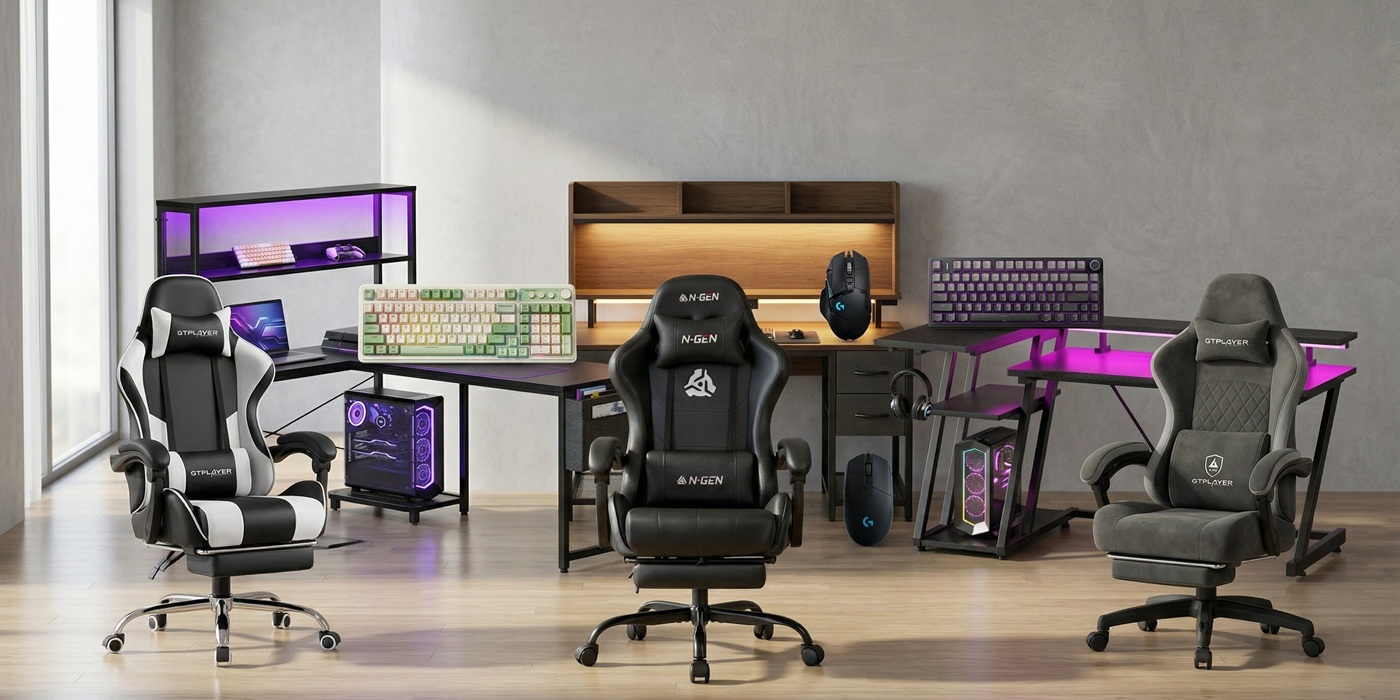
Let’s be honest: long gaming sessions are incredibly fun, but they can be brutal on your body. If you’ve ever ended a marathon raid or an intense ranked match with a stiff neck, lower back pain, or aching wrists, your battle station is failing you. Upgrading your gear isn’t just about flashy RGB lights or matching aesthetics; it’s about preserving your health and enhancing your performance. Building a proper ergonomic gaming setup is the ultimate game-changer.
When your body is properly supported, your focus sharpens, your reaction times improve, and you can play longer without the dreaded physical burnout. An ideal ergonomic gaming setup combines a supportive chair, a spacious desk at the right height, and peripherals that reduce strain on your hands and wrists.
In this comprehensive guide, we have handpicked the best ergonomic chairs, desks, keyboards, and mice on the market. Whether you are aiming for peak competitive performance or just want a pain-free space to unwind, these pieces will help you assemble a complete ergonomic gaming setup that looks great and feels even better.
Quick Comparison: Top Gear for Your Ergonomic Gaming Setup
Before we dive into the detailed reviews, here is a quick overview of the top-rated products that make up the perfect ergonomic gaming setup.
| Product Name | Product Image | Key Ergonomic Feature | Connection/Type | Buy Now |
| GTPLAYER Gaming Chair w/ Footrest | 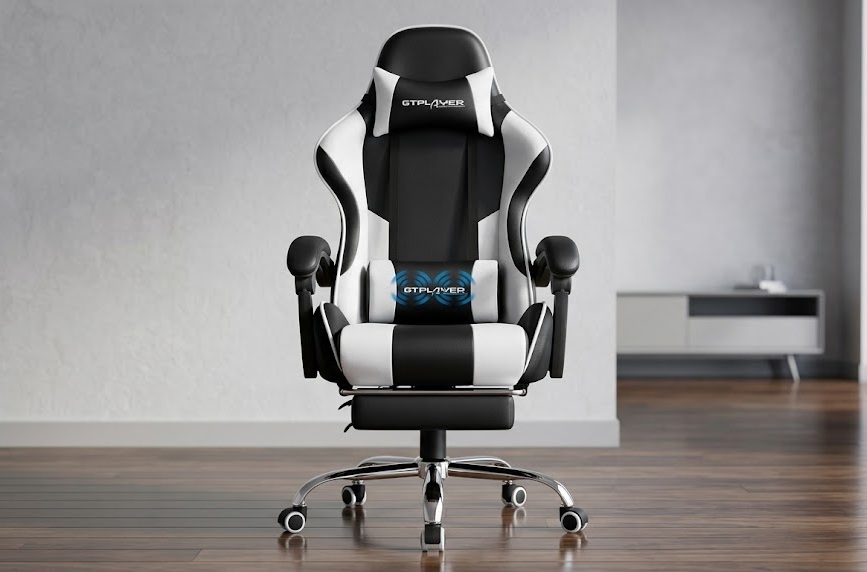 | Retractable footrest & lumbar pillow | High-Back Chair | 🛒Check Price on Amazon |
| N-GEN GAMING Video Gaming Chair | 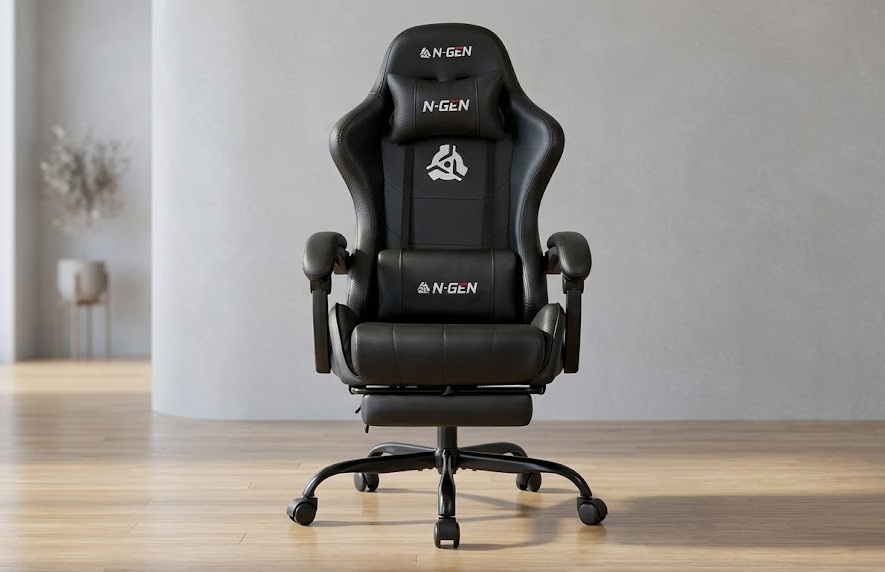 | Removable lower back pillow | Reclining Chair | 🛒Check Price on Amazon |
| GTPLAYER Pocket Spring Chair | 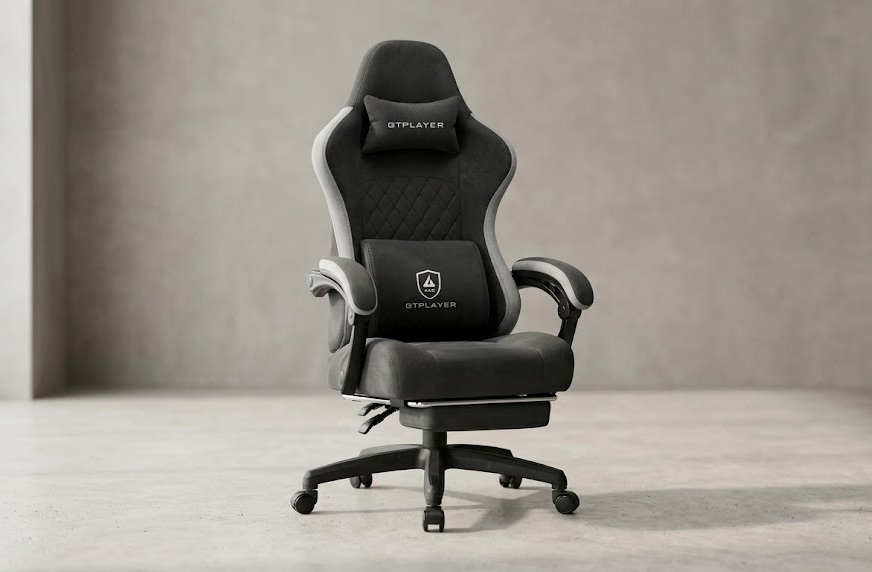 | Pocket spring cushion for bounce | High-Back Chair | 🛒Check Price on Amazon |
| AODK 53″ L-Shaped Gaming Desk | 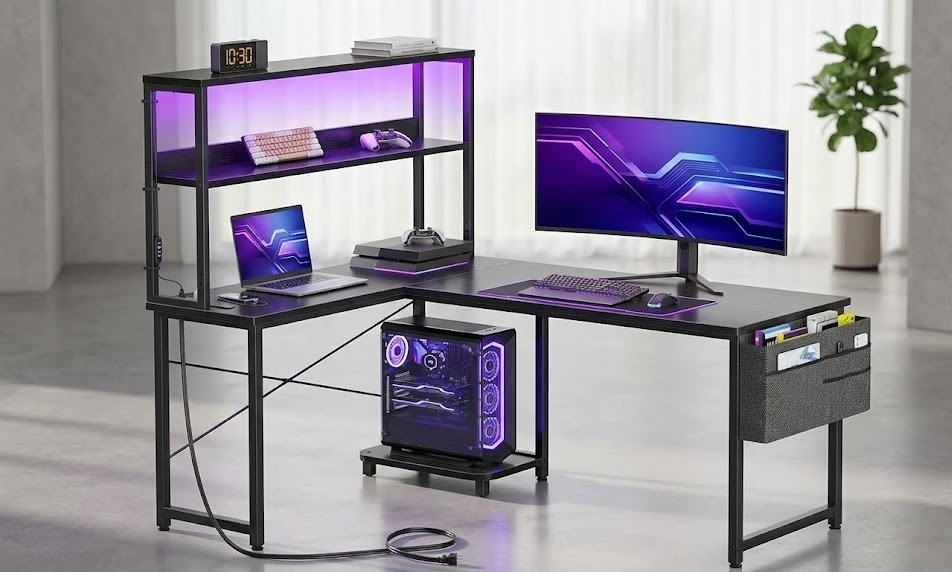 | Reversible layout for optimal reach | Desk w/ Power | 🛒Check Price on Amazon |
| Huuger 47″ Computer Desk | 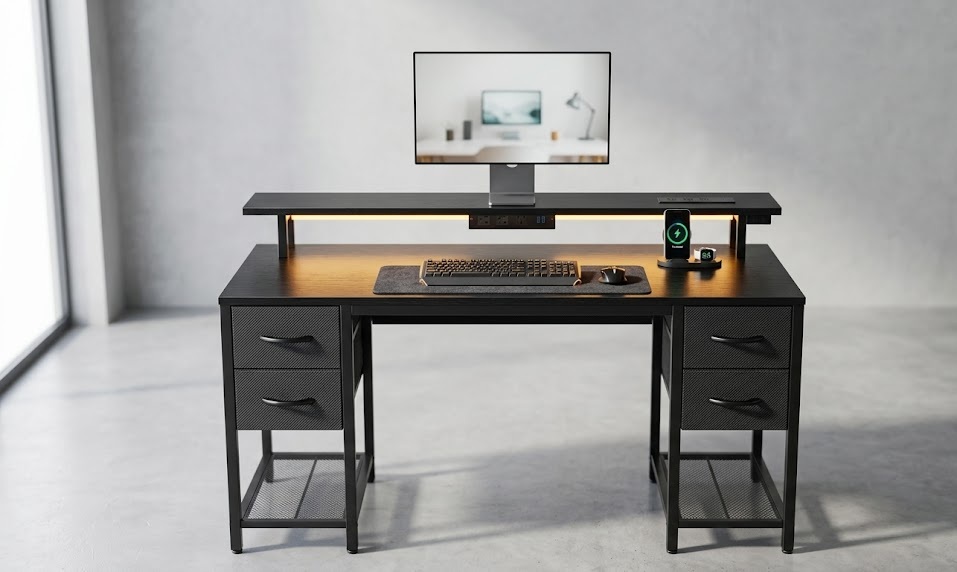 | Thick metal legs for stable posture | Desk w/ Drawers | 🛒Check Price on Amazon |
| Korfile 40″ L-Shaped Gaming Desk | 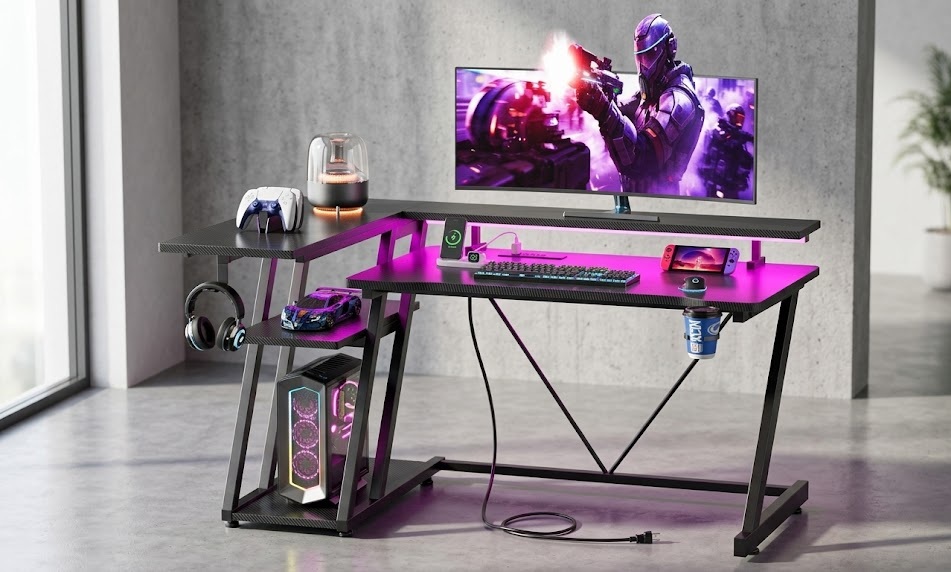 | Integrated monitor stand for eye level | Corner Desk | 🛒Check Price on Amazon |
| AULA S99 Wireless Gaming Keyboard | 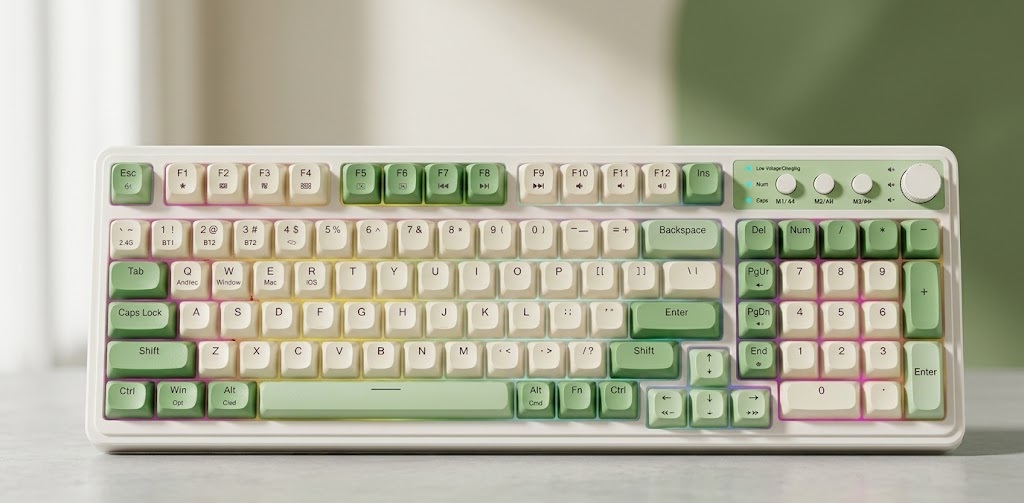 | Two-stage ergonomic stand | Tri-Mode Wireless | 🛒Check Price on Amazon |
| AULA F75 Pro Mechanical Keyboard | 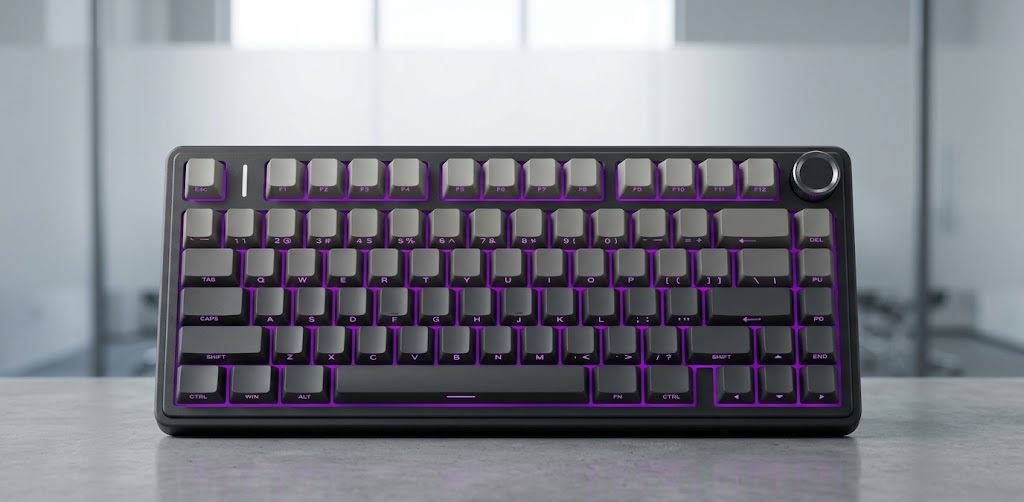 | Gasket mount with silicone padding | 75% Mechanical | 🛒Check Price on Amazon |
| Redragon S101M-KS Combo | 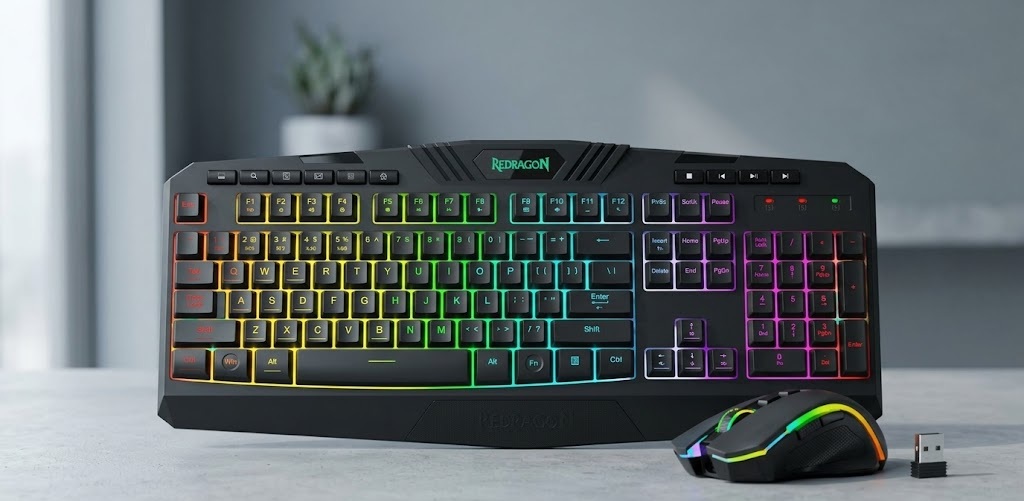 | Splash-resistant wrist support | Wireless Combo | 🛒Check Price on Amazon |
| Logitech G305 Lightspeed Mouse | 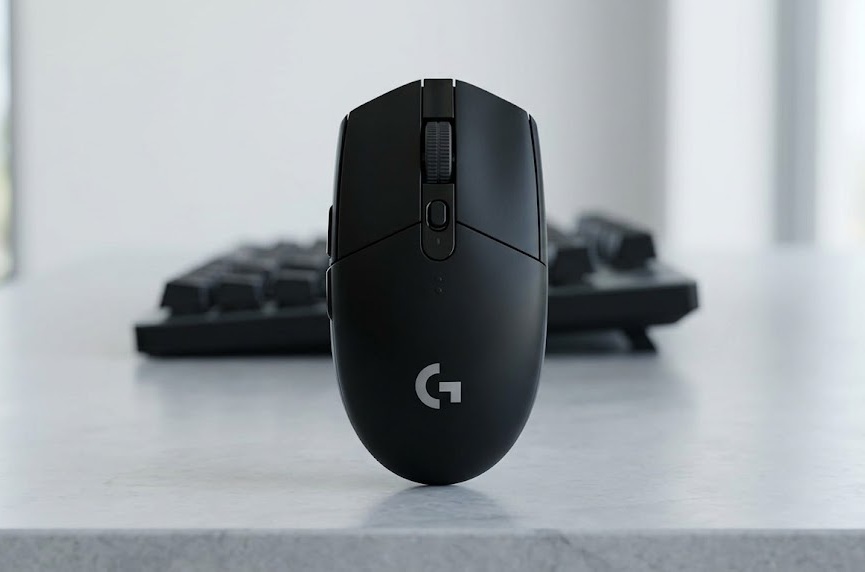 | Lightweight under 100g to reduce strain | Wireless | 🛒Check Price on Amazon |
| Logitech G502 Hero Wired Mouse | 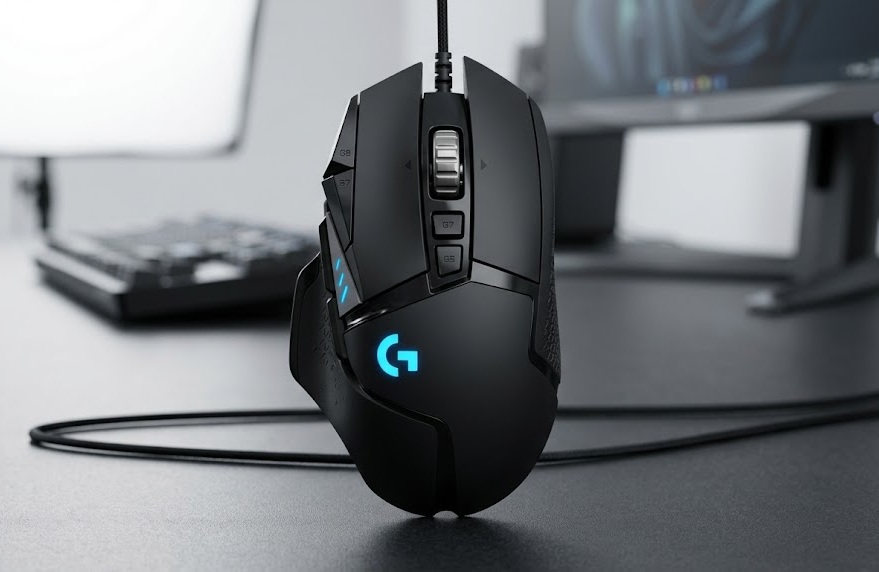 | Adjustable weight balancing | Wired | 🛒Check Price on Amazon |
| Redragon M612 Predator Mouse | 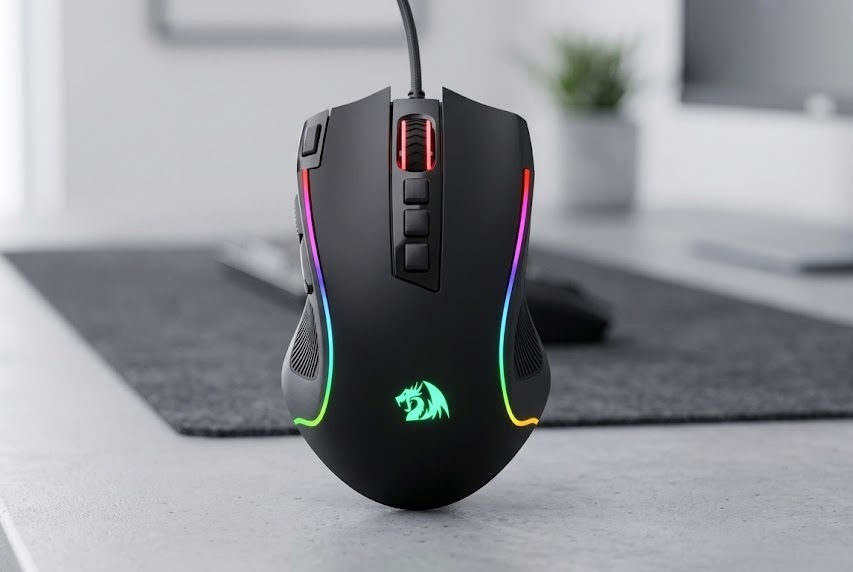 | Claw-grip design with thumb rest | Wired | 🛒Check Price on Amazon |
The Foundation: Best Chairs for an Ergonomic Gaming Setup
The most critical component of any complete ergonomic gaming setup is where you sit. A chair with proper lumbar support, adjustable armrests, and neck relief ensures your spine stays aligned, preventing long-term damage.
1. GTPLAYER Gaming Chair with Footrest and Lumbar Support
Finding a chair that balances budget with high-end ergonomic features can be tricky, but this GTPLAYER model hits the sweet spot. Designed for gamers who spend hours locked into their screens, this chair emphasizes full-body support. The high-density foam prevents the “bottoming out” feeling, while the retractable footrest allows you to kick back during cutscenes or loading screens, promoting better blood circulation in your legs.
| Feature | Details |
|---|---|
| Design Type | Ergonomic high-back with 360° swivel |
| Support Elements | Removable headrest & lumbar pillow |
| Comfort Extras | Retractable footrest, high-density foam |
| Build Quality | Sturdy metal frame, smooth-rolling casters |
Pros and Cons
Pros:
- Very comfortable for long gaming or work sessions.
- Excellent adjustability across height, recline, and support pillows.
- Highly stable build quality with a sturdy metal frame.
- Great value for money for a budget ergonomic gaming setup.
- Effectively relieves neck and back fatigue.
Cons:
- Requires manual assembly.
- May not be suitable for very tall or heavy users (check weight capacity).
- Seat padding can compress over time with heavy, daily use.
2. N-GEN GAMING Video Gaming Chair with Footrest
If you are putting together a sleek, modern ergonomic gaming setup, the N-GEN GAMING chair offers a fantastic blend of style and posture support. It features a high-back design that hugs the natural curve of your spine. The inclusion of a pull-out footrest and a deeply reclining backrest means you can seamlessly transition from an upright, competitive posture to a relaxed, casual gaming position without compromising on spinal support.
| Feature | Details |
|---|---|
| Design Type | Ergonomic high-back, 360° swivel |
| Support Elements | Removable headrest & lower back pillow |
| Comfort Extras | Reclining back, pull-out footrest |
| Material Options | Fabric or leather-like material available |
Pros and Cons
Pros:
- Great ergonomic support that actively reduces fatigue.
- Convenient, easy-to-use adjustable features.
- Comfortable hybrid for both gaming and office work.
- Stylish design that fits well into any room setup.
- Generally reported to be easy to assemble.
Cons:
- Limited long-term review data as it is a newer product.
- May feel slightly firm initially until broken in.
- Assembly instructions could be clearer for some users.
3. GTPLAYER Gaming Chair with Pocket Spring Cushion
One of the biggest complaints gamers have is that chair cushions flatten over time. This GTPLAYER model solves that by incorporating a pocket spring cushion—the same technology used in premium mattresses. This ensures the seat retains its bounce and support for years. Furthermore, the linkage armrests adjust automatically as you recline, guaranteeing that your elbows and wrists are supported at any angle.
| Feature | Details |
|---|---|
| Design Type | Ergonomic high-back, linkage armrests |
| Support Elements | Head and lumbar support, highly elastic PU cushioning |
| Comfort Extras | Pocket spring cushion seat, retractable footrest |
| Material Options | Breathable fabric with butterfly embroidery |
Pros and Cons
Pros:
- Superior seat cushioning that won’t flatten over time.
- Linkage armrests keep your arms supported in reclining positions.
- Breathable fabric material keeps you cool during intense matches.
- Highly adjustable to fit your specific body type.
- Premium feel and stylish design at an accessible price.
Cons:
- Assembly is required.
- Fabric versions may show wear or stains faster than PU leather.
- Weight capacity maxes out depending on the user’s size.
The Command Center: Best Desks for an Ergonomic Gaming Setup
Your desk dictates your arm angle, monitor height, and legroom. A cramped desk forces you to hunch, defeating the purpose of a good chair. Let’s look at the best desks for optimizing your space.
1. AODK 53 Inch L-Shaped Desk Gaming Desk with LED Light
L-shaped desks are incredible for an ergonomic gaming setup because they keep all your peripherals within a comfortable arm’s reach, minimizing unnatural twisting. The AODK 53-inch desk is fully reversible, meaning you can adapt it to the layout of your room. It also includes built-in power outlets and USB ports, allowing you to route cables cleanly and keep your desktop completely free of clutter.
| Feature | Details |
|---|---|
| Dimensions | 18.9″D x 53.15″W x 29.8″H |
| Design Type | Reversible L-shaped corner desk |
| Power & Tech | 3 AC outlets, 2 USB ports, Built-in LED light strip |
| Storage Extras | 2-tier shelves, CPU stand, headphone hook, storage bag |
Pros and Cons
Pros:
- Reversible design allows for flexible corner placement.
- Excellent storage solutions keep your gaming area organized.
- Convenient built-in power strip for clean cable management.
- Vibrant, customizable LED lighting enhances room ambiance.
- Highly sturdy and stable metal frame.
Cons:
- Assembly can be time-consuming for a single person.
- Shelves are not meant for extremely heavy items.
- Black surface can show scratches or fingerprints easily.
2. Huuger 47 inch Computer Desk with 4 Drawers
If your ergonomic gaming setup doubles as a work-from-home station, storage and stability are key. The Huuger 47-inch desk offers a robust, wobble-free metal frame that supports heavy PC towers and multi-monitor setups with ease. By keeping your gaming environment tidy with its four spacious drawers, you mentally reduce fatigue. Plus, the built-in power outlets keep your devices charged without forcing you to crawl under the desk.
| Feature | Details |
|---|---|
| Dimensions | 19.7″D x 47.3″W x 29.5″H |
| Design Type | Rectangular modern minimalist desk |
| Power & Tech | Built-in power outlets, USB ports, LED lighting |
| Storage Extras | 4 spacious drawers, open compartments |
Pros and Cons
Pros:
- Incredibly sturdy build with thick metal legs.
- Ample storage space to hide clutter and accessories.
- Convenient power outlets right on the desktop.
- Wide enough to comfortably support multiple monitors.
- Modern look with ambient LED lights.
Cons:
- Drawer assembly can be tricky and requires patience.
- Surface may show wear with heavy, long-term use.
- LED brightness settings might not suit everyone’s taste.
3. Korfile 40 Inch Gaming Desk with Monitor Stand
For gamers working with smaller spaces, the Korfile 40-inch desk is a lifesaver. What makes this desk perfect for an ergonomic gaming setup is the integrated monitor stand. Elevating your monitors to eye level is a crucial ergonomic rule to prevent neck strain. This desk gives you that elevation built-in, alongside a sleek carbon fiber texture that looks aggressively stylish.
| Feature | Details |
|---|---|
| Dimensions | 25.6″D x 39.4″W x 29.5″H |
| Design Type | Reversible L-shaped corner desk for small spaces |
| Power & Tech | Built-in power outlet strip, USB ports, RGB/LED strip |
| Storage Extras | 3-tier storage shelves, integrated monitor stand |
Pros and Cons
Pros:
- Monitor stand promotes ergonomic eye-level viewing.
- Great for compact rooms without sacrificing L-shape benefits.
- Plentiful storage with 3-tier shelves.
- Attractive carbon fiber finish is spill-resistant.
- Includes convenient desktop power outlets.
Cons:
- Not large enough for massive, triple-monitor setups.
- Shelving cannot hold excessively heavy equipment.
- Assembly takes some time to align perfectly.
Typing Comfort: Best Keyboards for an Ergonomic Gaming Setup
Keyboards are notorious for causing wrist strain and carpal tunnel. Choosing a keyboard with the right tactile feedback, actuation force, and angle is vital.
1. AULA S99 Wireless Custom Creamy Keyboard
The AULA S99 brings a “creamy” typing experience to the membrane keyboard market. The standout feature for an ergonomic gaming setup is its foldable two-stage ergonomic stand, allowing you to perfectly adjust the typing angle to keep your wrists neutral. The tri-mode connectivity means you can shift it around your desk seamlessly without fighting cables.
| Feature | Details |
|---|---|
| Connectivity | Tri-mode (Bluetooth 5.0, 2.4GHz, USB-C) |
| Layout & Switches | 96% layout with membrane keys (creamy feel) |
| Ergonomics | Foldable two-stage stand for wrist angle |
| Extras | Dual-mode rotary knob, RGB backlit |
Pros and Cons
Pros:
- Two-stage stand significantly reduces wrist strain.
- Versatile wireless connectivity clears desk clutter.
- Creamy typing feel is soft on the fingers.
- Programmable macros and media knob save time.
- Excellent battery life in 2.4GHz wireless mode.
Cons:
- Membrane keys are less snappy than mechanical switches.
- Not hot-swappable for custom switch tuning.
- Stand clips feel a bit delicate.
2. AULA F75 Pro Wireless Mechanical Keyboard
A 75% compact layout is highly recommended for an ergonomic gaming setup because it brings your mouse hand closer to your body’s center, reducing shoulder strain. The AULA F75 features pre-lubed Reaper switches and a gasket mount with silicone padding. This absorbs the harsh impact of bottoming out keys, creating a soft, thocky typing experience that saves your finger joints during rapid gaming inputs.
| Feature | Details |
|---|---|
| Connectivity | Tri-mode (Bluetooth 5.0, 2.4GHz, USB-C) |
| Layout & Switches | 75% compact (81 keys), pre-lubed Reaper linear switches |
| Ergonomics | Gasket mount with silicone padding for shock absorption |
| Extras | Hot-swappable, multi-function knob, PBT keycaps |
Pros and Cons
Pros:
- Compact size reduces shoulder strain by minimizing arm reach.
- Gasket mount provides incredibly soft, joint-friendly typing.
- Hot-swappable allows you to install your preferred switches.
- Premium side-printed PBT keycaps resist shine.
- Excellent battery life with a 4000mAh battery.
Cons:
- Lacks a number pad, which some users need for work.
- RGB drains the battery faster at maximum brightness.
- The multi-function knob can be sensitive during adjustments.
3. Redragon S101M-KS Gaming Keyboard and Mouse Combo
If you want to upgrade your entire interface in one go, this Redragon combo is a fantastic budget choice. The keyboard features a splash-resistant, ergonomically sloped design that naturally fits the resting angle of your hands. Combined with the included 4800 DPI mouse, this wireless combo gives you the freedom to position your peripherals exactly where they feel best on your desk.
| Feature | Details |
|---|---|
| Connectivity | Tri-mode wireless combo (shared receiver) |
| Layout & Switches | 104-key full layout |
| Ergonomics | Ergonomically sloped design, splash-resistant |
| Extras | Includes 4800 DPI mouse, 10 multimedia keys |
Pros and Cons
Pros:
- Great ergonomic shape for both the keyboard and mouse.
- Long battery life (up to 300 hours with RGB off).
- Excellent value for a complete peripheral upgrade.
- Convenient independent multimedia keys.
- Shared wireless receiver saves USB ports.
Cons:
- Keyboard keys can feel slightly stiff after months of use.
- Mouse sensor can be inconsistent at the absolute highest DPI.
- Software is required to unlock full customization.
Precision & Grip: Best Mice for an Ergonomic Gaming Setup
A heavy, awkwardly shaped mouse forces you to grip tightly and move from the wrist instead of the arm, leading to rapid fatigue. The right ergonomic mouse should feel like a natural extension of your hand.
1. Logitech G305 Lightspeed Wireless Gaming Mouse
Weight plays a massive role in mouse ergonomics. At under 100 grams, the Logitech G305 glides effortlessly across your mousepad. Because it requires very little physical force to move, it dramatically reduces the tension in your forearm and wrist. Combined with its zero-lag LIGHTSPEED wireless tech, you get top-tier performance without the drag of a cable ruining your aim.
| Feature | Details |
|---|---|
| Sensor & DPI | HERO optical sensor, up to 12,000 DPI |
| Connectivity | LIGHTSPEED wireless (1 ms report rate) |
| Ergonomics | Lightweight (under 100g), compact shape for claw/fingertip |
| Battery Life | Up to 250 hours (single AA battery) |
Pros and Cons
Pros:
- Extremely lightweight, minimizing hand and wrist fatigue.
- Flawless tracking precision for competitive gaming.
- Phenomenal 250+ hour battery life.
- No cable drag means complete freedom of movement.
- Solid build quality from a trusted brand.
Cons:
- The compact shape may be too small for users with very large hands.
- Requires occasional AA battery replacement.
- Lacks RGB lighting aesthetics.
2. Logitech G502 Hero High Performance Wired Gaming Mouse
For gamers with medium to large hands, a larger, deeply sculpted mouse is better for palm-grip support. The Logitech G502 Hero features an aggressive, highly ergonomic right-handed shape with a prominent thumb rest. It allows your hand to rest completely relaxed over the mouse. It also features adjustable weights, letting you find the exact center of gravity that feels best for your wrist.
| Feature | Details |
|---|---|
| Sensor & DPI | HERO 25K sensor, up to 25,600 DPI |
| Connectivity | Wired USB |
| Ergonomics | Right-handed ergonomic design with thumb rest, adjustable weights |
| Extras | 11 programmable buttons, customizable RGB |
Pros and Cons
Pros:
- Deeply ergonomic shape fits perfectly in the palm, preventing cramping.
- Superior 25K sensor precision.
- Adjustable weights let you dial in the perfect ergonomic balance.
- Massive amount of customizable buttons for macros.
- Highly durable mechanical switch tensioning.
Cons:
- Wired design limits mobility compared to wireless options.
- Can feel heavy for gamers who prefer ultra-light mice.
- The G HUB software can be confusing for new users.
3. Redragon M612 Predator RGB Gaming Mouse
The Redragon M612 is explicitly designed for gamers who utilize a claw grip. It features a frosted, skin-friendly coating and rubbered side textures that ensure you don’t have to squeeze the mouse tightly to keep your grip. By relaxing your grip strength, you reduce strain on your finger tendons, making it a highly valuable addition to an ergonomic gaming setup on a budget.
| Feature | Details |
|---|---|
| Sensor & DPI | Wired optical sensor, up to 8000 DPI |
| Connectivity | Wired USB |
| Ergonomics | Claw-grip design, rubber side texture, skin-friendly coating |
| Extras | 11 programmable buttons (including rapid fire), 5 RGB modes |
Pros and Cons
Pros:
- Ergonomic claw-grip design prevents hand cramps.
- Textured sides allow for a relaxed, secure hold.
- Great value with 11 buttons and a rapid-fire feature.
- High DPI for accurate, small-movement control.
- Durable, fingerprint-resistant materials.
Cons:
- Heavier than modern ultra-lightweight mice.
- Cable can cause drag during fast, sweeping movements.
- The side button placement might result in accidental clicks for some.
Why You Must Invest in an Ergonomic Gaming Setup
Upgrading to a complete ergonomic gaming setup is an investment in your physical well-being. Think of it as a linked system:
- Your Desk sets the height baseline.
- Your Chair aligns your spine and places your arms at the correct desk level.
- Your Keyboard & Mouse ensure your wrists stay straight and your shoulders stay relaxed.
When any of these three elements are out of sync, your body compensates by slouching, shrugging, or leaning—all of which lead to pain. By choosing products that are specifically designed to adjust to your body’s natural mechanics, you can enjoy your favorite hobby or grind out your work safely.
Final Thoughts
Whether you are sniping in a fast-paced shooter, managing a massive empire in an RTS, or working from home, comfort should be your number one priority. Take the time to evaluate your current battle station. Start with a supportive chair, upgrade to a desk that fits your space, and finish off with peripherals that treat your hands right. Your body will thank you, and your gameplay will show the results.
Explore More from Ergo Setup Lab:
- Looking for more desk options? Check out our guide on the Best L-Shaped Desk for Gaming.
- Need a deep dive into premium seating? Read our Best Pinmoco Ergonomic Chair Reviews.
2 thoughts on “The Ultimate Guide to Building the Perfect Ergonomic Gaming Setup”